
Kobo vs Kindle: A Real-World Comparison After 6 Months of Testing

Summary: After my hands-on Kobo vs Kindle testing, I found that both e-readers have their own strengths. Kindle still works best for Amazon-first readers who value syncing, Kindle Unlimited, and X-Ray, while Kobo feels better for readers who want EPUB support, a cleaner interface, easier sideloading, and stronger long-term control over their books.
I've used a Kindle for years, mostly out of habit. But when Amazon recently blocked direct USB downloads for local backups, it left a sour taste in my mouth. Since many users were switching to Kobo and my old Paperwhite 5's battery was dying, I decided to buy a Kobo Clara BW. Still, I wondered: they're both E Ink, so how different could they be?
To compare Kobo vs Kindle, I spent the last six months using both devices every day—on my subway commutes, during my 30-minute bedtime reading, and even on signal-free cross-border trains. Based on my hands-on experience, I wrote this post to compare Kindle and Kobo, the two most popular e-readers on the market in 2026.
Kobo vs Kindle: A Quick Overview First
Before I compare the Kindle Paperwhite 5 and Kobo Clara BW from daily use, I want to start with the bigger Kobo vs Kindle picture. These two brands are not just selling different devices. They represent two different reading systems: Kobo feels more open and library-friendly, while Kindle feels more polished, store-driven, and closely connected to Amazon.
| Key Features | Kobo eReaders | Amazon Kindle eReaders |
| User Interface | Simple, but more customizable (more front and layout options) | Streamlined and straightforward, but less customizable |
| Ecosystem | Open; supports EPUB, integrates with OverDrive (library browsing) | Closed – uses Amazon's proprietary format (AZW/KFX), integrates with Kindle Store |
| Supported File Formats | EPUB, PDF, MOBI, CBZ, CBR, TXT, HTML | AZW, MOBI, PDF, TXT, DOC, HTML |
| Weight Range (in gms) | 171 gms - 390 gms | 158 gms - 431 gms |
| Screen Size (in inches) | 6 in - 10.3 in | 6 in - 10.2 in |
| Storage Range | 8 GB - 32 GB | 8 GB - 64 GB |
| Bluetooth Connectivity | All, excluding Kobo Nia | Across all devices |
| Store Access | Kobo Store (by Rakuten) | Amazon Kindle Store |
| Reading Subscription | Kobo Plus, with ebook and audiobook plans | Kindle Unlimited, with ebooks, comics, magazines, and selected audiobooks |
| Advertisements | No ads (ad-free) | Some ads are present on the lock screen |
| Best Use (Country) | Focused on Canadian users, but gaining traction with US readers lately. | More focused on the U.S. users |
| Note: Subscription services can also affect the buying decision. For a detailed breakdown, see my full comparison of Kindle Unlimited vs Kobo Plus. | ||
Kindle vs Kobo: Where Kindle Still Feels Better
1. Kindle Has the Stronger Book Ecosystem
Kindle's biggest advantage is the Amazon ecosystem around it. The Kindle Store is huge, Kindle Unlimited is easy to access, purchased books sync smoothly, and the whole system is designed for people who want to read with almost no setup. I spent less time thinking about file formats, sideloading, or library organization. The device handled purchase, delivery, and syncing in the background.
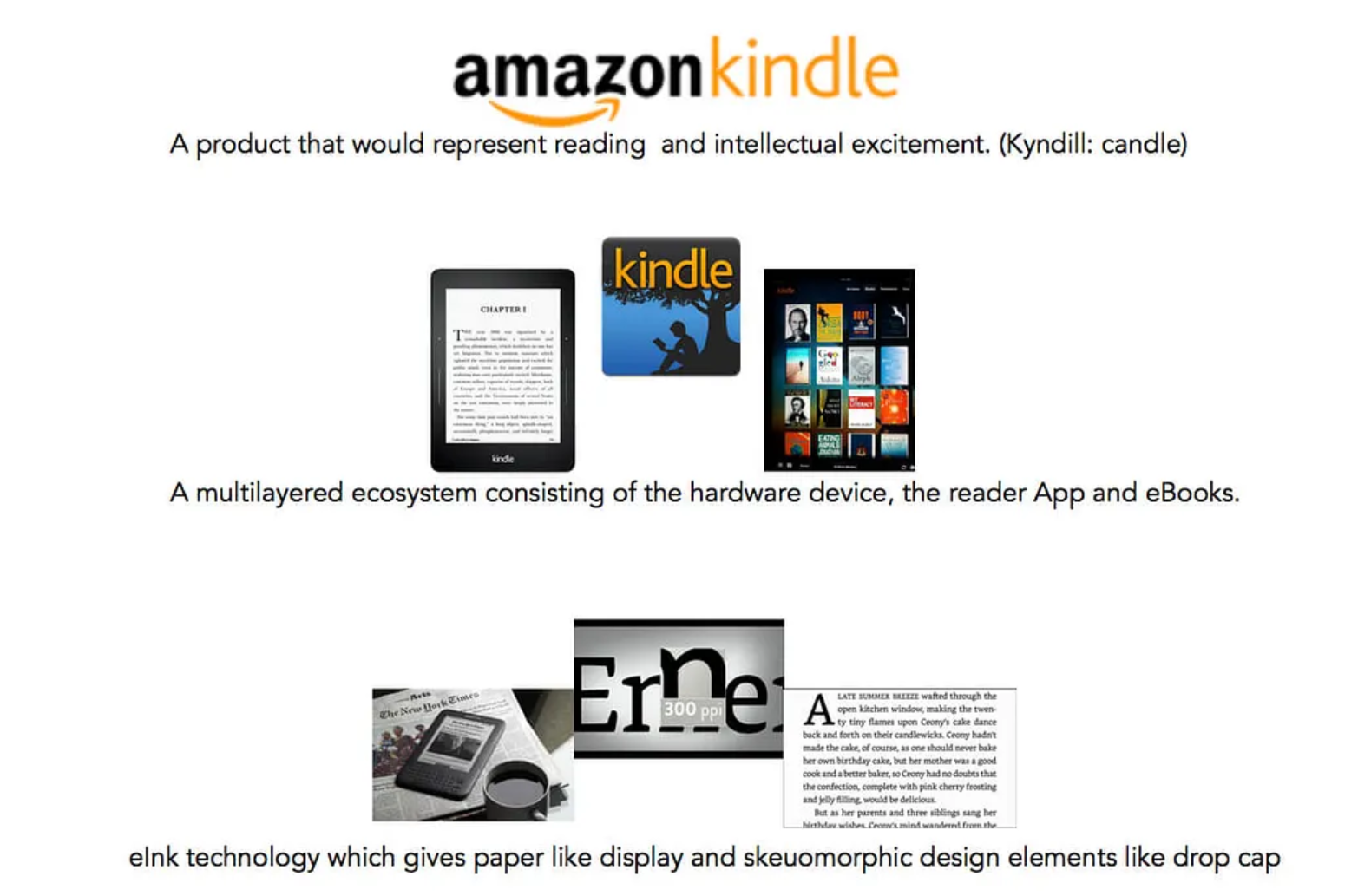
But this strength also became its weakness for me. Kindle works best when I stay inside Amazon's system. After Amazon removed Download & Transfer via USB in February 2025, local backup became a bigger concern for long-time Kindle users. In 2026, removing DRM from Kindle books has become the only practical way to keep offline backups outside Amazon's ecosystem.
2. Kindle X-Ray Makes Complex Books Easier
Both Kindle PW 5 and Kobo Clara BW cover the normal reading tools well. I can highlight text, add notes, look up words in the dictionary, search inside a book, use Wikipedia, and translate selected text on both devices. For everyday novels or simple nonfiction, this makes them feel quite close.
But Kindle's exclusive X-Ray is still a feature I highly value. When available, X-Ray can surface important people, places, terms, and passages in a book, making it easier to remember who someone is, where a concept appeared earlier, or how often a name is mentioned.
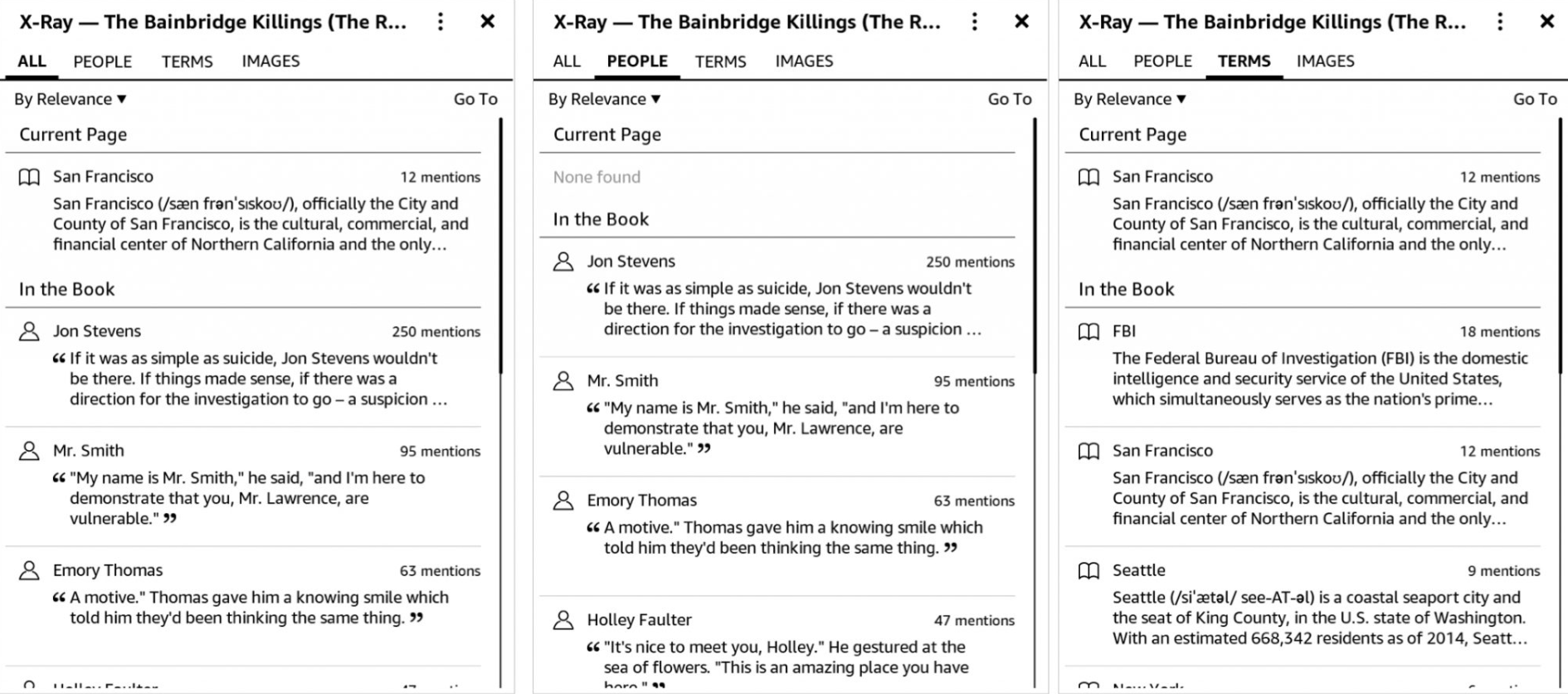
In real reading, this is especially useful for long novels, fantasy series, biographies, history books, and business books with many names or concepts. Instead of typing a name into search and checking every result manually, I can use X-Ray almost like a smart index. It does not matter for every book, and not every Kindle book supports it, but when it works, it makes Kindle feel more intelligent than a basic e-reader.
3. A Bigger Screen Helps Longer Reading
The Kindle Paperwhite 5 uses a 6.8-inch, 300 ppi display, while the Kobo Clara BW uses a 6-inch, 300 ppi display. On paper, that difference does not sound huge, but in daily reading it is noticeable.
The larger Kindle screen gives me more room per page. During longer reading sessions, I turn pages a little less often, and the layout feels more open. This is especially pleasant for nonfiction books, books with longer paragraphs, and reading in bed when I increase the font size.
However, the Paperwhite 5's screen design also has a trade-off. Its flush-front screen looks modern and is easy to wipe clean, but compared with the sunken-screen design of the Kobo Clara BW, the text can feel slightly farther away from my eyes. I would not call the Kindle screen bad at all. It is sharp, bright, waterproof, and comfortable. But when I placed both devices side by side, the Kindle sometimes felt like I was reading through an extra surface, while the Kobo felt a little more direct.
Beyond Kindle Paperwhite: Other Kindle Models
Paperwhite 5 is only one part of the Kindle lineup. The basic Kindle is the cheapest entry point for Amazon ebooks. Newer Paperwhite models focus on faster page turns and a larger screen. Colorsoft adds color for comics and illustrated books, while Scribe is built for reading plus handwriting. Across these models, Kindle's real strength stays the same: easy buying, cloud sync, and Amazon-only reading tools like X-Ray when the book supports it.
| Kindle eReader Model | Screen Size | Release Date (Year) | Price |
| Amazon Kindle 11th Gen | 6 inches | 2024 | $109.99 |
| Amazon Kindle Paperwhite 6th Gen | 7 inches | 2024 | $159.99 |
| Amazon Kindle Paperwhite Signature Edition 2nd Gen | 7 inches | 2024 | $199.99 |
| Amazon Kindle Colorsoft Signature Edition 1st Gen | 7 inches | 2024 | $279.99 |
| Amazon Kindle Scribe 2nd Gen | 10.3 inches | 2024 | $399.99 |
Kobo vs Kindle: Where Kobo Wins
1. Better Display Quality and Typography Control
Kobo Clara BW uses a Carta 1300 screen, while Kindle Paperwhite 5 uses a Carta 1200 screen. In side-by-side reading, Kobo's text looks darker and more defined to my eyes.
The difference is clearest in plain text and manga. On Kobo, black letters look deeper, fine lines are easier to separate, and gray shading appears cleaner. Kindle's larger screen helps with manga page size, but Kobo handles contrast and grayscale detail better.
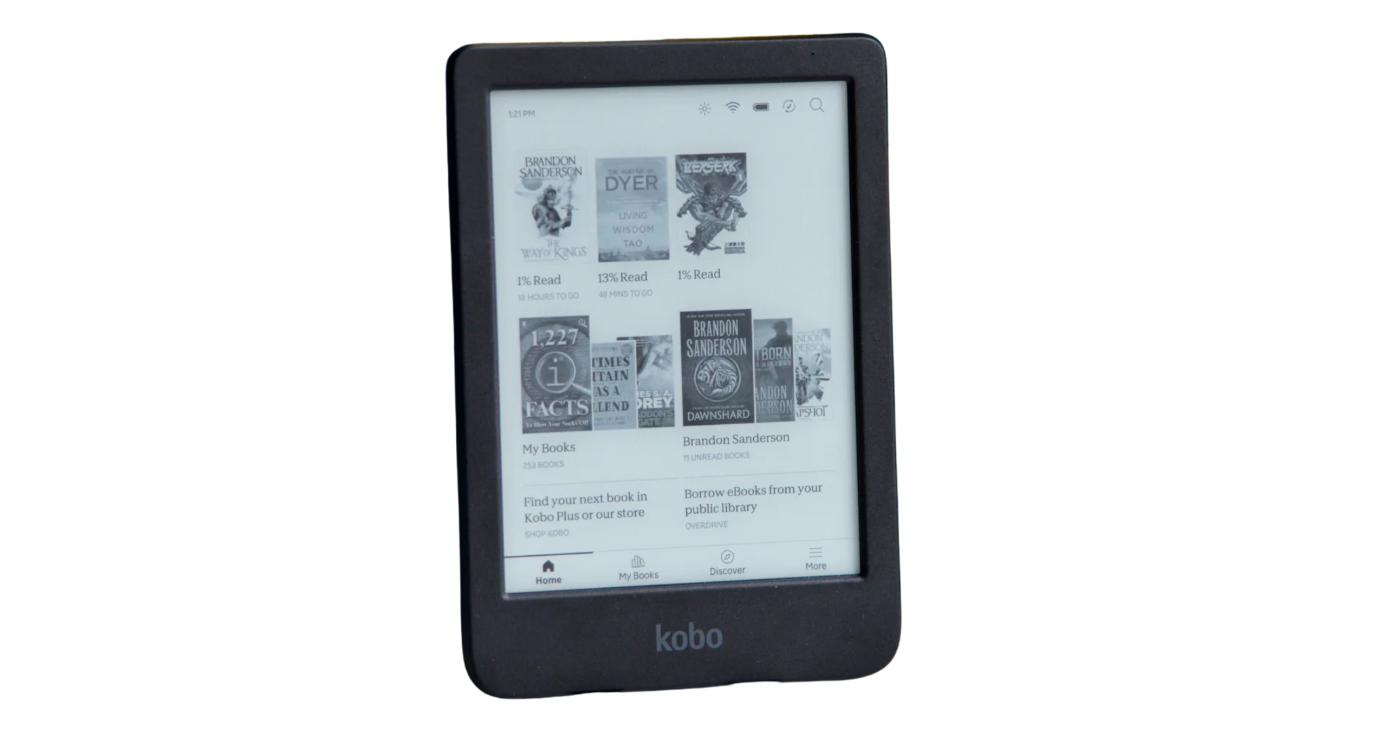
Kobo also gives me more control over font rendering. Kindle covers the basics, including font size, boldness, margins, and spacing. Kobo lets me fine-tune the font more precisely, which matters during long reading sessions. A small change in weight or spacing can make the page easier to read at night.
2. A Cleaner Home Screen
The biggest surprise of the Kobo Clara BW was not the screen. It was the home screen.
On Kindle, I often feel that the device is never just showing my library. It is also showing recommendations, store prompts, reading suggestions, and Amazon's idea of what I might buy next. This is not always annoying, and for some users it can be helpful. But after months of daily use, I started to notice how often Kindle reminded me that I was inside a store.
Kobo feels quieter. When I wake the Clara BW, the interface feels more centered on the books I already have. The store still exists, of course, but it does not dominate the experience in the same way. That makes Kobo feel less commercially noisy and more like a dedicated reading device.
This difference became obvious during short reading sessions. On the subway, I do not want to browse a store. I want to open the book I was reading yesterday and continue before my stop arrives. Kobo made that flow feel slightly calmer.
3. Kobo Makes Progress Visible
Kobo also does a better job of turning reading into a visible habit. Its reading stats make progress feel more concrete: how long I have read, how far I am through a book, and how much reading remains. Kobo has long used reading activity metrics, including hours read and pages flipped, as part of its reading experience.
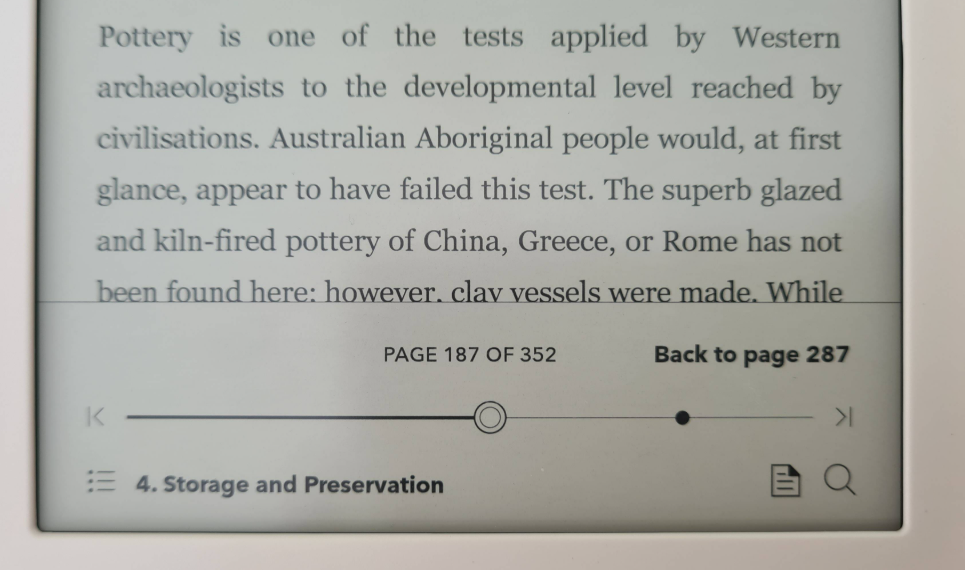
This sounds like a small feature, but it changed how I used the device. During bedtime reading, I often checked the estimated time left in a chapter before deciding whether to continue. During longer books, the stats made progress feel less vague. Instead of only seeing a percentage, I could feel my reading rhythm more clearly.
Kindle has progress indicators too, including time left in chapter or book, but Kobo makes the reading habit feel more visible and encouraging. It gives the device a slightly more personal feeling, almost like it is quietly tracking my relationship with books rather than simply delivering content.
Beyond Clara BW: Other Kobo Models
Clara BW shows Kobo's core appeal, but the lineup gives readers more hardware choices. Clara Colour keeps the small body and adds color. Libra Colour adds page-turn buttons, a larger screen, and stylus support. Elipsa 2E is the big-screen option for notes and documents. Compared with Kindle, Kobo's advantage is less about one killer feature and more about format flexibility, a cleaner interface, and a library that feels easier to manage yourself.
| Kobo eReader Model | Screen Size | Release Date (Year) | Price |
| Kobo Clara BW | 6 inches | 2024 | $129.99 |
| Kobo Clara Colour | 6 inches | 2024 | $149.99 |
| Kobo Libra Colour | 7 inches | 2024 | $219.99 |
| Kobo Sage | 8 inches | 2021 | $269.99 |
| Kobo Elipsa 2E | 10.3 inches | 2023 | $399.99 |
Tips: How to Back up Kobo/Kindle Books?
Whether you use Kindle or Kobo, ebook backup is still a problem in 2026, as neither official platform allows direct downloads of books as standard PDF or EPUB files. For readers who want to keep personal offline copies of books they have paid for, tools like BookFab Kindle Converter and BookFab Kobo Converter offer a simpler option: they can convert purchased Kindle/Kobo books into EPUB and PDF. For readers who decided to switch from Kindle to Kobo after reading this post, these format conversion tools are essential.
Try Kindle Converter for Free:
Try Kobo Converter for Free:
FAQ
Is Kobo better than Kindle?
Should I switch from Kindle to Kobo?
Can I read Kindle books on Kobo?
Is Kobo better for sideloading and EPUB files?
Which is better for library books, Kobo or Kindle?
Final Verdict: Should You Choose Kobo or Kindle?
So, after actually using them for such a long time, who is the winner between Kobo and Kindle? Honestly, I have decided to keep using both, because they work better in different reading situations.
Choose Kindle if...
- you mainly buy ebooks from Amazon.
- you use Kindle Unlimited or need smooth cloud sync.
- X-Ray matters when reading complex books.
- you prefer a larger screen for long reading sessions.
Choose Kobo if...
- you want EPUB support and easier sideloading.
- you borrow library books often.
- you dislike a store-heavy home screen.
- you care about darker text, finer font control, and reading stats.

 4 Easy Ways to Convert Kindle to PDFBy Amber Collins - May 18, 2026
 How to Print Kindle Books Without Losing QualityBy Amber Collins - May 14, 2026
![[Quick Solution] How to Remove Kindle DRM on Mac](https://images.dvdfab.cn/media/未命名的设计__87__crpyru.png/public) [Quick Solution] How to Remove Kindle DRM on MacBy Amber Collins - May 11, 2026
[Quick Solution] How to Remove Kindle DRM on MacBy Amber Collins - May 11, 2026 How to Download Kindle Books to PC in 2026 (The Complete Guide)By Amber Collins - May 9, 2026