
[Quick Solution] How to Remove Kindle DRM on Mac

Summary: This guide shows how to remove Kindle DRM on Mac quickly with BookFab Kindle Converter for Mac. With its built-in browser, simply log in to your Amazon Kindle library, select the books you own, and download them as DRM-free EPUB or PDF files for personal backup and reading.
Table of Contents
![[Quick Solution] How to Remove Kindle DRM on Mac](https://images.dvdfab.cn/media/未命名的设计__87__crpyru.png/public)
Many Kindle DRM removal tutorials work better on Windows than on Mac. Since Amazon ended Download & Transfer via USB on February 26, 2025, macOS users have lost a key way to download Kindle files locally. Newer Kindle for Mac versions may also hide downloaded files and keys, making many old Calibre tutorials outdated. So, how can you remove Kindle DRM on Mac without checking your Kindle e-ink model, firmware version, or Kindle for Mac version? In this guide, I'll share the method I used on my Mac running macOS Sequoia 15 and walk you through each step.
BookFab Kindle Converter for Mac: A Dedicated Kindle DRM Removal Tool for macOS
BookFab Kindle Converter for Mac is designed to remove DRM from Kindle books and convert them to common formats such as EPUB and PDF. It currently supports macOS 10.13 to 15.x. Unlike other methods, it does not depend on Kindle for Mac downloads, device serial numbers, or plugin combinations. It comes with a built-in browser. After logging in to your Amazon Kindle account, you can open the Kindle book page, click the download button, and save the book as an EPUB or PDF file on your Mac.
For Mac users, the biggest advantage is convenience. There is no need to check the Kindle e-ink device model, find a device serial number, downgrade Kindle for Mac, or test different Calibre plugin versions. With the built-in browser, the whole workflow becomes much more straightforward.
How to Remove Kindle DRM on a Mac: Step-by-Step Tutorial
The following tutorial shows how I use BookFab Kindle Converter for Mac to download Kindle books as EPUB or PDF directly. Before getting started, make sure you are using the tool only for Kindle books you own, and use the download files for personal reading, backup, or format-shifting purposes.
Step 1: Log in and Select Kindle eBooks via the Built-in Browser
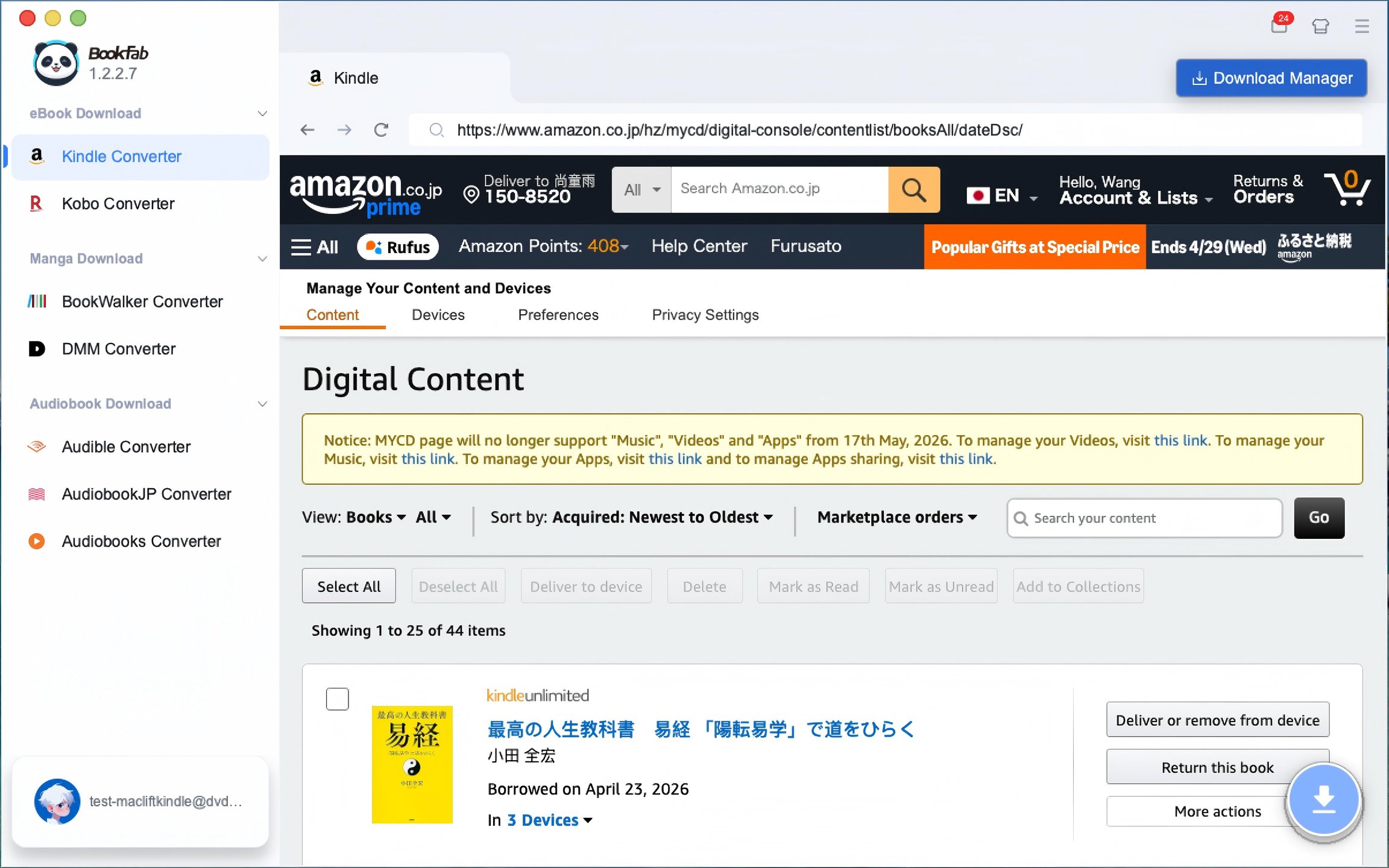
Download and launch BookFab on your Mac, and choose Kindle Converter from the left sidebar. The built-in browser will open the Amazon website, so you can sign in to your Amazon account directly inside the program.
After logging in, go to your Kindle library or the "Manage Your Content and Devices page". From there, find the Kindle book you want to convert.
Step 2: Click the Download Button and Choose the Output Format
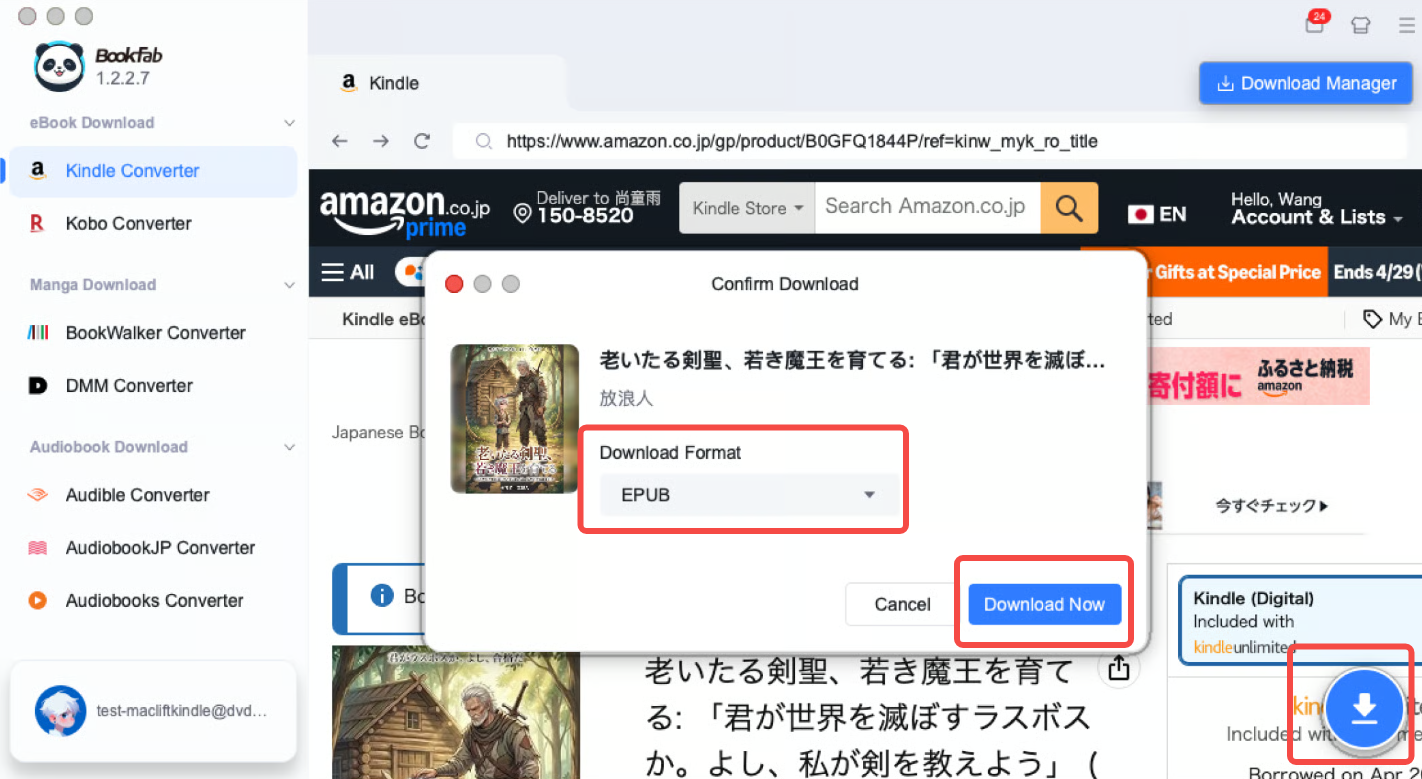
Once you find the Kindle book you want to process, click the blue Download icon in the lower-right corner of the interface. A confirmation window will appear, where you can choose your preferred output format, such as EPUB or PDF. After selecting the format, click Download Now to start removing Kindle DRM on your Mac.
Step 3: Monitor the Progress and Add More Books
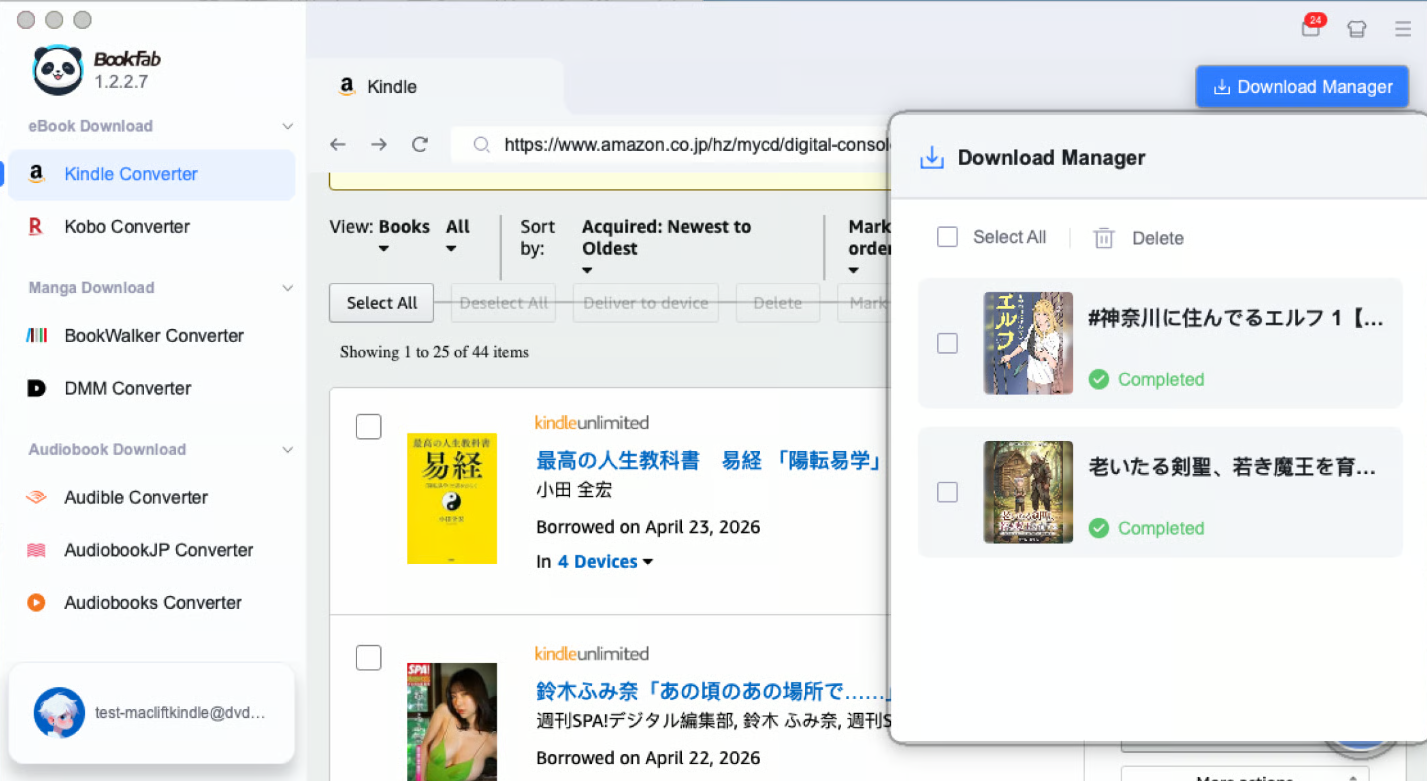
After the task begins, open Download Manager in the top-right corner of BookFab Kindle Converter. Here, you can check the real-time progress of DRM removal.
During the download, you can also continue visiting other book detail pages and repeat the steps above to choose an output format and add more books to the download queue. When the status changes to Completed, the converted eBook will be available locally on your Mac.
FAQ
Can I remove Kindle DRM on Mac with Calibre?
Conclusion
Removing Kindle DRM on Mac is not difficult if you use the right tool. For example, BookFab Kindle Converter for Mac lets you access your Amazon Kindle library through its built-in browser, remove Kindle DRM with one click, and download the book directly as a DRM-free file in formats like EPUB or PDF.
However, please make sure to follow your local copyright laws. The decrypted e-Books should only be used for personal backup, personal reading, or format-shifting purposes, and should not be shared, uploaded, or redistributed.

 4 Easy Ways to Convert Kindle to PDFBy Amber Collins - May 18, 2026
 How to Print Kindle Books Without Losing QualityBy Amber Collins - May 14, 2026
 How to Download Kindle Books to PC in 2026 (The Complete Guide)By Amber Collins - May 9, 2026
![How to Convert Kindle Books to EPUB Easily [2026 Verified]](https://r5.dvdfab.cn/upload/bookfab/en/convert-kindle-to-epub-RDlf.jpg) How to Convert Kindle Books to EPUB Easily [2026 Verified]By Amber Collins - May 6, 2026
How to Convert Kindle Books to EPUB Easily [2026 Verified]By Amber Collins - May 6, 2026