
7 Best EPUB Readers for Windows (2026 Review): Tested for Every User

Summary: I tested 7 EPUB readers for Windows in 2026 to compare ease of use, format support, sync, annotations, library tools, comic support, and free-version limits, helping beginners and power users choose the right reader for their habits.
Table of Contents

Choosing the best EPUB reader for Windows in 2026 is not just about finding an app that opens EPUB files. Some readers want speed and simplicity, while others need highlights, cloud sync, format conversion, or library management. To meet different reading needs, I tested dozens of EPUB readers and narrowed them down to 7 picks, with reviews of their features, limitations, and best-use scenarios.
How I Picked the Best EPUB Readers
I tested these EPUB readers on a Windows 11 laptop and focused on real reading scenarios, not just feature lists. Use the factors below to choose the reader that best fits your reading habits.
- Ease of use: How quickly I could install the app, open an EPUB file, and start reading.
- Reading comfort: Font adjustment, night mode, page layout, margins, and navigation.
- Format support: Whether the app supports only EPUB or also handles PDF, MOBI, TXT, CBZ, CBR, and other common formats.
- Library management: How well it organizes books, covers, metadata, tags, shelves, or reading progress.
- Notes and study tools: Highlights, bookmarks, annotations, dictionary, translation, and text search.
- Sync and device support: Whether the app can sync your books, bookmarks, and reading progress across different devices.
- Free-version value: Whether the free version is actually usable without too many ads, upgrade prompts, or locked core features.
This is also why I split the list into two groups: beginner-friendly readers for quick, simple EPUB reading, and power-user readers for people who need stronger organization, syncing, annotation, or format tools.
Comparing the Contenders: Top 7 EPUB Readers for Windows
Before getting into the full reviews, here is a quick comparison of the seven Windows EPUB readers I tested. The table highlights the key differences in features, price, sync, annotations, library management, and major limitations, so you can quickly find the options that match your reading habits.
| Reader | Free/PAID | Open Source | Sync Support | Annotation | Supported Formats |
| Calibre | Free | Yes | Basic (device transfer) | ✔️ (ebook notes & highlights) | EPUB, PDF, MOBI, AZW3, TXT, HTML, DOCX, CBZ, CBR, LIT, RTF, AZW, SNB, DJVU |
| Sumatra PDF | Free | Yes | No | Limited (read-only) | EPUB, PDF, MOBI, CBZ, CBR, XPS, DjVu, CHM, XPS |
| WPS Office | Free | No | Cloud sync (Pro) | ✔️ (highlights, comments) | EPUB, PDF, DOC/DOCX, TXT, XLS/XLSX, PPT/PPTX |
| FBReader | Free | No | Cloud sync | ✔️ (basic highlights, bookmarks) | EPUB, MOBI, FB2, RTF, DOC, HTML, TXT, CHM, AZW3 |
| Bookviser | Free | No | Yes | ✔️ (notes, highlights) | EPUB |
| Cover | Lite (free), paid for extras | No | No | ✔️ (bookmarks, less note-taking) | EPUB, CBZ, CBR, PDF, CBT, RAR, ZIP, images |
| Kobo | Free | No | Cloud sync | ✔️ (notes, highlights, bookmarks) | EPUB, Kepub, PDF |
3 Best EPUB Readers For Windows: Beginner-Friendly Choices
As someone who often gets the "which app do I actually click?" question from friends and family, I know that for newcomers, nothing beats a reader that just works. In 2026, these three stand out for everyday users who want to read, not wrestle with settings and pop-ups.
Sumatra PDF: Lightning-Fast, Fuss-Free Reading
Ratings: ⭐⭐⭐⭐⭐
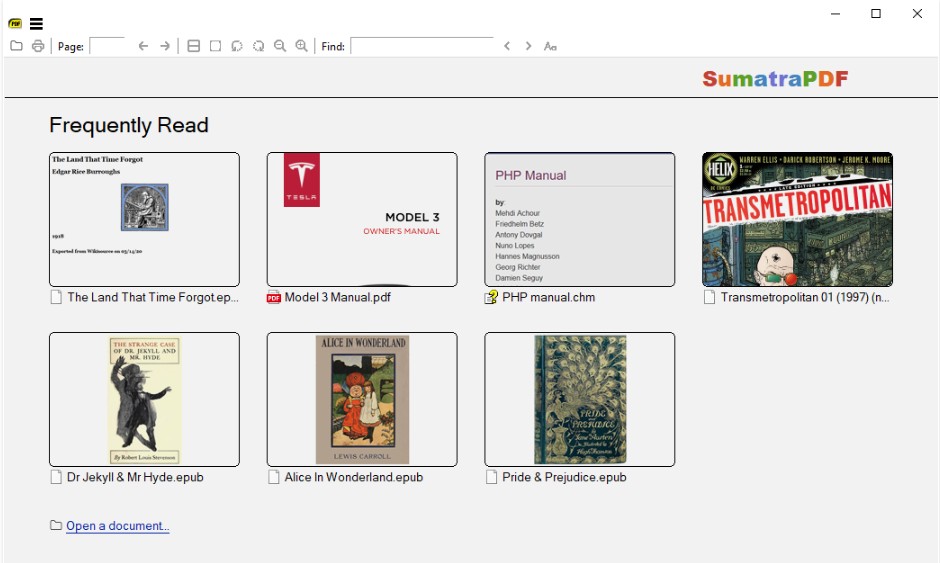
Sumatra PDF has become a favorite EPUB reader among Windows users for a simple reason: it opens books quickly and stays out of the way. Just double-click an EPUB file, and you can start reading without account registration, store prompts, or a complicated setup process. The interface is very basic, but that is also its strength. You get the essentials, such as page controls, tabs, recent files, and table of contents support, without extra panels or visual clutter. It does not offer a bookshelf-style library, rich EPUB customization, cloud sync, or advanced annotation tools. But if you want a fast, lightweight reader for EPUB, PDF, MOBI, comics, and other document formats, Sumatra PDF is still one of the easiest Windows apps to recommend.
Key Features:
- Opens EPUB files quickly, with no account registration or complicated setup.
- Supports EPUB, MOBI, PDF, CBZ, CBR, CHM, XPS, and DjVu files.
- Runs on Windows 7, 8, 10, and 11 with low system requirements.
- Offers a portable version for USB drives or backup use.
- Keeps the interface simple, with basic navigation, recent files, tabs, and table of contents support.
Trade-offs:
- No visual bookshelf or full library management.
- Limited EPUB customization compared with dedicated eBook readers.
- Not ideal for heavy annotation, study notes, or academic reading.
- No built-in cloud sync, reading progress sync, or eBook store.
- Some advanced settings require editing a text file instead of using a normal settings panel.
- • Beginners who want the fastest free EPUB reader for Windows.
- • Users who prefer a clean, distraction-free interface.
- • Readers who open EPUB, PDF, MOBI, comics, and other document formats in one lightweight app.
- • People using older or low-spec Windows laptops.
Bookviser: Modern, Visual, and Beginner-Friendly
Ratings: ⭐⭐⭐⭐
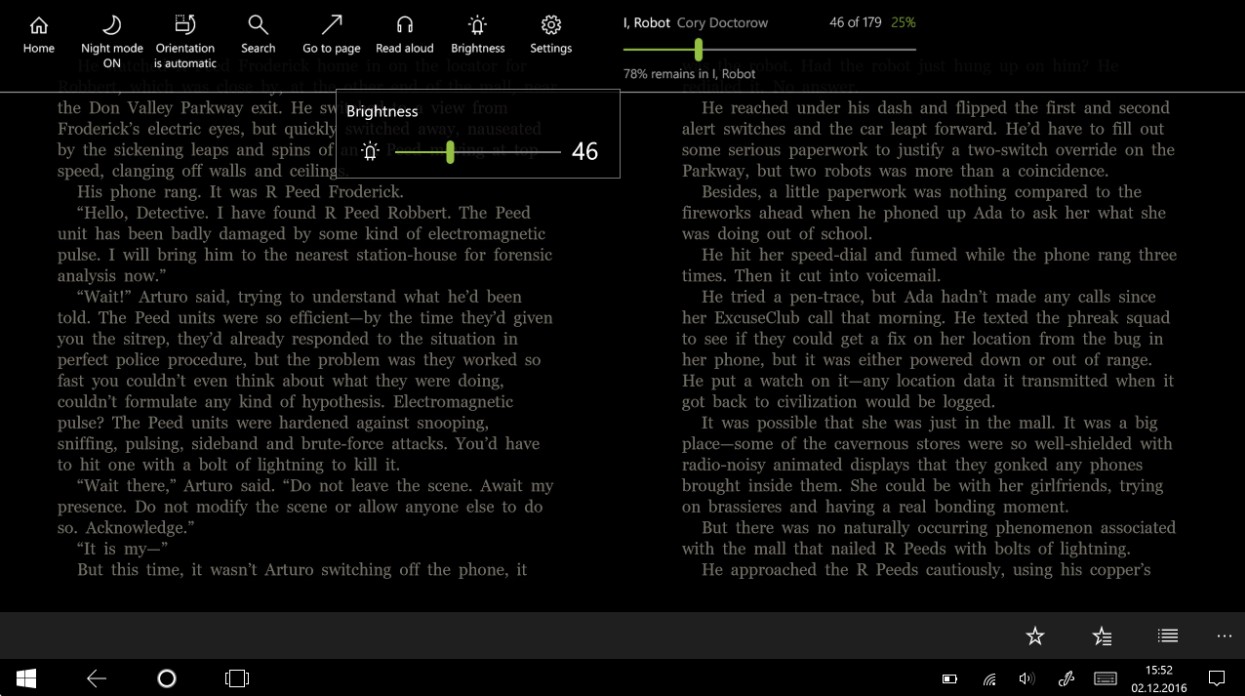
Bookviser keeps the reading experience closer to an eBook app than a plain document viewer. It uses a book-style layout with page-turning animation, adjustable fonts, color themes, margins, and line spacing, so reading a novel on a Windows laptop or tablet feels fairly natural. I also like that common settings are easy to reach: text size, night mode, and page layout can be changed without digging through too many menus. It supports EPUB, TXT, and FB2 files, and can import books from local files, email, OneDrive, browser downloads, and public catalogs such as Feedbooks, ManyBooks, and Smashwords. This Windows EPUB reader is not meant for heavy file conversion or advanced library management, but for someone opening EPUB books casually, it is cleaner than many basic EPUB viewers.
Key Features:
- Supports EPUB, TXT, and FB2 files.
- Offers a book-style reading layout with page-turning animation.
- Lets users adjust font size, font type, margins, line spacing, and color themes.
- Includes day and night reading themes for more comfortable reading.
- Can import books from local files, email, OneDrive, browser downloads, and public catalogs.
- Provides bookmarks, highlights, notes, text search, and text-to-speech in its feature set.
Trade-offs:
- Supports fewer file formats than readers like Sumatra PDF or Calibre.
- Better for casual reading than advanced library management or file conversion.
- Some sync and backup features require a Bookviser account.
- Not ideal for users who want a fully desktop-style, power-user reading workflow.
- • Beginners who want a more visual and book-like EPUB reader.
- • Readers who prefer adjustable fonts, themes, margins, and night mode.
- • Casual readers who mainly read EPUB, TXT, or FB2 books.
WPS Office: The Versatile All-in-One Reader
Ratings: ⭐⭐⭐⭐
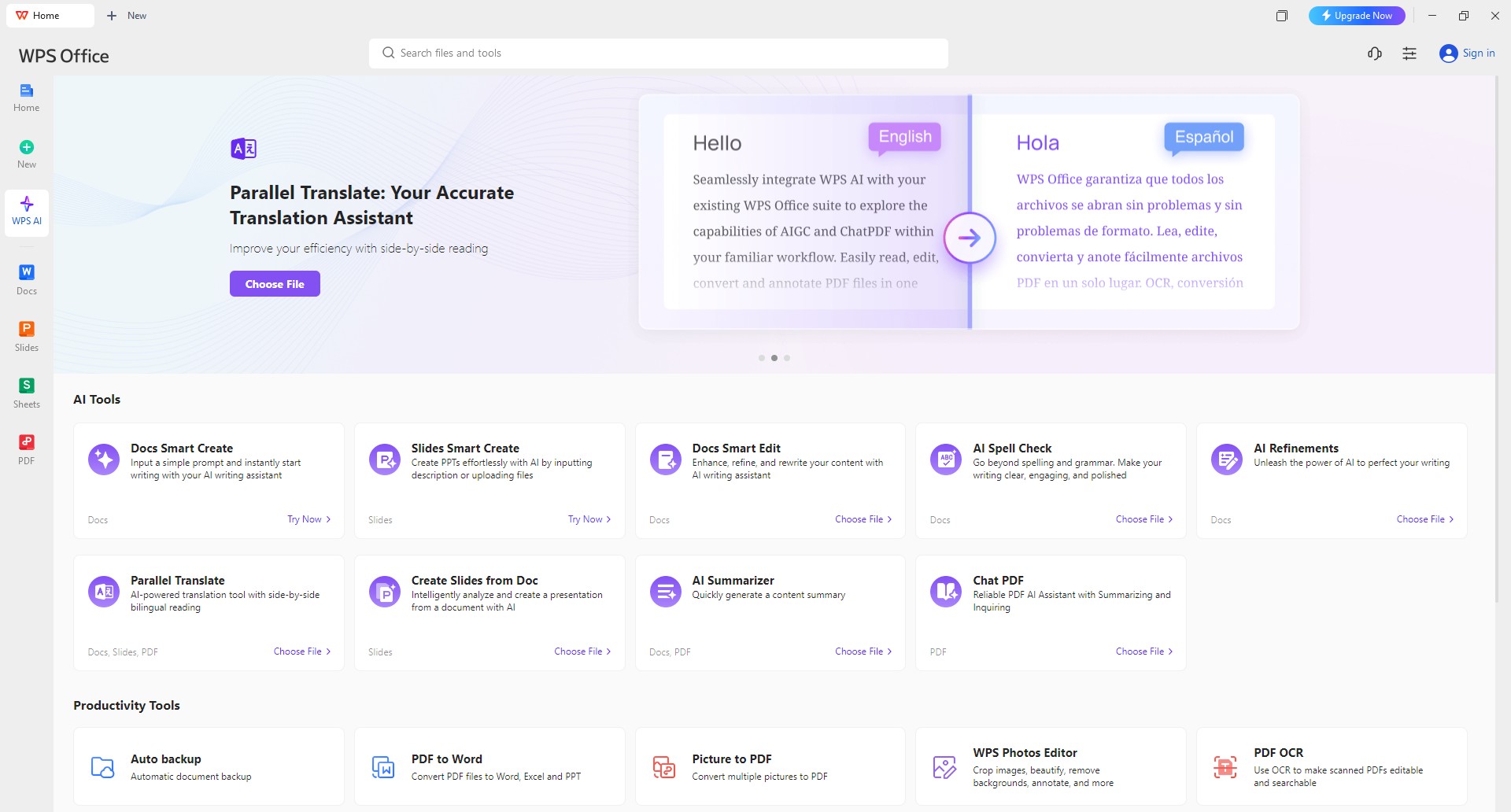
WPS Office may be an unexpected candidate from this Windows EPUB reader list. Most people know it as a Microsoft Office alternative, but it can also work as a practical EPUB reader. In use, opening an EPUB feels convenient because I can read it in the same workspace I already use for documents and PDFs. This program has a neat interface with smooth page backgrounds, night mode, bookmarks, and intuitive navigation. Furthermore, it allows changing the reading mode, such as adaptive view, single-page view, and double-page view. Finally, another advantage is the ability to translate texts into other languages. Though it is heavier than Sumatra PDF and less like a book browser compared to Bookviser, WPS Office can serve as a compromise choice for casual users who want all features mentioned in one application.
Key Features:
- Opens EPUBs inside a familiar office-style interface.
- Includes night mode for more comfortable PDF and eBook reading.
- Provides basic reading controls such as font adjustment, bookmarks, and navigation.
- Works alongside Word, Excel, PowerPoint, and PDF tools in one app.
- Useful for users who want both reading and light document annotation in the same workspace.
Trade-offs:
- Not as lightweight or distraction-free as dedicated EPUB readers.
- EPUB reading is not its main focus, so the book experience feels less specialized.
- Library management is limited compared with Calibre or other eBook-focused tools.
- Some advanced PDF and document tools may require payment.
- Occasional upgrade prompts or subscription-related friction may bother users who only want a simple reader.
- • Beginners who want an EPUB reader inside an office suite.
- • Users who also work with Word, PDF, Excel, or PPT files.
- • Readers who need bookmarks, night mode, and simple navigation.
4 Best EPUB Readers for Windows: Top Picks for Power Users
Once your eBook library starts to grow, "just reading" is no longer enough. You may want better organization, customization, syncing, annotations, or format conversion. Here are four EPUB readers for Windows that power users will appreciate, each offering more than a basic open-and-read experience.
Calibre: The Ultimate Library Manager for Power Users
Ratings: ⭐⭐⭐⭐⭐
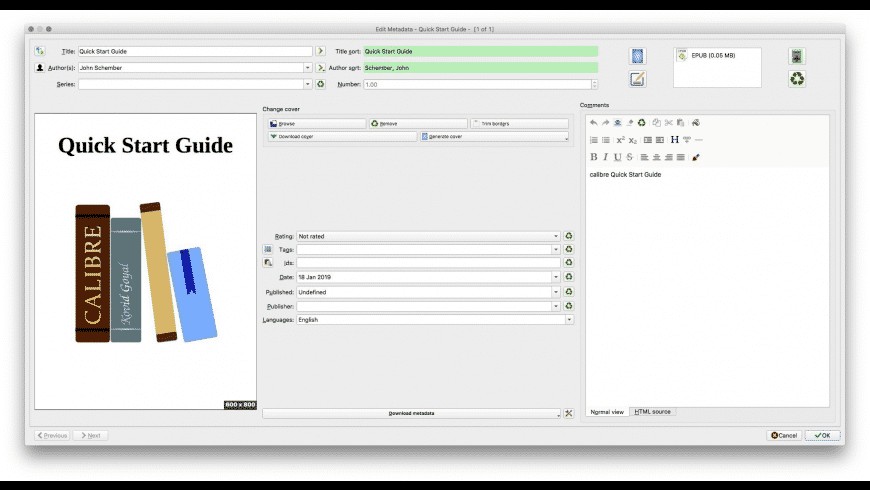
Calibre is one of the best free EPUB readers for Windows if your book collection has grown into a large digital library. When I imported my EPUB, MOBI, and PDF books, Calibre automatically read their metadata and organized them on one dashboard. Its strongest advantage is library management: you can edit metadata, convert formats (such as Kindle to epub), fetch covers, download news, and send books to many eReader devices from the same app.
The interface is not the most modern, and beginners may need time to get used to it. But for research, collecting, format conversion, and long-term library management, Calibre is hard to replace.
Key Features:
- Manages large eBook libraries with metadata, tags, series, authors, and covers.
- Converts between major eBook formats.
- Lets users edit metadata and fetch missing book covers.
- Sends books to Kindle, Kobo, and other eReader devices.
- Includes an eBook viewer for reading on PC.
- Supports plugins, news downloads, and more advanced workflows.
Trade-offs:
- Interface can feel crowded for beginners.
- More complex than basic EPUB readers.
- Not ideal if you only want to open one book quickly.
- Some features require setup before they become useful.
- DRM-protected books may not work without extra steps, since Calibre does not natively remove DRM.
- • Power users with large EPUB, MOBI, PDF, AZW3, or mixed-format libraries.
- • Readers who need metadata editing, tagging, covers, and library organization.
- • Users who often convert eBooks between formats.
- • Kindle, Kobo, and eReader owners who need device transfer tools.
- • Researchers, collectors, and heavy readers who want more control over their books.
FBReader: Seamless Sync Across All Your Devices
Ratings: ⭐⭐⭐⭐
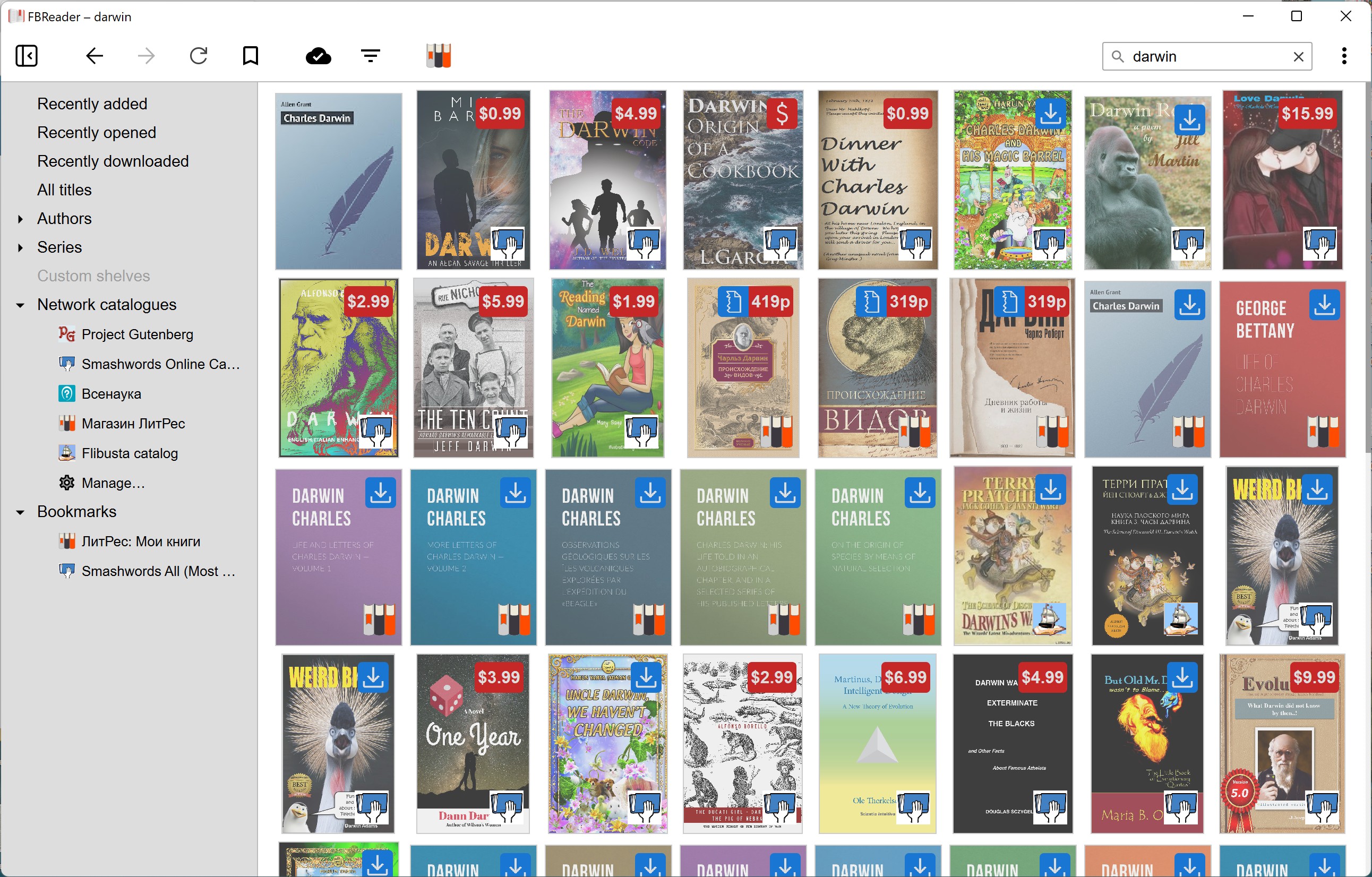
I recommend FBReader for readers who move between multiple devices. If you are like me, reading on your phone during the commute and then continuing on a tablet or laptop at night, FBReader's cloud sync is the feature that matters most. FBReader keeps the layout simple and puts the text first, but it still supports useful extras such as dictionaries, translation, custom fonts, and text-to-speech. The highlighting and bookmarking tools also come in handy for students, as you can make brief notes while reading your documents. While you need to purchase some extra functionalities, at least the basics of this Windows EPUB reader are always for free.
Key Features:
- Syncs book collection, reading positions, and bookmarks across devices.
- Available on Windows, macOS, Linux, Android, and iOS.
- Supports EPUB and other common eBook formats, including FB2 and AZW3.
- Offers customizable fonts, text sizes, colors, and day/night modes.
- Supports online catalogs and custom OPDS sources.
- Newer Windows versions support Readium LCP-protected EPUB files.
Trade-offs:
- Not as powerful as Calibre for large library management.
- Some sync, storage, or mobile features may sit behind paid options.
- Interface is practical rather than visually polished.
- Annotation tools are useful, but not as deep as dedicated study-focused readers.
- Best experience depends on using the broader FBReader ecosystem.
- • Readers who switch between Windows, macOS, Linux, Android, and iOS.
- • Users who want reading position and bookmarks to sync across devices.
- • People who prefer a clean reader with customizable fonts, colors, and day/night modes.
- • Readers who use online catalogs or OPDS sources.
Kobo: Annotation Champion for Studious Readers
Ratings: ⭐⭐⭐
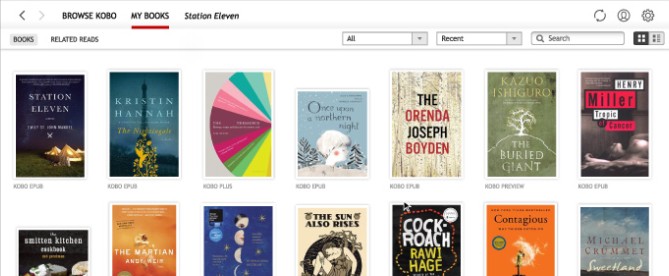
Kobo for Windows can be easily dismissed as most people will remember Kobo devices for reading, rather than the Windows software version. When using Kobo for reading long books, the main advantage that Kobo offers is not necessarily speed but consistency; you can take notes, highlight passages, lookup and translate unknown words and even keep your bookmarks synchronized using the Kobo service. In terms of reading EPUB on the Windows system, it offers all the comfort features I would require, which include adjustable font size, customizable page margins, page color and layout. While having the book store inside the application is convenient when buying books from Kobo, it reduces the flexibility of the application compared to Calibre or Sumatra PDF.
Key Features:
- Supports highlights, notes, bookmarks, dictionary, and word translation.
- Lets users adjust font size, page margins, and page color.
- Syncs purchased books, bookmarks, and annotations with Kobo eReaders.
- Includes access to the Kobo Store and purchased Kobo library.
- Helps manage books on compatible Kobo eReader devices.
Trade-offs:
- More tied to the Kobo Store than open Windows EPUB readers.
- Not as flexible as Calibre for local library management.
- Kobo Desktop is no longer available for users in Europe.
- Not compatible with some newer Kobo models, including Kobo Libra Colour, Kobo Clara Colour, and Kobo Clara BW.
- Heavier and less minimal than lightweight EPUB readers like Sumatra PDF.
- • Readers who already buy books from the Kobo Store.
- • Kobo eReader owners who want desktop syncing and device management.
- • Students who rely on highlights, notes, bookmarks, and dictionary tools.
- • Users who prefer a store-connected reading app over a standalone file reader.
Cover: Comics and EPUBs in a Vibrant Package
Ratings: ⭐⭐⭐⭐
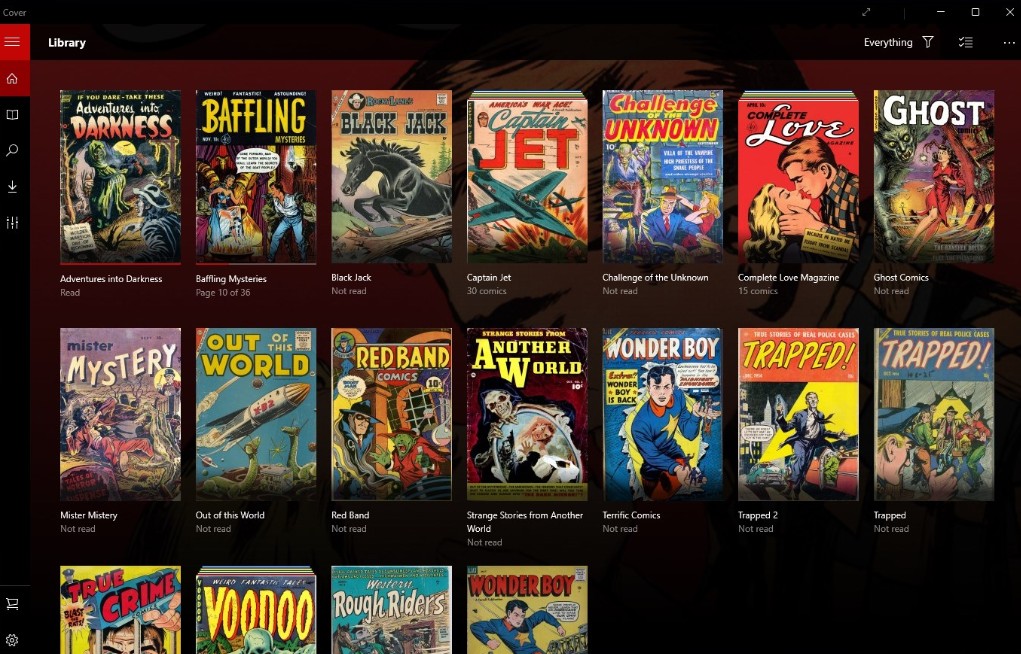
Cover surprised me more than any other reader on this list. I first installed it for digital comics, but it also works well for image-based EPUB files. The interface is clean and snappy. Just drag an EPUB book or comic folder in, and it appears on a tidy, cover-based shelf. Fullscreen reading is especially comfortable for comics, manga, PDFs, and visual books. It is not the reader I would choose for long text-heavy novels, but if your library includes comics or image-rich EPUBs, Cover is much more pleasant than a plain file viewer.
Key Features:
- Supports CBZ, CBR, CB7, CBT, PDF, and image-based EPUB files.
- Displays books in a visual library with shelves and cover art.
- Tracks read/unread status, page count, and current page.
- Supports local, network, OneDrive, Google Drive, and Dropbox folders.
- Offers single/dual page view, vertical scrolling, fit options, cropping, background color, and night mode.
Trade-offs:
- EPUB support is mainly for image-based EPUB files, not rich text eBooks.
- Not ideal for long novels or text-heavy reading.
- Annotation and study tools are limited.
- The free version limits how many books can be managed at once unless upgraded.
- Works better as a comic and visual library app than as a general EPUB reader.
- • Readers who mainly enjoy comics, manga, and image-heavy EPUB files.
- • Users who want a visual bookshelf instead of a plain file list.
- • Windows tablet or touchscreen users who like fullscreen reading.
- • Casual users who want one app for CBZ, CBR, PDF, and image-based EPUB files.
FAQs
Can I annotate and highlight in these apps?
Is there a simple, beginner-friendly app that just opens books?
Which EPUB reader doesn't push upgrades or show ads?
What about syncing between devices?
Is there any EPUB reader for Mac?
Final Verdict
The best EPUB reader for Windows depends on how you actually read. If you want speed, Sumatra PDF is hard to beat. If you prefer a more visual reading space, Bookviser or Cover may suit you better. For larger libraries, format conversion, syncing, or annotations, Calibre, FBReader, and Kobo offer more room to grow. Most of these readers are free to try, so the simplest approach is to start with the one that matches your main reading habit and switch if your needs change. And if you find a hidden gem I missed, let me know. I am always happy to add one more EPUB reader to the list.

 4 Easy Ways to Convert Kindle to PDFBy Amber Collins - May 18, 2026
 How to Print Kindle Books Without Losing QualityBy Amber Collins - May 14, 2026
![[Quick Solution] How to Remove Kindle DRM on Mac](https://images.dvdfab.cn/media/未命名的设计__87__crpyru.png/public) [Quick Solution] How to Remove Kindle DRM on MacBy Amber Collins - May 11, 2026
[Quick Solution] How to Remove Kindle DRM on MacBy Amber Collins - May 11, 2026 How to Download Kindle Books to PC in 2026 (The Complete Guide)By Amber Collins - May 9, 2026