How to Download Audible Books to PC and Phone: A Complete Tutorial

Summary: How to download Audible books depends on your device and the type of file you want. This guide explains how to download Audible books on phone and computer, including offline listening in the Audible app, AAX downloads from audible.com, and MP3, M4A, or M4B downloads for personal backup. It also covers common download issues and helps you choose the right method.
Can You Download Audible Books? Yes. You can download Audible books in three ways: save them in the Audible app for offline listening, download AAX files from your Audible library to a computer, or use a third-party tool to save Audible books to PC as MP3 or M4A.
In this guide, I'll show you how to download Audible books on your phone, save them on your PC, and use dedicated tools for more flexible Audible downloading and backup.
Choose your Audible download method quickly:
- If you want to listen offline on your phone, go to How to Download Audible Books on iPhone or Android section.
- If you want to save Audible books on your computer, go to How to Download Audible Books on a Computer section. Audible desktop downloads are usually AAX files, not regular MP3 files.
- If you want remove Audible DRM and download audiobooks in MP3, M4A, or M4B format, go to How to Download Audible Books to MP3 or M4A section.
How to Download Audible Books on iPhone or Android
Audible lets you download audiobooks inside the mobile app for offline listening. The advantage is clear: you can listen to your books without Wi-Fi or mobile data. However, this method does not give you a real audio file that you can freely use. The downloaded book stays inside the Audible app. If a subscription-included title expires, or if you want to play the audiobook in another media player, the in-app download will not help. Purchased Audible titles generally remain in your library after cancellation, while Plus Catalogue titles may become unavailable after your membership ends.
Step 1: Open Audible and go to Library
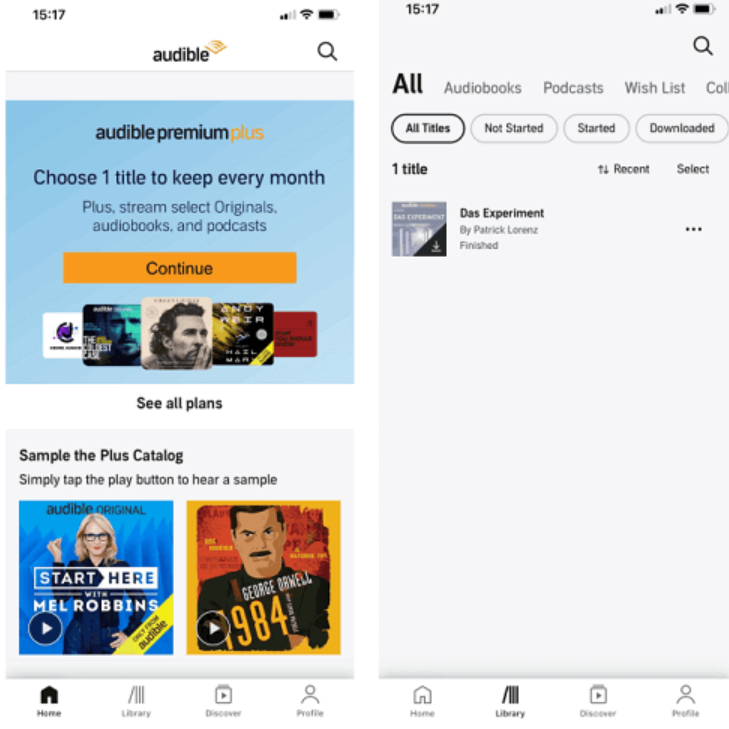
Open the Audible app on your iPhone or Android phone. Sign in with the Amazon account linked to your Audible library. Then tap Library at the bottom of the screen.
Step 2: Find the audiobook you want to download
On the Library page, tap All Titles. Scroll through your library and find the audiobook you want to save for offline listening.
Step 3: Open the title menu and start downloading
Tap the three-dot icon next to the audiobook title. Then tap Download. Keep the app open until the download finishes.
Step 4: Play the downloaded book offline
When the download is complete, return to Library and tap the audiobook cover. The book will play inside the Audible app without Wi-Fi or mobile data.
How to Download Audible Books on a Computer
On a computer, you can download Audible books from your Audible Library. The downloaded file is usually an .aax file, which is Audible's protected audiobook format, not a regular MP3 file. This method can work as a basic backup, but the backup is not very flexible. Most common media players cannot play AAX files directly, and ordinary format converters usually cannot convert AAX to MP3 because the file is protected by Audible DRM.
Step 1: Sign in to Audible on your browser
Open your web browser and go to Audible.com. Click Sign In in the top-right corner. Enter the Amazon account email and password linked to your Audible library.

Step 2: Open your Audible Library
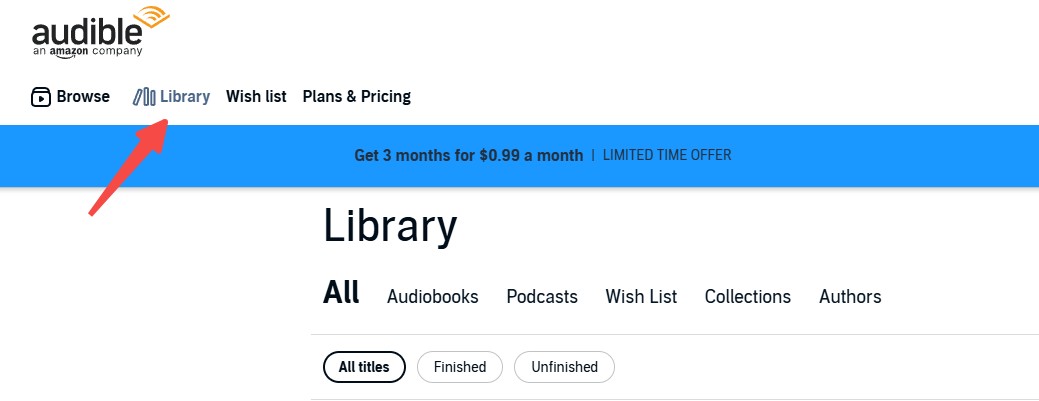
After signing in, click Library in the top navigation bar. This will open the list of audiobooks in your account.
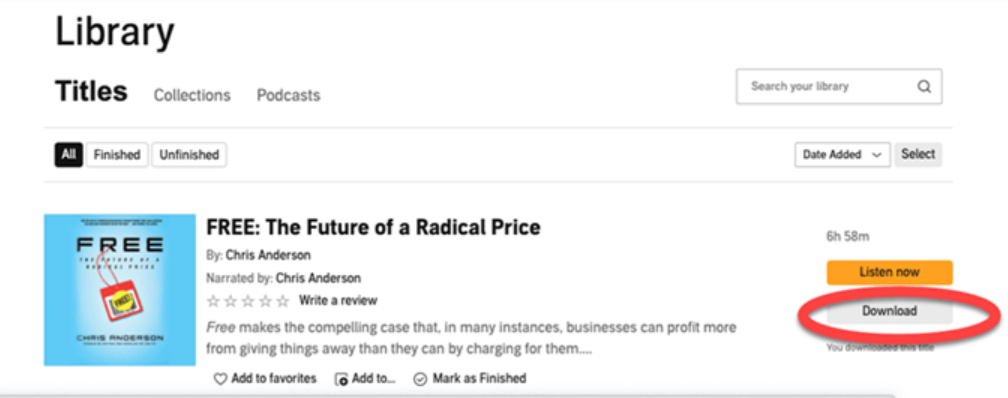
Step 3: Download the audiobook
Find the audiobook you want to save. Click Download next to the title.
How to Download Audible Books to MP3 or M4A
If you want to play Audible books outside the Audible app, an AAX download is not enough. AAX is Audible's protected audiobook format, so common media players cannot open it directly. To make the audiobook easier to play, transfer, or back up, you need to download Audible books as open formats such as MP3.
Download Audible Books with BookFab Audible Converter
BookFab Audible Converter is designed to download Audible books in DRM-free format. It lets you sign in to Audible through a built-in browser, access the audiobooks in your library, and download them directly to common formats including MP3, M4A, FLAC, WAV, and OPUS. It also keeps useful audiobook information such as chapters, cover art, title, duration, and metadata, which is helpful for audiobook management.
Step 1: Open BookFab Audible Converter and log in
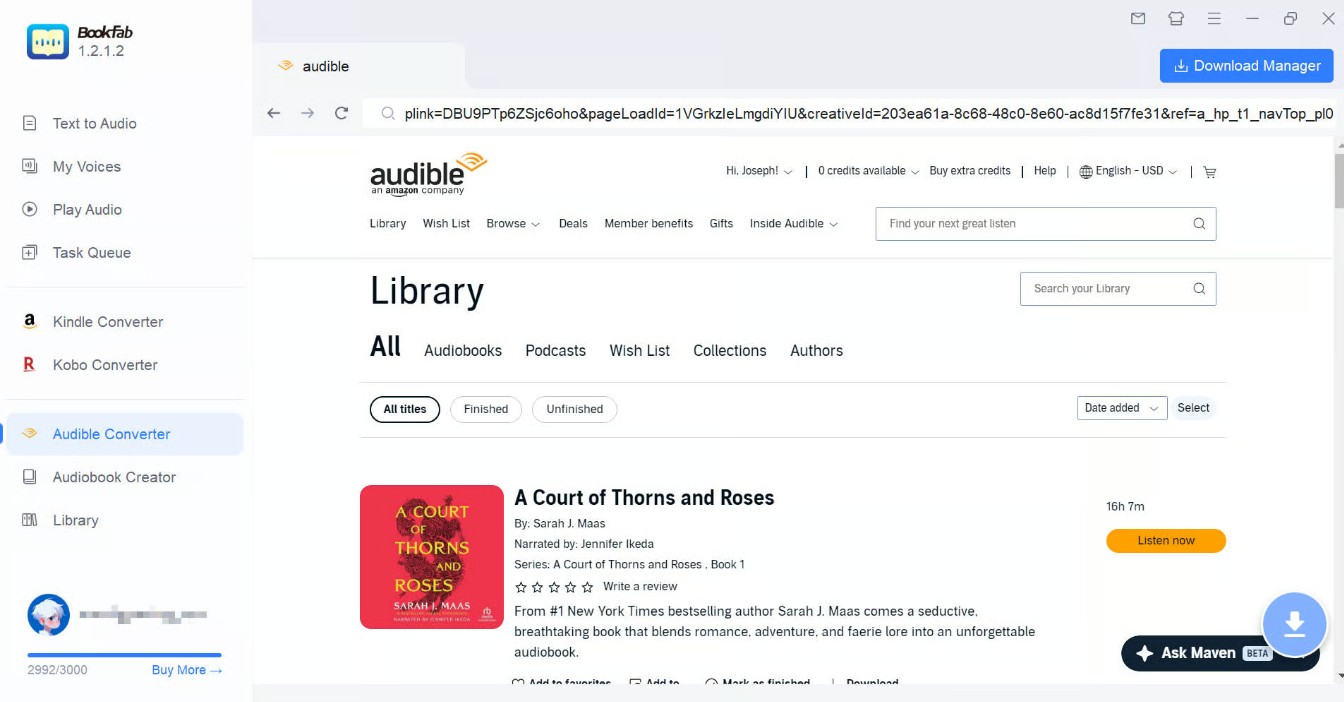
Launch BookFab on your PC and choose Audible Converter. In the built-in browser, sign in to your Audible account.
Step 2: Pick a book and set the format
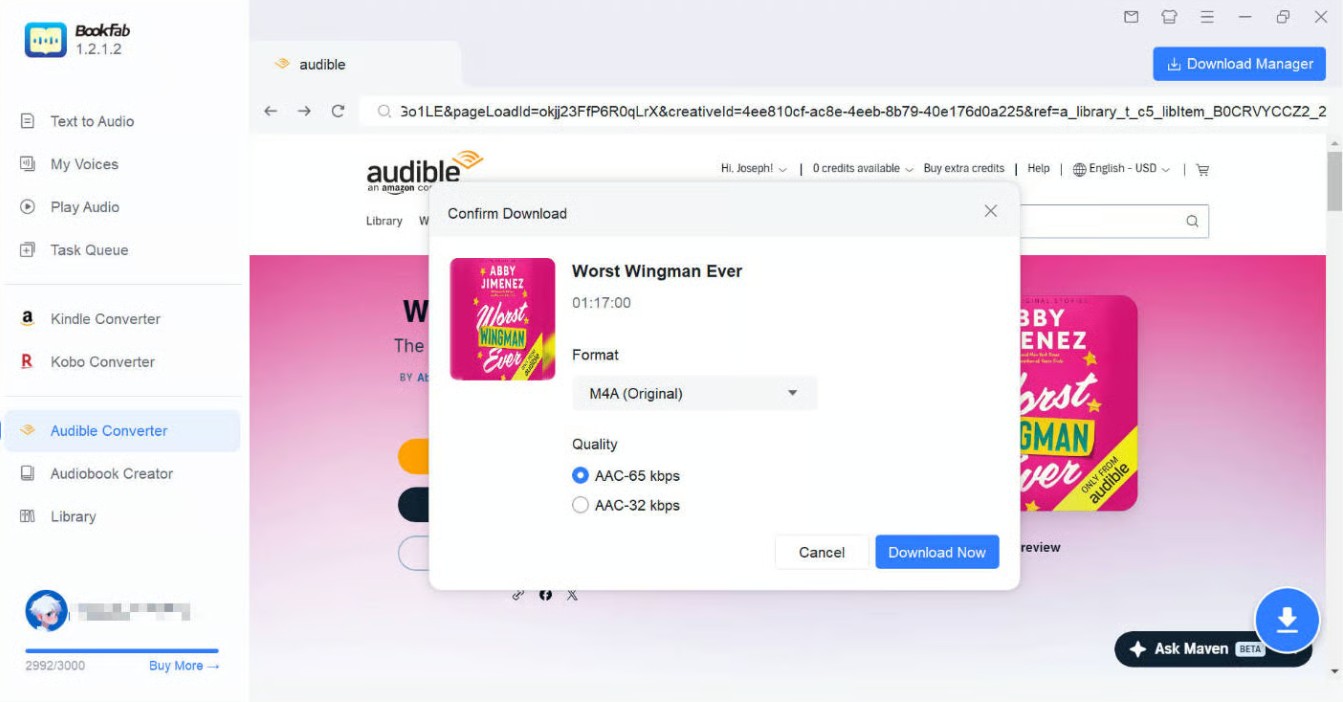
Open the audiobook's detail page inside BookFab and click the Download button in the lower-right corner. In the Confirm Download window, choose the output format you want, such as MP3 or M4A.
Step 3: Start the download task
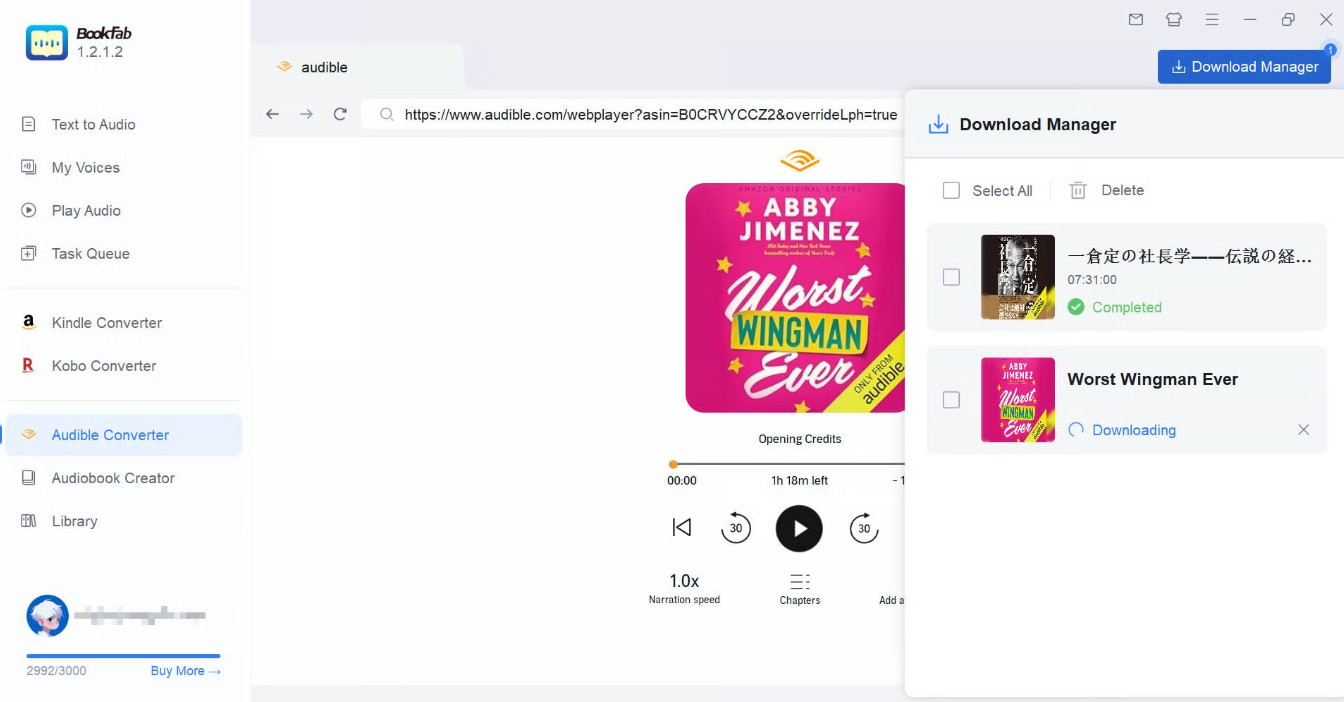
Click Download Now to begin. BookFab will handle the download and conversion in one task. You can check the progress in Download Manager. When the task is complete, open the output folder and you can find the downloaded DRM-free Audible book.
Disclaimer: This method is intended for audiobooks you own or are authorized to access. Keep the downloaded Audible books for private listening or backup, and avoid sharing, uploading, reselling, or redistributing them.
Download Audible Audiobooks with OpenAudible
OpenAudible is another way to download Audible books to a computer and convert them to common audiobook formats. It supports Windows, Mac, Linux, and Docker, and can export Audible books as MP3 or M4B. It is especially worth mentioning because it supports Linux and Docker, so it may be useful for users who want to manage their Audible library on Linux or a NAS setup.
However, OpenAudible is not completely free anymore if you want format conversion. You can download, manage, and play books for free, but converting Audible books to MP3 or M4B requires a paid license.
Step 1: Install OpenAudible and set the output format
Download and install OpenAudible from its official website. Launch the program, then go to Edit > Preferences and choose M4B or MP3 as the audio output format.
Step 2: Connect your Audible account
Go to Controls > Connect to Audible. Choose your Audible region, sign in through the browser window, and complete any verification required by Audible.
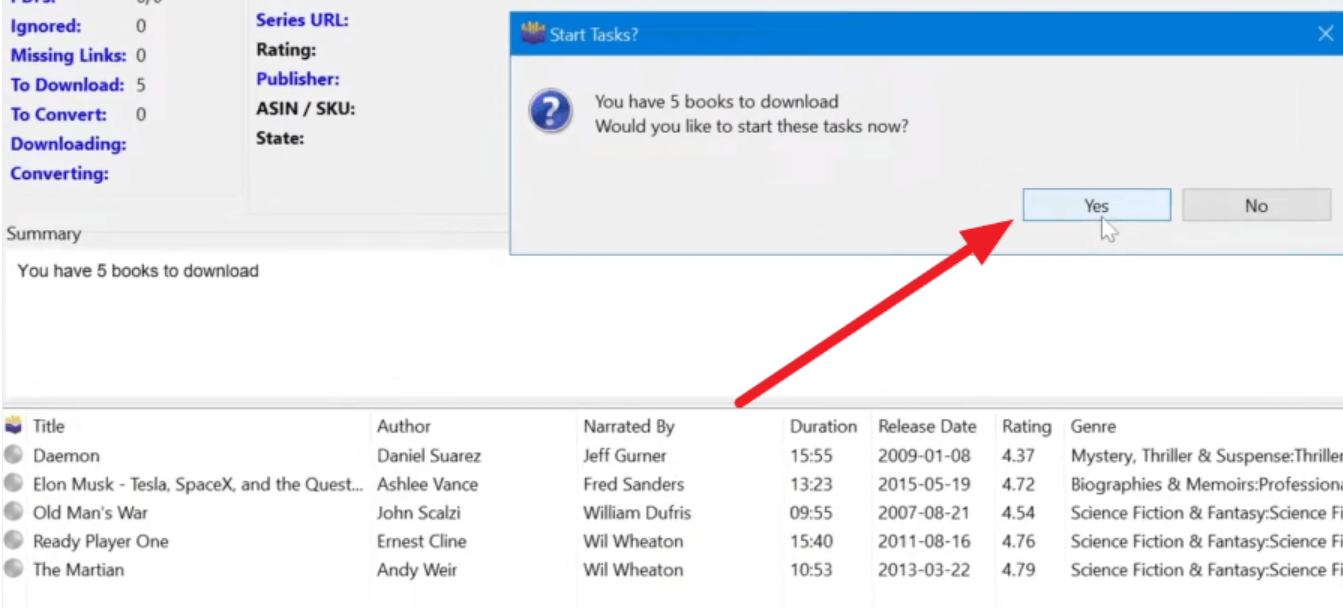
Step 3: Download and convert your books
After your Audible library loads, OpenAudible may ask whether you want to download and convert your books. Click Yes to process them automatically. To choose titles manually, select one or more books, then click Action > Download to download Audiobooks.
Which Audible Download Method Should You Use?
There are several ways to download Audible books to PC, but they do not give you the same type of file. Use the table below to choose the right method based on how you want to listen and manage your audiobooks.
| Method | Best for | Output file | Main limitation | Recommendation |
| Audible app download | Offline listening on iPhone or Android | No regular audio file | Only works inside the Audible app | ⭐⭐⭐ |
| Audible website download | Saving an Audible file on computer | AAX file | Not playable in most common media players | ⭐⭐⭐ |
| BookFab Audible Converter | Downloading Audible books to PC as MP3, M4A, FLAC, WAV, or OPUS | MP3, M4A, FLAC, WAV, OPUS | Mainly for users who want open-format personal backup | ⭐⭐⭐⭐⭐ |
| OpenAudible | Managing an Audible library and converting books to MP3 or M4B | MP3, M4B | MP3/M4B conversion requires a paid license | ⭐⭐⭐⭐ |
Why Can't I Download Books from Audible?
If Audible cannot download a book, check the problem based on the device you are using. Phone downloads usually fail because of network, storage, or app settings. Computer downloads usually fail because of account, title eligibility, browser settings, or the discontinued Audible for Windows app.
📱On iPhone or Android
1. Check Wi-Fi and storage
Switch to a stable Wi-Fi connection and make sure your phone has enough free storage. If the download stops halfway, delete unused files or remove old Audible downloads, then try again from Library.
2. Check your Audible account and title access
Make sure you are signed in to the Amazon account that owns the audiobook. If the book is from the Plus Catalog or another subscription-included library, it may become unavailable after the title leaves the catalog or your membership ends.
3. Adjust download settings in the Audible app
Open Profile > Settings > Data & Storage. Try lowering Download Quality or changing Download by Parts, then return to Library and download the book again.
💻On PC
1. Stop using the old Audible for Windows app
If you are using the old Audible for Windows app from the Microsoft Store, switch to another method. The app was discontinued, so it is no longer a reliable way to stream or download Audible books on PC. Instead, use Audible.com > Library > Download to download available books as AAX files.
2. Check whether you purchased the audiobook
Make sure the audiobook is actually purchased or redeemed with an Audible credit. Some subscription-included books, Plus Catalog titles, Audible Originals, or region-limited titles may not provide the Download button on desktop. If you do not see Download next to the title in your Audible Library, the book may not support AAX download.
3. Check your PC system, browser, and storage
Make sure your browser is working normally and your PC has enough storage space. If clicking Download does not save a file, check your browser's download list and default download folder first. You can also try refreshing Audible.com, signing in again, or using another browser.
FAQ
Where are Audible books downloaded on PC?
Can I download an Audible book to listen to offline?
How to convert Audible to MP3?
Can you permanently download Audible books?
Conclusion
There are several ways to download Audible books, but each method fits a different need. If you only want to listen offline inside the Audible app, the official download option is enough. But if you feel restricted by the way your purchased audiobooks are locked inside Audible, you can use a third-party tool like BookFab Audible Converter to convert Audible to MP3 or other common audio files. Whichever method you choose, the downloaded files should be used only for personal convenience and backup.

 4 Easy Ways to Remove Audible DRM in 2026: Tool Reviews and TutorialBy Amber Collins - May 19, 2026
 How to Listen to Audible on Mac: 4 Practical MethodsBy Amber Collins - May 11, 2026
 Convert AAX to MP3: 9 Best Free Audible Converters in 2026 (Tested)By Amber Collins - Apr 16, 2026
 How to Download Audible to Mac Easily: A Step-by-Step TutorialBy Amber Collins - Feb 24, 2026