4 Easy Ways to Remove Audible DRM in 2026: Tool Reviews and Tutorial

Summary: The guide details four effective methods to remove Audible DRM for legal and personal use, including high-speed desktop converters and free alternatives. Keep reading and enjoy your journey of free listening.
Audible is one of the biggest names in audiobooks. I love using it for long drives and weekend chores, but Audible DRM can also be inconvenient when my purchased audiobooks are tied to the app and drain my phone battery during long sessions.
If users can remove Audible DRM and save purchased books in common formats like MP3, listening and managing the library becomes much easier. In this guide, I will share the best Audible DRM removal tools I have used in recent years, compare their real-world performance, and walk you through detailed steps to strip Audible DRM effectively.
- Wider Device Compatibility: After converting the files to DRM-free formats like MP3 or M4B, they can be played on common players, car stereo systems, and standalone MP3 players.
- Personal Backup: You retain a readable local copy, ensuring you are not affected if your account region changes or the application becomes unavailable.
- Easier Management: You can rename files by album or chapter, customize covers and tags, and organize your library in bulk more efficiently.
1. BookFab Audible Converter - Best Audible DRM Removal Tool for Win/Mac
- Available on: windows 10/11, macOS 10.13 - 15.x
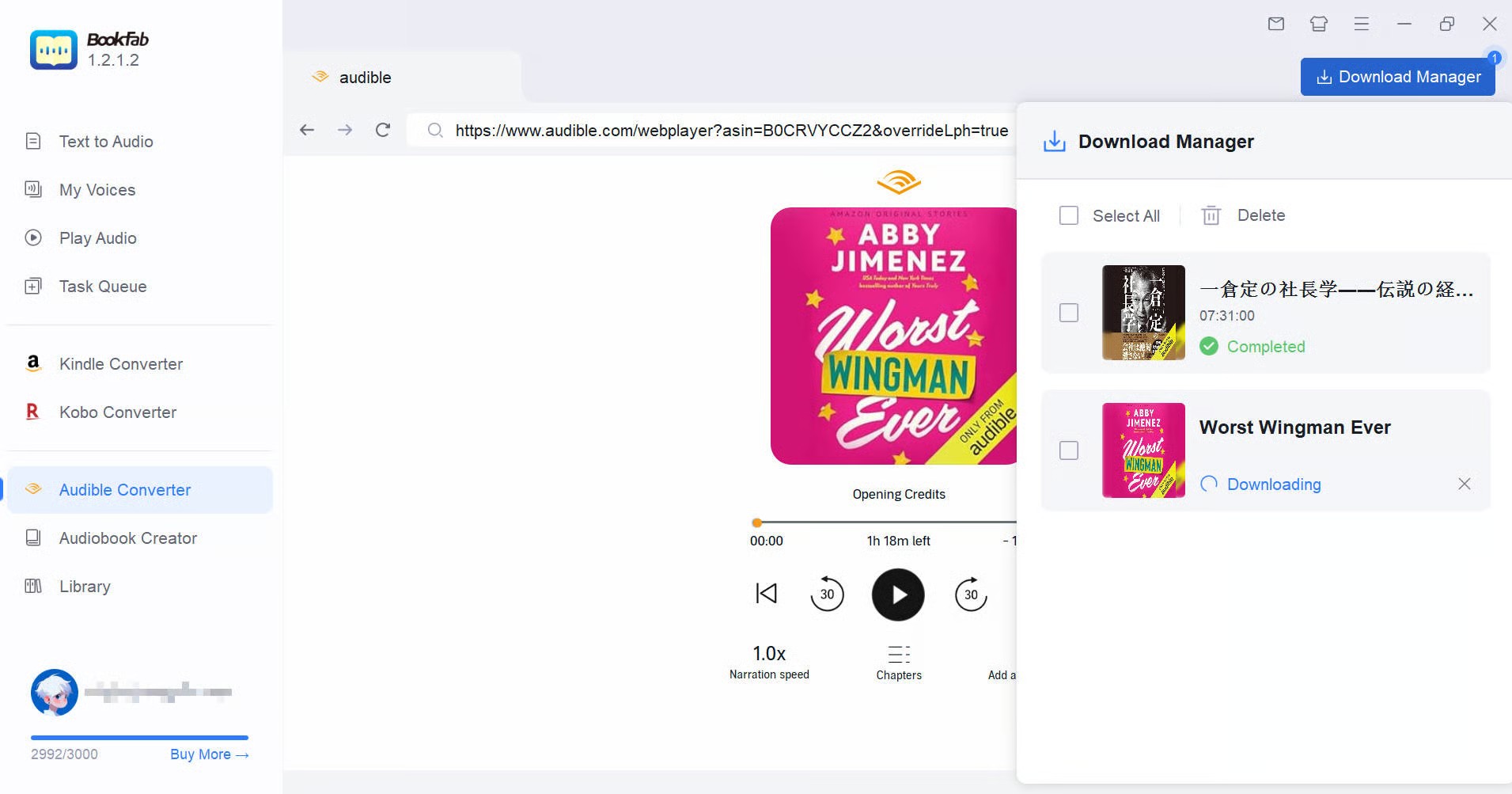
BookFab Audible Converter is designed to remove DRM from Audible books and convert them into common audio formats for personal listening and backup. What I like most is its built-in browser: after I sign in to my Audible account, the software can access my library and detect the audiobook I want to download, so I do not have to manually download the .aax file first.
Once the book is detected, I can choose an output format such as MP3, M4A, WAV, FLAC, or OPUS, then let BookFab handle the download and conversion in one workflow. It also keeps useful audiobook details such as chapter information, cover art, and metadata, which makes the converted files much easier to organize. It is simple to use but still complete enough for serious audiobook management, which is why I recommend BookFab Audible Converter as my top Audible DRM removal tool for both beginners and more technical users.
How to Remove Audible DRM with BookFab Kindle Converter
Step 1: Download BookFab and Choose Audible Converter Module
BookFab Audible Converter is a built-in module of BookFab software. First, download and install the BookFab program on your computer.
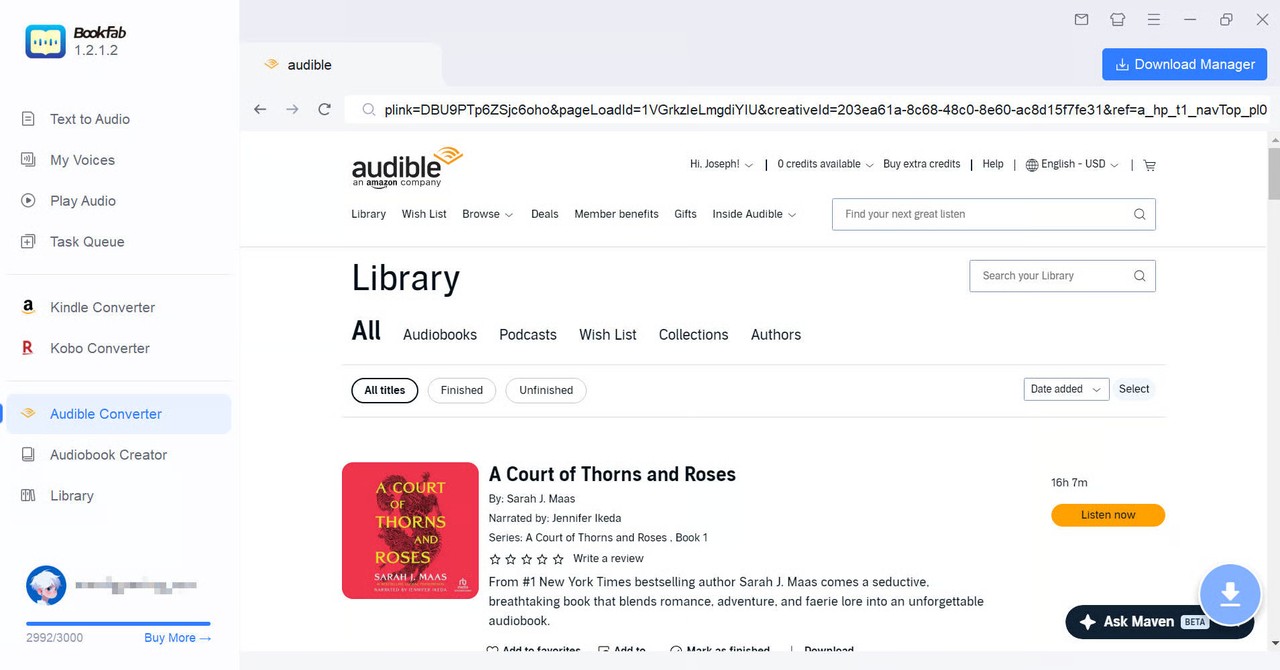
Launch BookFab. On the main interface, select "Audible Converter". Click the Audible icon in the interface to open the built-in browser and log in using your Audible account.
Step 2: Open the Audiobook You Want to Decrypt
After logging into your Audible account, open your Library. Find the book you want to process. Once you open the book's details page, the BookFab program will automatically analyze the book and display a blue Download button.
Step 3: Start Audible DRM Removal
Click the Download button, and a new window will pop up. Here, you can set the output format and adjust the bitrate. Available formats include M4A, MP3, FLAC, WAV (lossless file), or OPUS. For better compatibility, M4A or MP3 is recommended. For clear, lossless audio quality, choose FLAC or WAV.
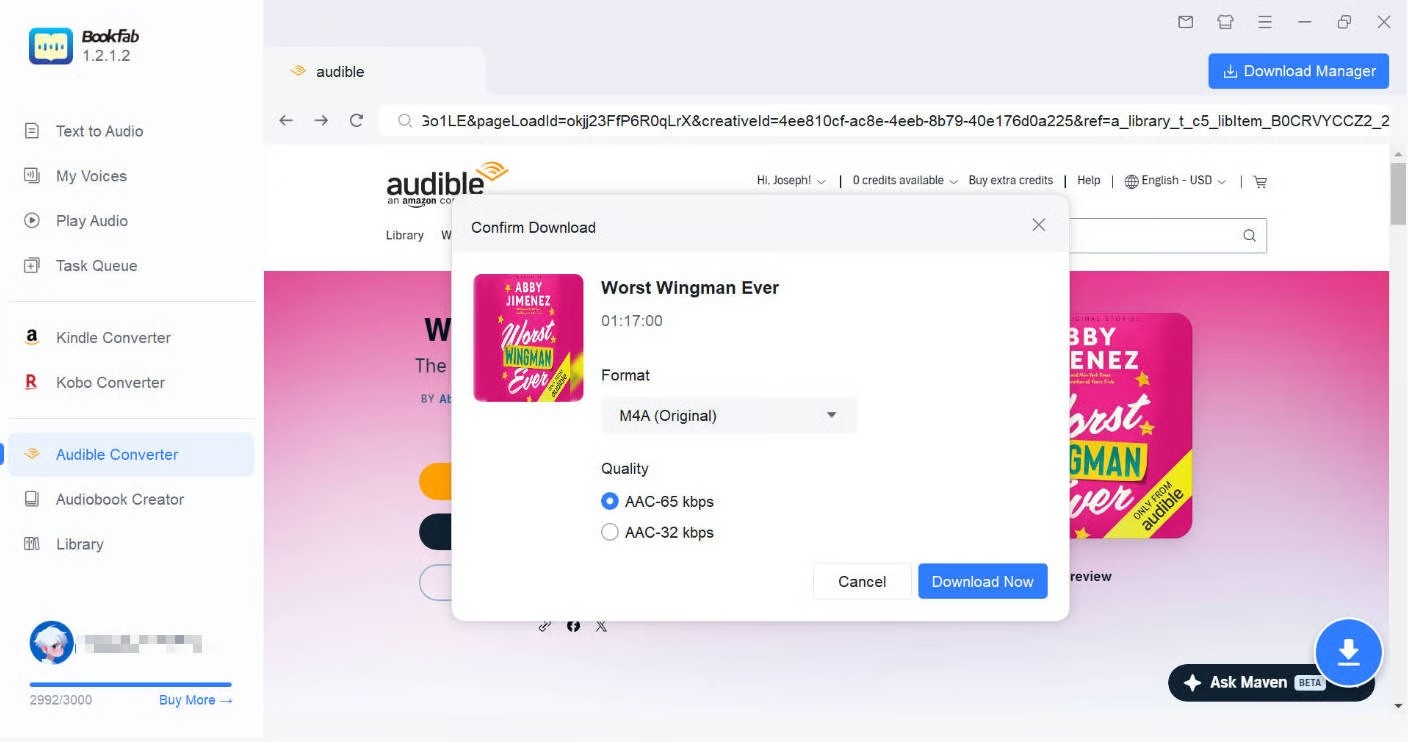
After setting the output format and quality, click "Download Now". BookFab will directly download the selected audiobook and remove Audible DRM at the same time, saving the DRM-free files to PC.
2. Libation - Free Open-Source Audible DRM Removal Tool
- Available on: Windows, macOS, Linux
Libation is a free and open-source Audible library manager that focuses on backing up the audiobooks you already own. It feels more like a library management tool: after signing in to Audible. You don't need to download audible to mac or Windows, this Audible DRM removal tool can scan your account, list the titles in your library, and help you "liberate" them for local storage.
However, Libation may take a little more time to understand if you are new to Audible DRM removal. Its interface and settings feel more technical than a dedicated Audible DRM removal tool, and the workflow is closer to "manage and back up my Audible library" than "click once and convert this audiobook to MP3." I would recommend it most to users who like open-source tools and do not mind spending a few minutes learning the settings.
How to Remove Audible DRM with Libation
Step 1: Install Libation and Add Your Audible Account
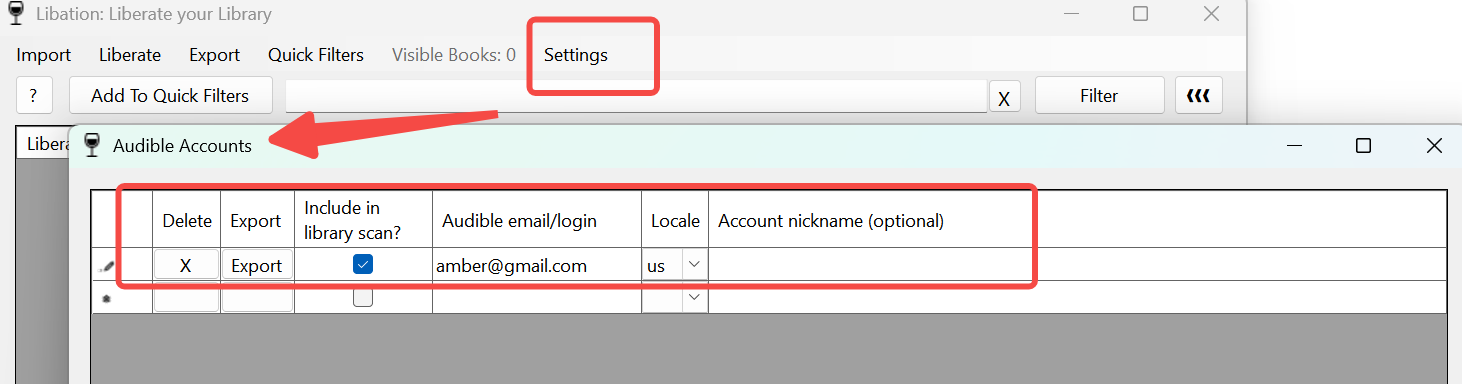
Download and install Libation. After launching the program, go to Settings > Accounts and add your Audible account. Choose your Audible marketplace, such as US, UK, or CA, then sign in with the Amazon/Audible account that contains your audiobook library.
Step 2: Scan Your Audible Library
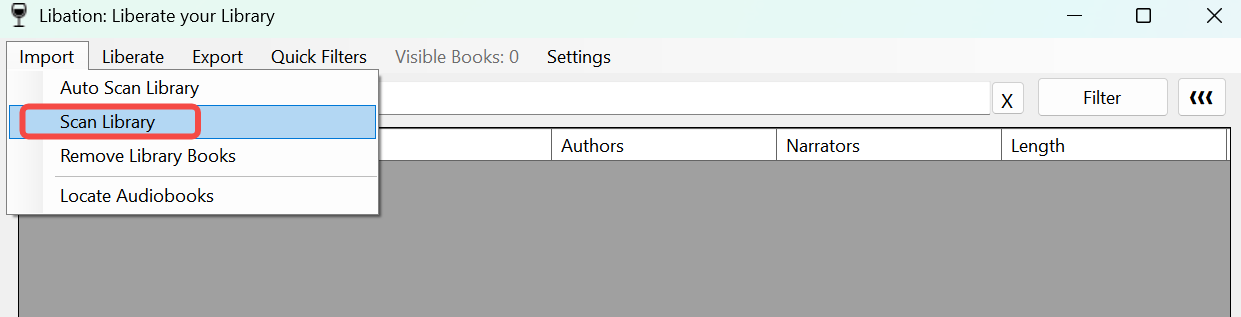
After the account is added, return to the main interface and click Scan Library. Libation will connect to your Audible account and load the audiobooks in your library. When the scan is complete, your titles will appear in the book list.
Step 3: Select the Audiobook and Remove DRM
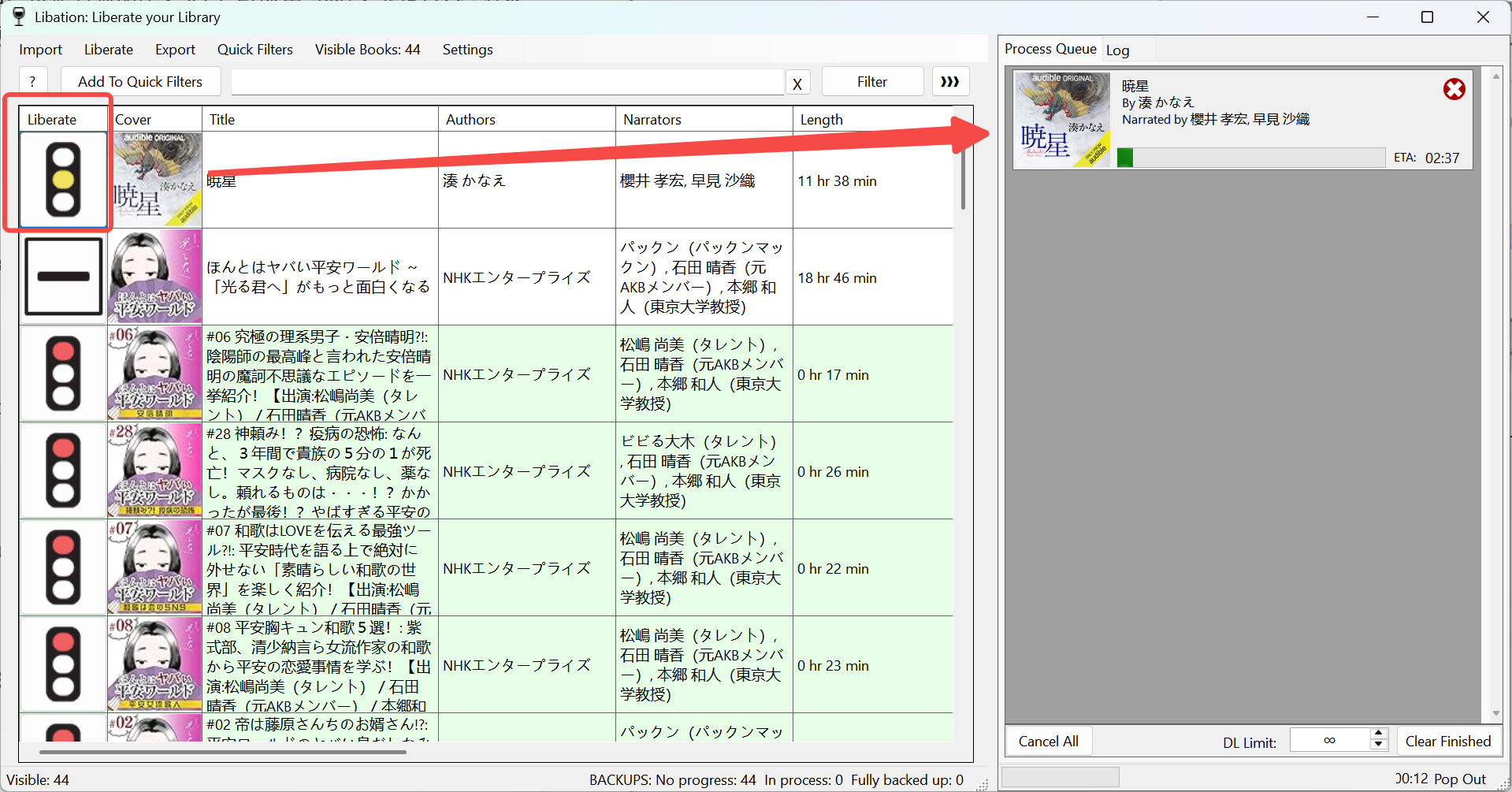
In the library list, select the audiobook you want to process, then click the traffic-light icon under the Liberate column. Libation will start decrypting the audiobook and save it in M4B format by default.
The icon color shows the current DRM removal status. A red icon means the audiobook is still DRM-protected. After you click it, the icon will turn yellow and the Audible DRM removal progress bar will appear. When the process is complete, the icon will turn green. You can then open the output folder and find the DRM-free audiobook file there.
3. audible-tools.kamsker.at - Remove Audible DRM Online
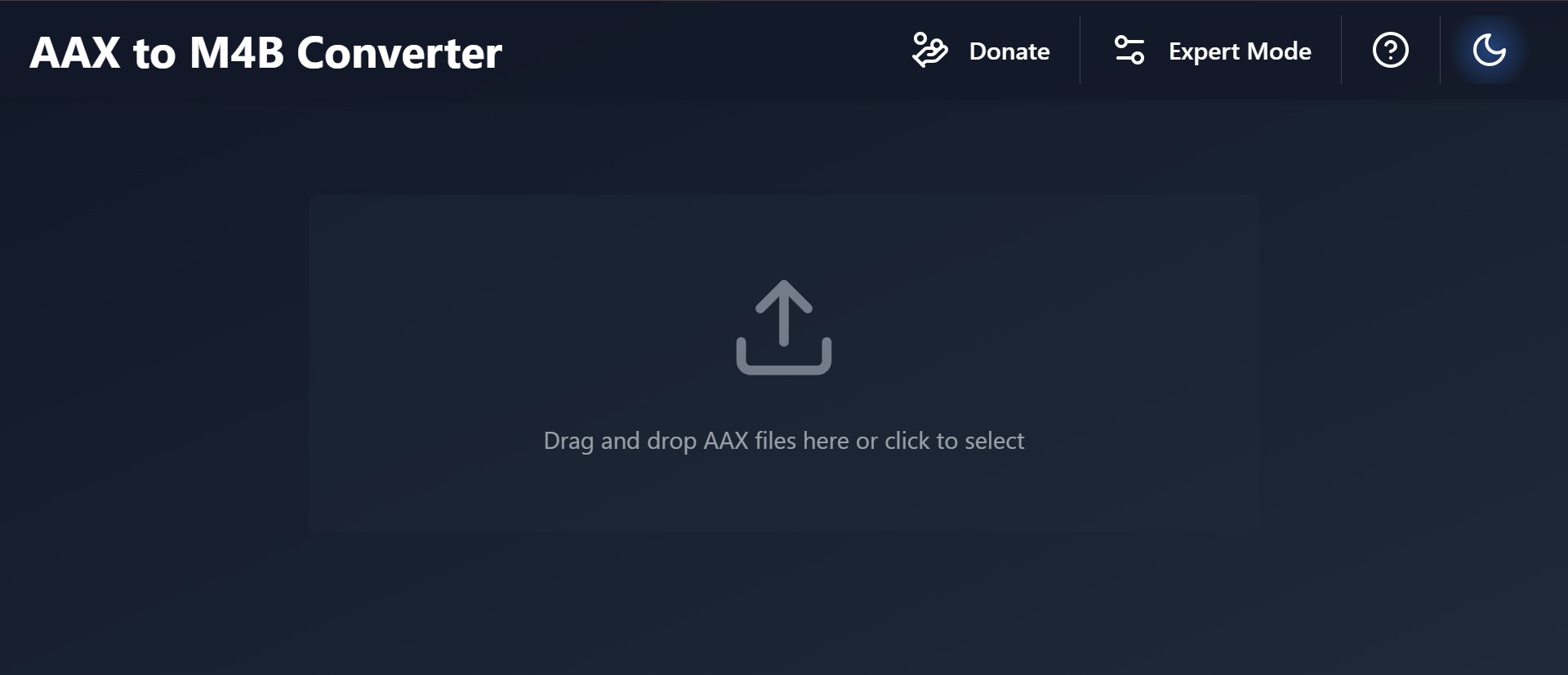
If you do not want to install standalone Audible DRM removal software, audible-tools.kamsker.at can be a quick browser-based option. It works with downloaded Audible .aax files and converts them to M4B or MP3, so it is convenient when you only need to process a small audiobook file once.
That said, I would not rely on it for a full Audible library. In my test, files larger than about 900 MB were not supported, chapter splitting was unavailable, and the converted audiobook became one long file that was harder to navigate. The DRM removal result was also inconsistent: out of eight Audible books I tested, only four were decrypted successfully. If you run into the same limits or want a more stable workflow, a desktop Audible DRM removal tool is still the better choice.
How to Remove DRM from Audible Online
Step 1: Download the Audible Book to Your Local Folder
Go to the official Audible website and log in to your account. Then, download the purchased audiobook as an .aax file to your local computer.
Step 2: Add the Audible File to the DRM Removal Tool
Open the website: audible-tools.kamsker.at. Then, drag and drop your downloaded .aax file onto the website panel. The aax to m4b converter will automatically analyze the file's metadata and chapters.
Step 3: Select the Output Format and Start Conversion
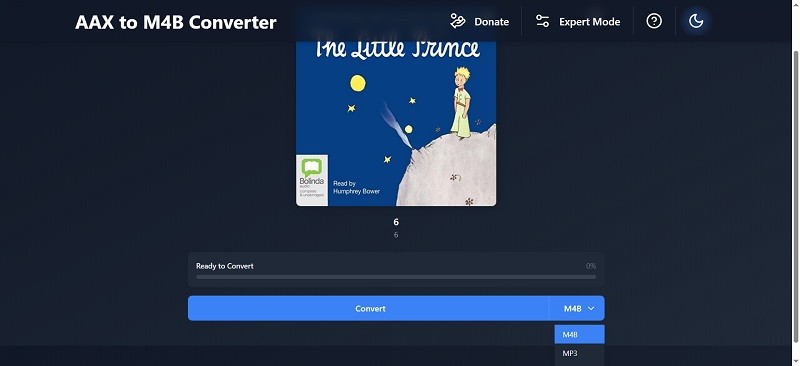
Choose your desired output format (e.g., M4B or MP3). Click the "Convert" button. The tool will begin to strip the DRM and save the resulting file to your local drive.
4. Audacity - Record Audible as DRM-Free Audio
I'd like to say this is a very old-school approach: you don't need to know how to download audible books, and you don't necessarily need a dedicated tool to strip Audible DRM; you can play the audiobook in real time and let your computer record the system audio. For example, you can use the free recorder Audacity to capture desktop audio and save it locally. Of course, there are trade-offs: real-time recording takes as long as the book plays, audio quality can suffer, and you must avoid any system notification sounds while recording. Still, if the other three methods don't fit or fail for you, this is a solid fallback.
Here's a quick Windows walkthrough:
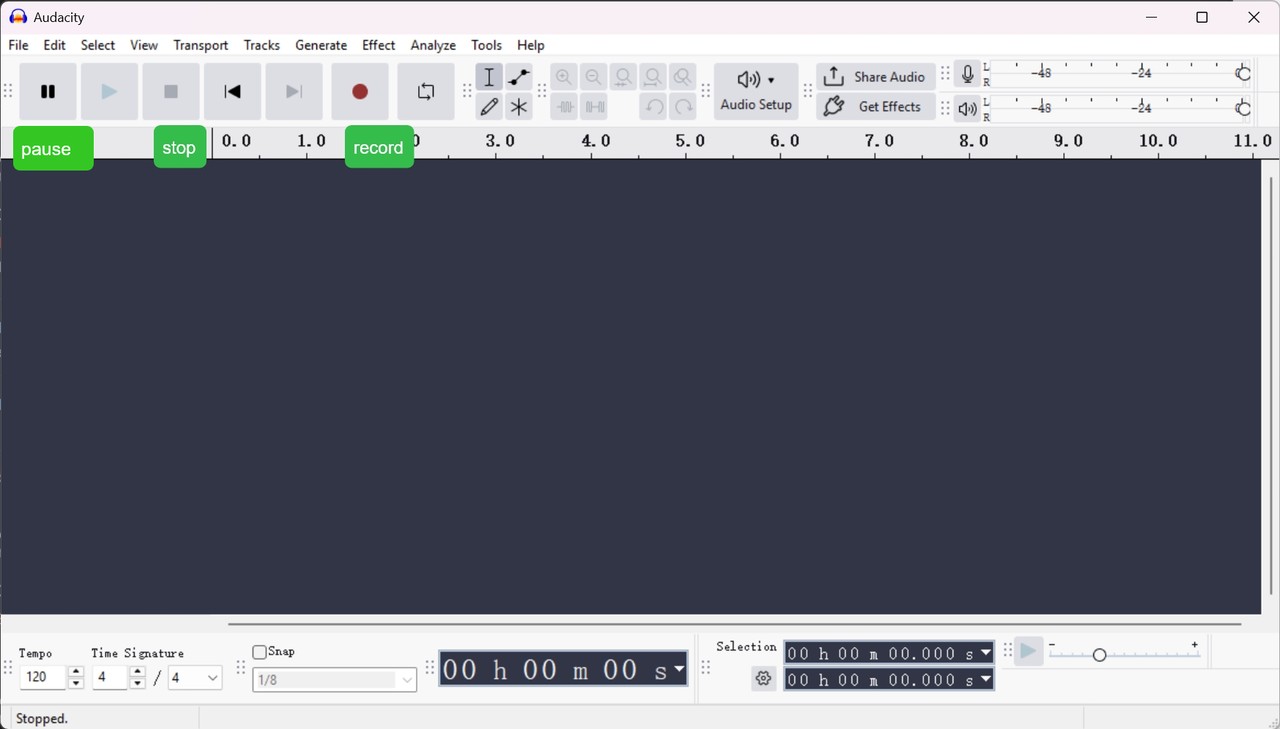
Step 1. Open Audacity, set Host to Windows WASAPI, then set the Recording Device to the (loopback) option for your speakers or headphones. This lets Audacity capture what your computer is playing.
Step 2. Switch to your browser or the Audible app and start playing the audiobook you want to record. If Audacity's meters are moving, it's hearing the sound. Then, click Record to start, and Stop when you're done.
Step 3. Go to File > Export, choose the output format you prefer (MP3/WAV/M4A), and save it locally. You'll now have a recorded copy of the audiobook without DRM.
Comparison of the 4 Best Audible DRM Removal Methods
Not every Audible DRM removal method works the same way. Some are built for fast desktop conversion, some focus on free open-source library backup, and others are better as online or recording-based fallback options. The table below compares the four methods by OS, .aax requirement, output format, speed, audio quality, and best use case.
| Tool | OS | Beginner-friendly | Requires .aax File | Output Format | Speed | Audio Quality | Best Suited For |
| BookFab Audible Converter | Windows/macOS | Yes | No | M4A, MP3, FLAC, WAV, OPUS | Supports batch conversion; High-speed conversion | lossless or high-bitrate conversion | Users who want the easiest, all-in-one download + Audible DRM removal solution. |
| Libation | Windows/macOS/Linux | No | No | M4B, MP3 | Supports batch conversion | Selectable high quality or low quality | Mac users seeking to remove Audible DRM. |
| Kamsker Audible Tools | Online Tool | Yes | Yes | M4B / MP3 | Speed depends on network condition | Lower | Users who prefer an online tool. |
| Audacity (Backup Recording Method) | Windows/macOS/Linux | Yes | No | MP3 / M4A / WAV, etc. | Real-time recording | Lower | Use as a last resort when other methods are unavailable. |
Of course, these four methods are not the only ways to remove Audible DRM. If you want to compare more free and premium tools, check out our 2026 best free Audible converter round-up, where I also explain how to convert AAX to MP3 for easier playback and library management.
FAQ
Is removing Audible DRM illegal?
Can I remove Audible DRM directly on Android or iOS?
The better workflow is to remove Audible DRM on a Windows or Mac computer first, then transfer the converted audiobook files to your Android phone, iPhone, MP3 player, or other device for personal listening.
How do I turn off DRM restrictions?
Conclusion
Audible DRM removal is a technical step, but it pays off. Whether you go for a one-click desktop route like BookFab Audible Converter, the lightweight Kamsker web tool, or the old-school Audacity recording fallback, you end up in control. You can back them up, play them across devices, and keep your library tidy without hoops. But remember, any DRM stripping must be for lawful use only.

 How to Download Audible Books to PC and Phone: A Complete TutorialBy Amber Collins - May 19, 2026
 How to Listen to Audible on Mac: 4 Practical MethodsBy Amber Collins - May 11, 2026
 Convert AAX to MP3: 9 Best Free Audible Converters in 2026 (Tested)By Amber Collins - Apr 16, 2026
 How to Download Audible to Mac Easily: A Step-by-Step TutorialBy Amber Collins - Feb 24, 2026