
[Solved] How to Remove DRM from DMM Books?

Summary: To remove DMM DRM, you need a dedicated tool such as BookFab DMM Converter to convert your purchased DMM books into standard EPUB or PDF formats. This tutorial will walk you through the entire process, from accessing your library to exporting your final files for offline reading.
Table of Contents
"Does anyone know how to remove DMM DRM?" — A Reddit user asked.
DMM Books (book.dmm.com) is a leading Japanese digital bookstore offering a vast library of manga and light novels, serving as a go-to destination for many international fans of Japanese subculture. However, content purchased on the platform is primarily intended for use within its official ecosystem and proprietary reader, making it impossible to import books directly into third-party e-readers like Kindle or Kobo, or to perform local backups. To address these limitations, this article will demonstrate how to remove DMM DRM and convert DMM book files into universal formats like EPUB and PDF.
- Online-only viewing
- Official app lock-in
- Fragmented, inaccessible cache
- No export to EPUB options
- Full device compatibility
- Permanent offline backups
- Centralized library management
- Customized reading layouts
- Unrestricted offline access
DMM DRM Removal Tool: BookFab DMM Converter
BookFab DMM Converter is a tool for downloading and saving DMM Books content. It allows you to convert purchased DMM books, including manga, novels, photobooks and magazines, directly into PDF or EPUB files, bypassing the reading restrictions of the official DMM app. The software automatically organizes image files and preserves metadata, making it easy to create local backups for offline reading on any device.
⭐Key features of this DMM DeDRM Tool:
- DMM Books Downloading: Save purchased manga, novels, photobooks, and magazines directly to your local storage.
- Standard Format Export: Convert proprietary DMM formats (such as .dmmr) into PDF or EPUB files.
- Remove DMM DRM: Automatically removes protection during the conversion process to ensure files are compatible with any reader.
- Integrated Browser: Log in and browse your DMM library via the built-in browser for automatic content recognition and one-click parsing.
- Automatic Metadata: Automatically fetches and embeds covers, titles, and author information to keep your local library organized.
- Task Manager: Allow to manage multiple downloads through Download Manager that tracks task status (pending, downloading, or completed).
How to Remove DMM DRM and Convert DMM Books to EPUB/PDF
Follow these steps to download and convert your purchased DMM books using BookFab DMM Converter.
Step 1: Download and Install BookFab
Before starting the DMM DRM removal process, you will need to download and install BookFab. The software is available for free download and offers a trial that allows you to convert up to three DMM books for free.
Step 2: Access Your DMM Library
Launch BookFab and select the DMM Converter module from the main interface. Use the integrated browser to log in to your official DMM account. This secure environment allows the software to safely access your purchased digital library.
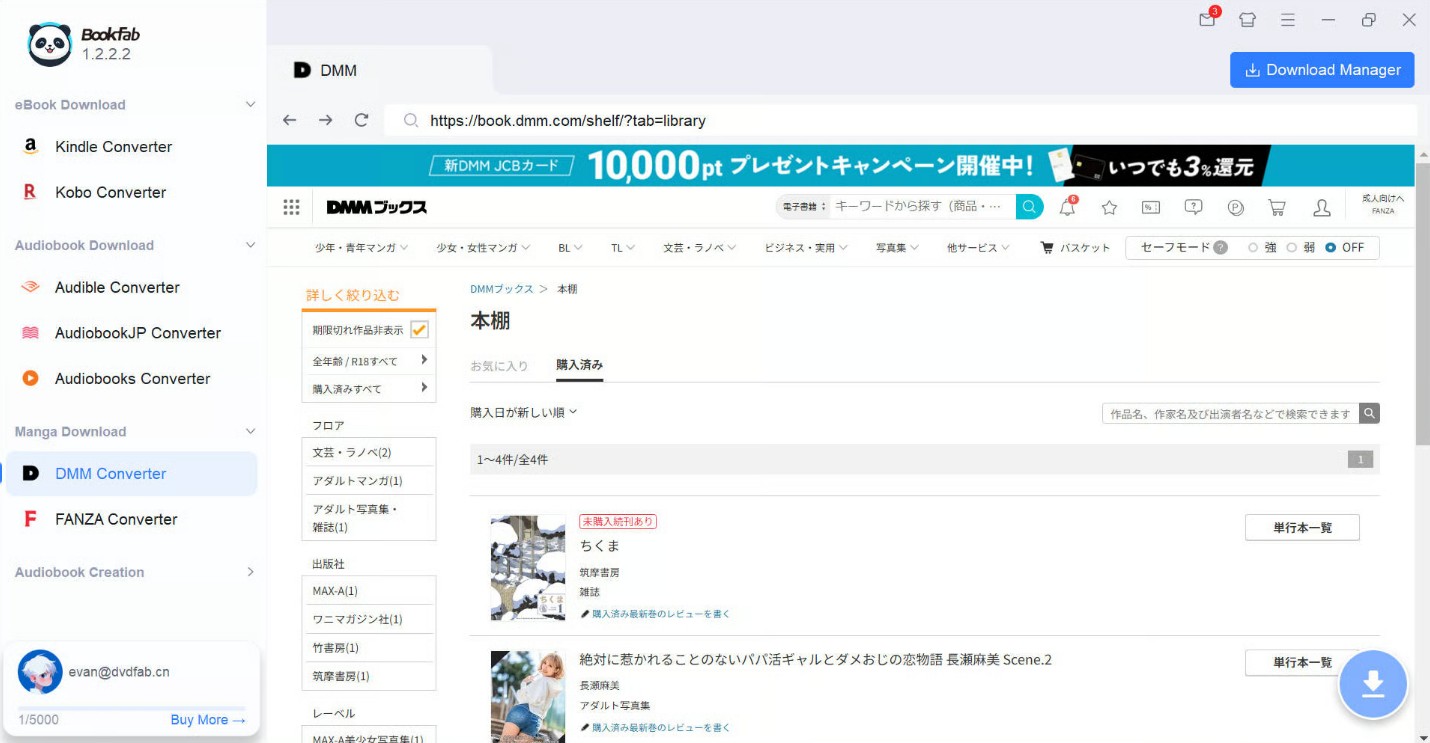
Step 3: Parse DMM Book and Select Output Format
Navigate to your "My Books" section and click on the specific title you wish to convert. Once you stay on the book's detail page for a moment, BookFab DMM Converter will automatically analyze the content metadata and cloud-source the decryption keys.
A download window will appear. Here, you can choose your preferred output format:
- EPUB: Best for light novels or if you prefer reflowable text on mobile devices.
- PDF: Recommended for manga or magazines to preserve the original fixed-layout and high-quality imagery.
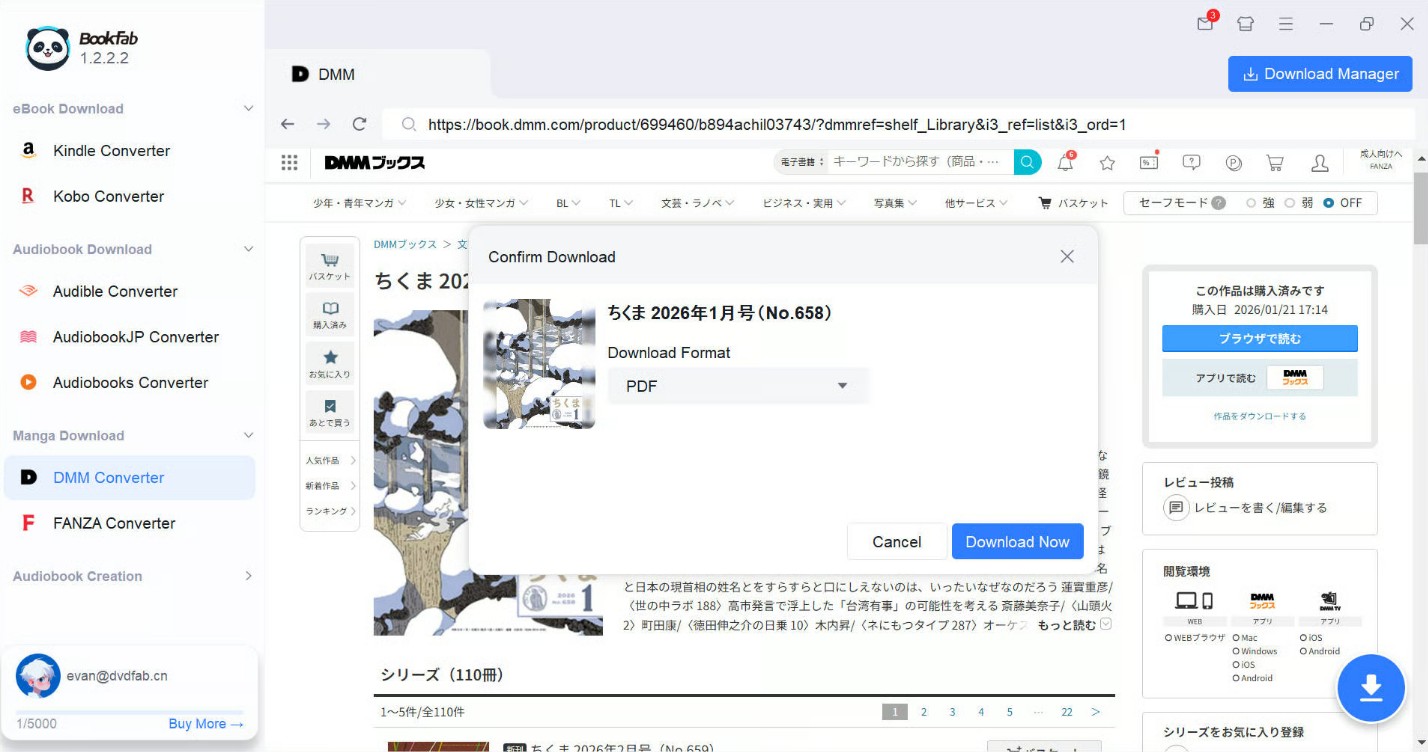
Step 4: Remove DMM DRM and Download DMM Books
After clicking "Download Now," the software begins the simultaneous process of removing the DRM and reassembling the image fragments into a single file.
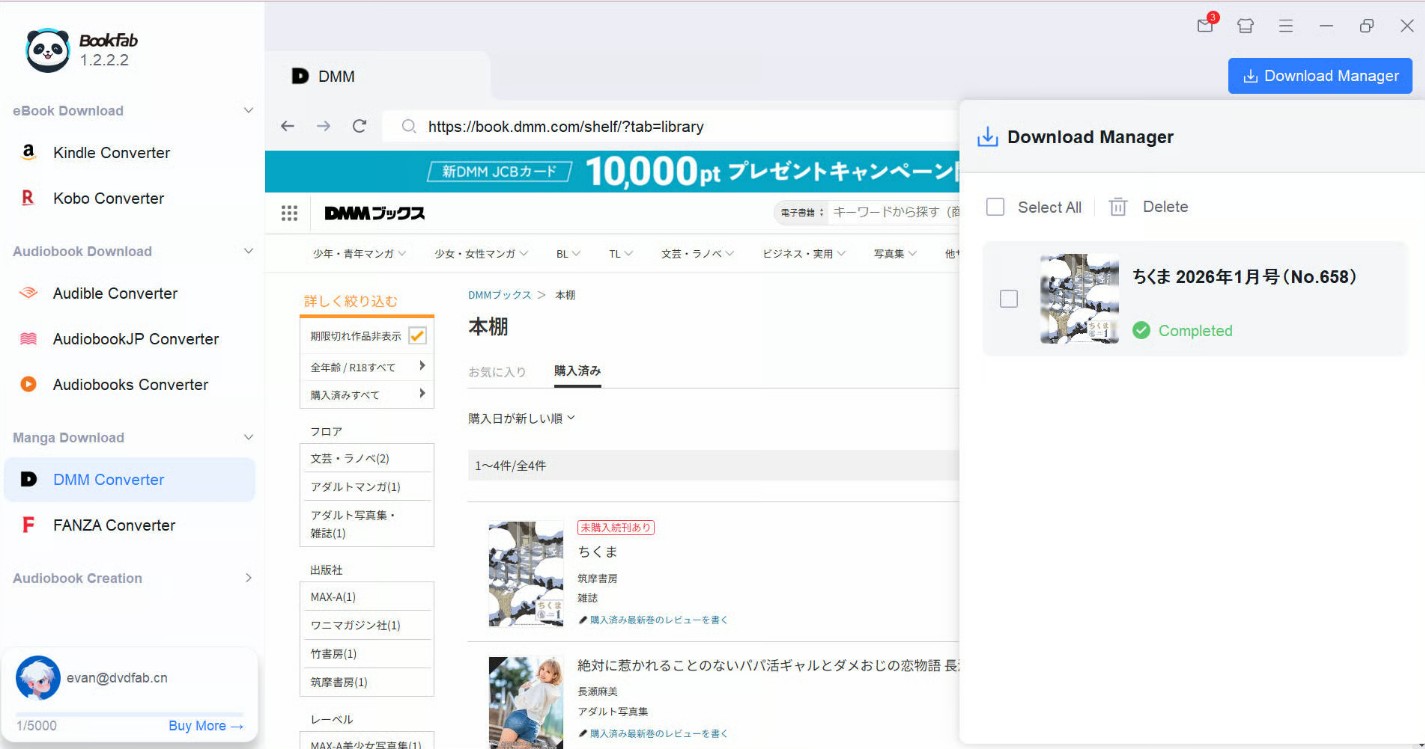
You can track the real-time progress of multiple titles in the "Download Manager" tab. Once the status changes to "Completed," you can click the folder icon to open the local directory. Your DMM books are now DRM-free.
FAQ
Can Calibre be used to remove DRM from DMM books?
No. While Calibre is an excellent library management tool, it does not natively support DMM DRM removal. Even with third-party plugins like DeDRM, Calibre is primarily designed to handle Kindle or Adobe Digital Editions encryption. It cannot decrypt DMM's proprietary formats (such as .dmmr), which require a specialized tool like BookFab DMM Converter to handle the initial decryption and format conversion.
Conclusion
While many have searched for a reliable way to handle DMM DRM without success, it is no longer a challenge. With BookFab DMM Converter, you can directly download your purchased DMM manga and books to your local storage in universal EPUB or PDF formats. This allows you to bypass platform restrictions and enjoy your favorite titles on any device with total offline freedom.
Disclaimer: This guide is for informational purposes and personal, non-commercial use only. We do not condone piracy. Use these methods solely for content you have legally purchased and ensure compliance with your local laws and platform terms of service.