
What Is FANZA? How to Download FANZA Manga & eBooks [2026]

Summary: To download FANZA manga and eBooks in US, start by using a VPN to access a Japanese IP address to get past FANZA region locks. Once connected, use BookFab FANZA Converter to convert your library into PDF and EPUB files, allowing you to back up your collection and read freely on any device.
FANZA is often seen as the "holy grail" for high-quality Japanese adult content. However, its strict DRM is a headache for overseas fans. Most users head straight for the official Fanza Reader app, only to realize its offline download is a bit of a mirage, locking you out when you're away from a Japanese IP.
Don't worry. In this guide, I'll explain what FANZA is, how to access it from outside Japan, and walk you through the best way to download FANZA manga as PDF or EPUB files that live on your hard drive, not just in a locked app.
What Is FANZA?
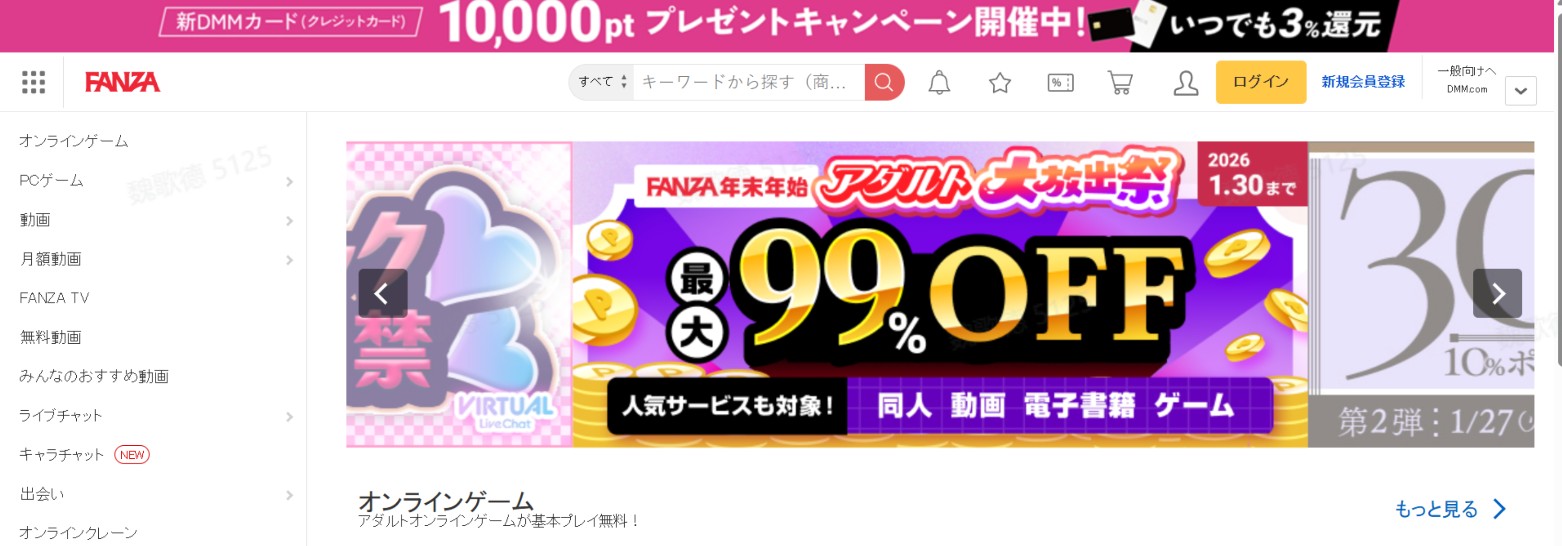
FANZA (formerly DMM.R18) is Japan's largest and most popular digital marketplace for adult-oriented entertainment, including videos, manga, eBooks, high-resolution photo books, and games. It is a subsidiary of the tech giant DMM and serves as the primary hub for both mainstream and niche adult content that is often exclusive to the Japanese market. Whether you are looking for specific Doujinshi, Hentai manga, or adult films, the FANZA official website is the ultimate destination. The table below outlines the types of content available on FANZA.
| Category | Details |
| Videos | Adult video content across formats such as live-action, animation, and VR, including subscription-style channels. |
| eBooks | Digital reading content such as manga, photo books/gravure, and magazines, including subscription-style "all-you-can-read" options. |
| Games | Adult-oriented games across web/PC/mobile, typically organized by genres (RPG, simulation, romance, etc.). |
| Live Chat | Interactive live chat/streaming services. |
| News | Official hub for promotions, updates, and announcements. |
| Others | Additional services beyond the core categories, such as online lottery/kuji, online crane games, AI character chat, and shopping/merch. |
FANZA Region Lock
The main challenge for international users is the Region Lock. FANZA uses an IP-based filtering system to control access to its library. This means:
- Browsing Restrictions: If your IP address is not from Japan, many product pages will simply show an error message or a "not available" notification.
- Unstable Access: Even after purchasing a book, the platform may verify your location when you try to open the web reader or sync your account.
- App Dependencies: To view content offline, the platform requires you to use the DMM/FANZA Reader app, which often needs a Japanese network connection to verify licenses.
How to Access Fanza Out of Japan?
Because of the region lock, you need a reliable VPN with Japanese servers to browse the site and make purchases. For stability and security, it's best to use a paid VPN service. If you still see the region block after using a VPN, you can try clearing your browser cookies or using a dedicated IP solution, since FANZA strictly blocks known data center IPs.
How to Download FANZA Manga & eBooks
While the official app offers a "download" button, it is far from a permanent solution because FANZA titles are heavily DRM-protected. Instead of standard EPUBs, downloads are saved as proprietary .dmmr files that are impossible to back up or view on other devices. Furthermore, the platform enforces strict IP restrictions; even for "offline" content, the app requires periodic license verification that will block access to your purchased books if you are outside Japan without an active VPN.
If you are tired of being restricted by official reading platforms, I recommend using BookFab FANZA Converter, which allows you to save your FANZA content as EPUB or PDF files, giving you total control over your library. BookFab FANZA Converter downloads FANZA manga, novels, and photo albums in PDF and EPUB formats. These are DRM-free files, meaning you can view them on any reading app or device—or even print them for your personal collection. The workflow is straightforward: log in to your DMM account using the built-in browser within BookFab FANZA Converter to start downloading.
Below is a step-by-step tutorial on how to download FANZA manga and books with this FANZA downloader.
Important! Users in US must use a VPN to connect to a Japanese server; otherwise, the official FANZA website will be inaccessible. If you're hitting a wall with your credit card while purchasing books, try using Amazon Pay or buying DMM Points via prepaid cards.
Step 1. Launch BookFab FANZA Converter
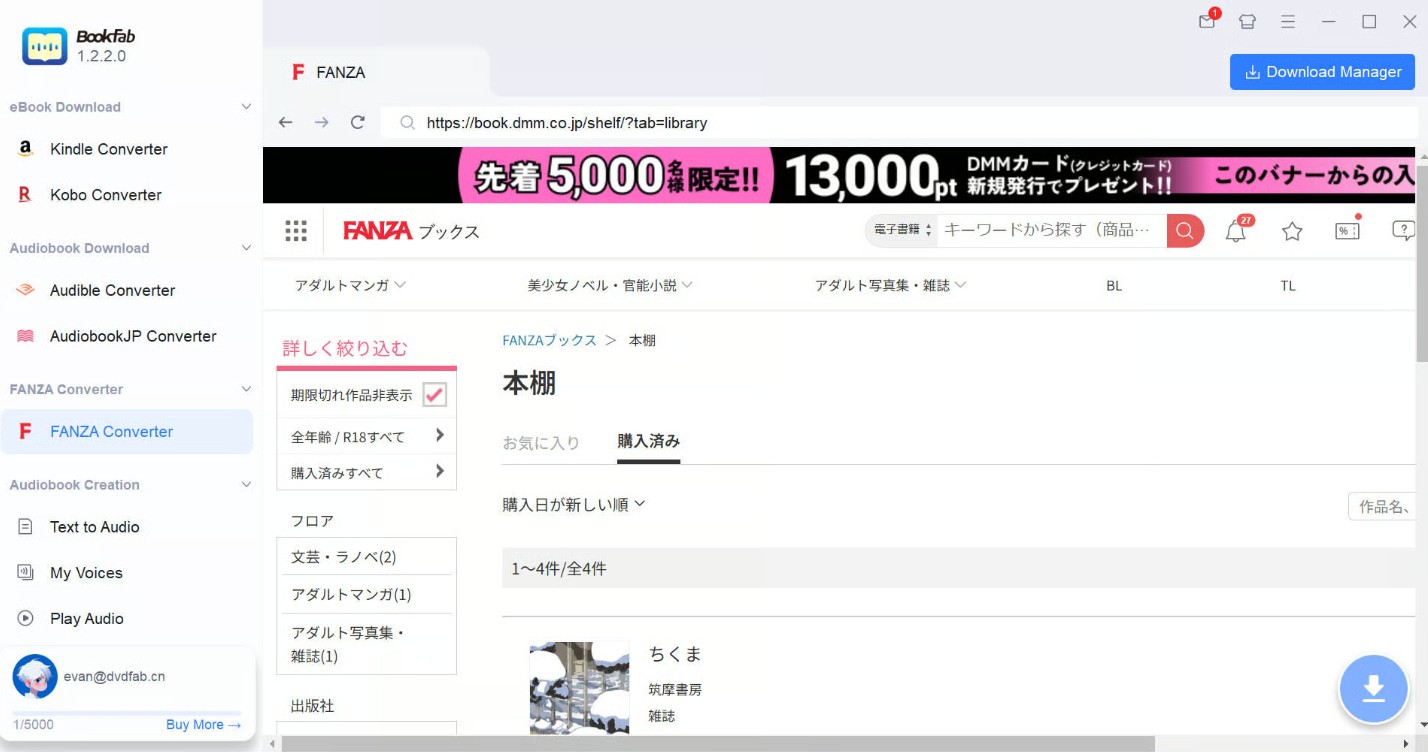
Launch the BookFab application and locate the FANZA Converter module from the left sidebar. Select the FANZA icon to launch the dedicated internal browser. You will be prompted to confirm you are 18+ before proceeding.
Step 2. Authenticate Your Account
Log in to your official FANZA/DMM account within the secure built-in browser. This allows the software to safely access your purchased library. Once logged in, navigate to the Purchased Books (購入済み商品) section to view your titles.
Step 3. Choose Your Title
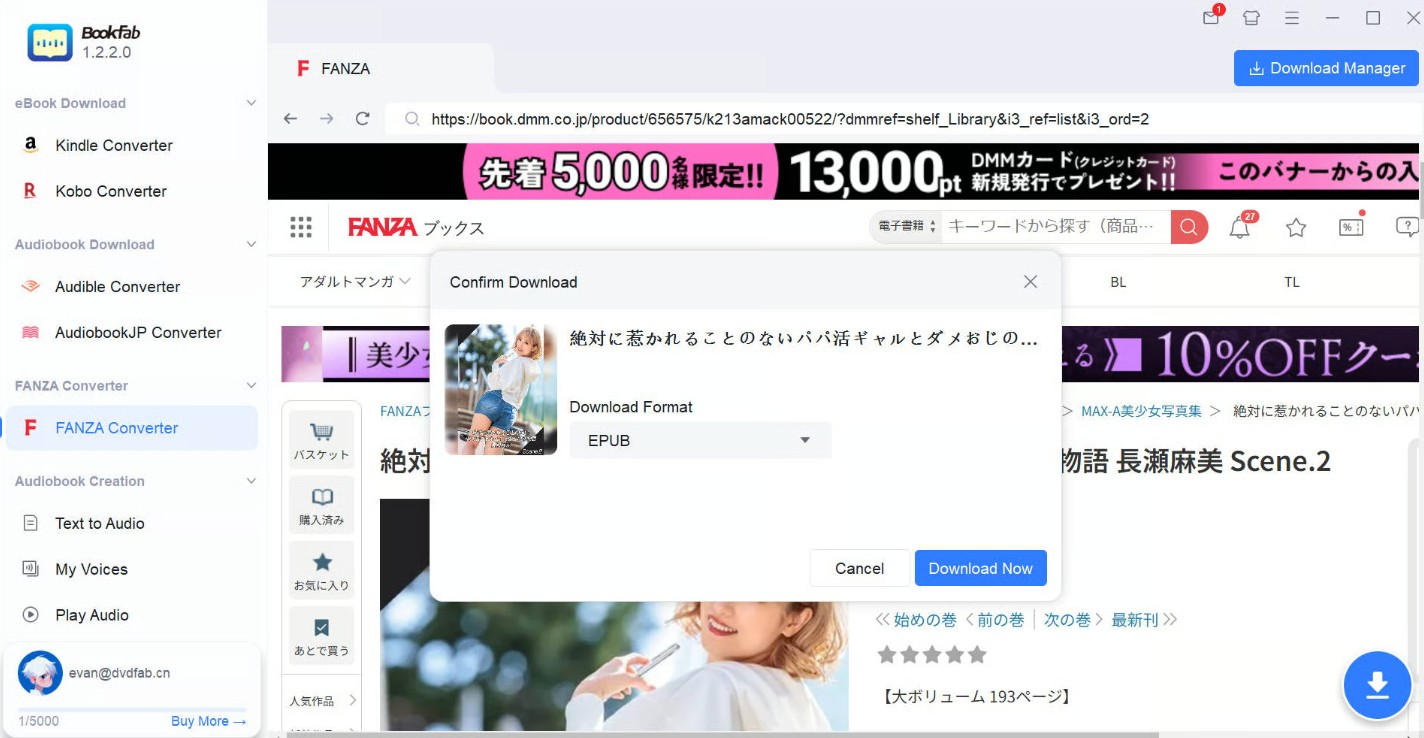
Click on the manga, light novel, or photo album you wish to save. As soon as you open the reader page, BookFab FANZA downloader will automatically scan the data. A pop-up window will appear, asking you to configure your output preferences.
Step 4. Customize Output Settings
In the download prompt, select your preferred format. Choose PDF for a fixed-page layout (best for manga and photobooks) or EPUB for reflowable text (best for novels). You can also select specific volumes if you are downloading a series. Once ready, click Download Now.
Step 5. Monitor and Manage Tasks
Head to the Download Manager tab to track your progress in real-time. You can queue multiple books simultaneously or pause tasks if needed. Once finished, click the folder icon to locate your DRM-free files, ready to be moved to any device.
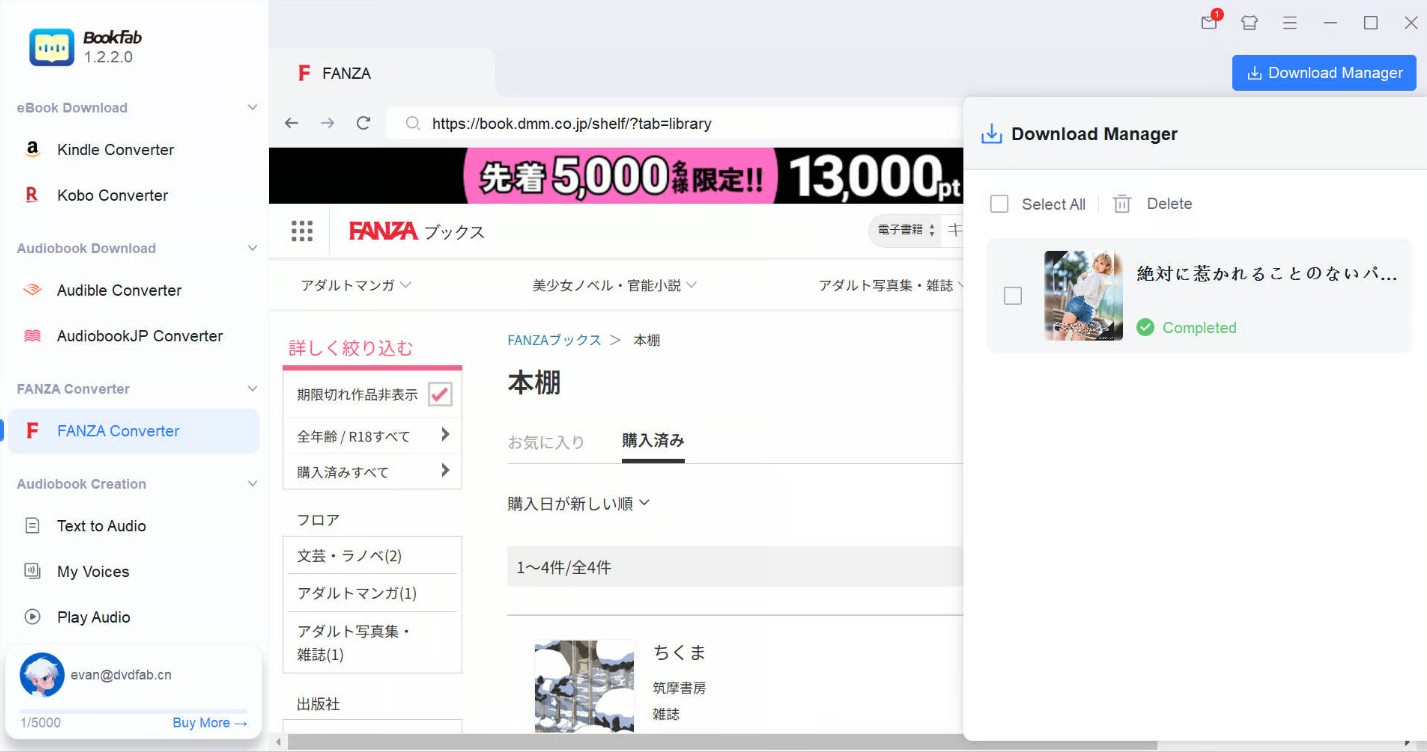
This FANZA manga downloader ensures you can manage your library independently, allowing for permanent backups and reading across all your favorite e-readers and reading apps.
FAQs about FANZA Download
Is FANZA legit and safe?
Yes, FANZA is completely legitimate. It is a major branch of DMM, which is one of Japan's largest and most reputable internet conglomerates (similar in scale to companies like Rakuten). The site is safe to use, and your payment information is handled by a massive, regulated corporation. The main issue for international users isn't safety—it's the geographic restrictions.
Is FANZA free to use?
The platform follows a standard store model. While it is free to create an account and browse, the vast majority of manga and eBooks must be purchased. However, FANZA does offer a "Free" (無料) section where you can find full volumes of manga or long previews, usually for a limited time to promote new releases.
How to buy on FANZA in the US?
When purchasing content on FANZA, you may find that foreign credit cards are often rejected due to regional restrictions. You can typically bypass this issue by using a VPN or to buy DMM Points via PayPal or Japanese gift cards. Here is the detailed guide:
- If you are located outside Japan, use a VPN to connect to a Japanese server.
- Find your manga or ebook and click "Add to Cart" (カゴに入れる).
- At checkout, select your payment method (PayPal or Japanese gift cards are recommended).
- Confirm the purchase. The title will now appear in your "Purchased" library.
Can I read FANZA manga on my Kindle or iPad?
You can read FANZA manga on iPad only with their official DMM Books app, but you can't read it on Kindle. However, if you use a tool like BookFab FANZA Converter to download the manga or eBooks as PDF or EPUB files, you can transfer those files to any device and app, including Kindles, Kobos, tablets, and standard PDF readers.
Conclusion
Downloading from FANZA seems hard due to region locks and DRM, but using a professional tool like BookFab FANZA Converter gives you full control over your library. While official apps limit your access to a "cloud cage," BookFab allows you to convert purchases into permanent, local PDF or EPUB files. It is the best way to ensure your favorite manga stays in your collection forever.
Disclaimer: The information provided here is for educational purposes only. All content on FANZA is protected by copyright laws. Please ensure that downloading manga and eBooks is strictly for personal backup purposes and avoid any actions that may infringe upon the copyrights of others.