Export FANZA Library for Total Reading Freedom
Full Ownership
Download FANZA Titles for Offline Reading
BookFab FANZA Converter downloads purchased FANZA manga, light novels, and photobooks for personal backup and offline reading. It syncs with your FANZA account and supports both individual and batch downloads. This downloader moves your entire FANZA library to local storage, giving you permanent ownership and reading freedom.

Streamlined Workflow
Access FANZA Library with Built-in Official Browser
This FANZA downloader features a built‑in browser with direct access to the official FANZA site. You can log in securely within the built-in browser and open a title's details page to activate the download button. This integrated approach ensures a safe, simple, and intuitive workflow.

Universal Compatibility
Convert FANZA Manga and eBooks to EPUB or PDF
FANZA titles typically use the proprietary and restrictive .dmmb format. This FANZA downloader converts these protected files into standard EPUB and PDF formats without any quality loss. PDF and EPUB formats offer both adaptability and fidelity for any platform or content type. You can then enjoy your FANZA manga and eBooks on various apps and devices.

Manage FANZA Downloads Without Any Hassle
What Our Users Say About FANZA Converter
Y
Yuto Matsumoto
TranslatorI translate FANZA doujinshi manga and share it with the community for fun. This manga downloader makes it super easy to export what I've bought in great quality. It saves me tons of time every week.
N
Nana Kobayashi
Manga ArtistI often study panel layout and framing from digital manga. Being able to download FANZA manga and store my references offline makes a huge difference. BookFab is now part of my creative workflow.
L
Leonard Grant
IT Support EngineerThe FANZA downloader works as advertised. I just log in, download my novels, and read offline on my preferred reader. Reliable software that respects your time and your content.
R
Riku Taniguchi
FANZA User Since 2019BookFab recognized my full library instantly—over 200 titles. Batch download worked without hiccups. It's rare to find software this smooth, especially for such a specific use case.
S
Sophie Lambert
Visual DesignerBookFab makes it easy to convert and organize everything from FANZA. The output PDF and EPUB files let me control formatting and manage layout the way I like across all my devices.
M
Michael Reyes
PhotographerI mainly use this FANZA downloader to save photobooks I've purchased. The image quality is preserved, and filenames stay clean. It's the only tool I trust when it comes to handling paid downloads properly.
Y
Yuto Matsumoto
TranslatorI translate FANZA doujinshi manga and share it with the community for fun. This manga downloader makes it super easy to export what I've bought in great quality. It saves me tons of time every week.
N
Nana Kobayashi
Manga ArtistI often study panel layout and framing from digital manga. Being able to download FANZA manga and store my references offline makes a huge difference. BookFab is now part of my creative workflow.
L
Leonard Grant
IT Support EngineerThe FANZA downloader works as advertised. I just log in, download my novels, and read offline on my preferred reader. Reliable software that respects your time and your content.
R
Riku Taniguchi
FANZA User Since 2019BookFab recognized my full library instantly—over 200 titles. Batch download worked without hiccups. It's rare to find software this smooth, especially for such a specific use case.
S
Sophie Lambert
Visual DesignerBookFab makes it easy to convert and organize everything from FANZA. The output PDF and EPUB files let me control formatting and manage layout the way I like across all my devices.
M
Michael Reyes
PhotographerI mainly use this FANZA downloader to save photobooks I've purchased. The image quality is preserved, and filenames stay clean. It's the only tool I trust when it comes to handling paid downloads properly.

Step 1. Launch BookFab and Sign In
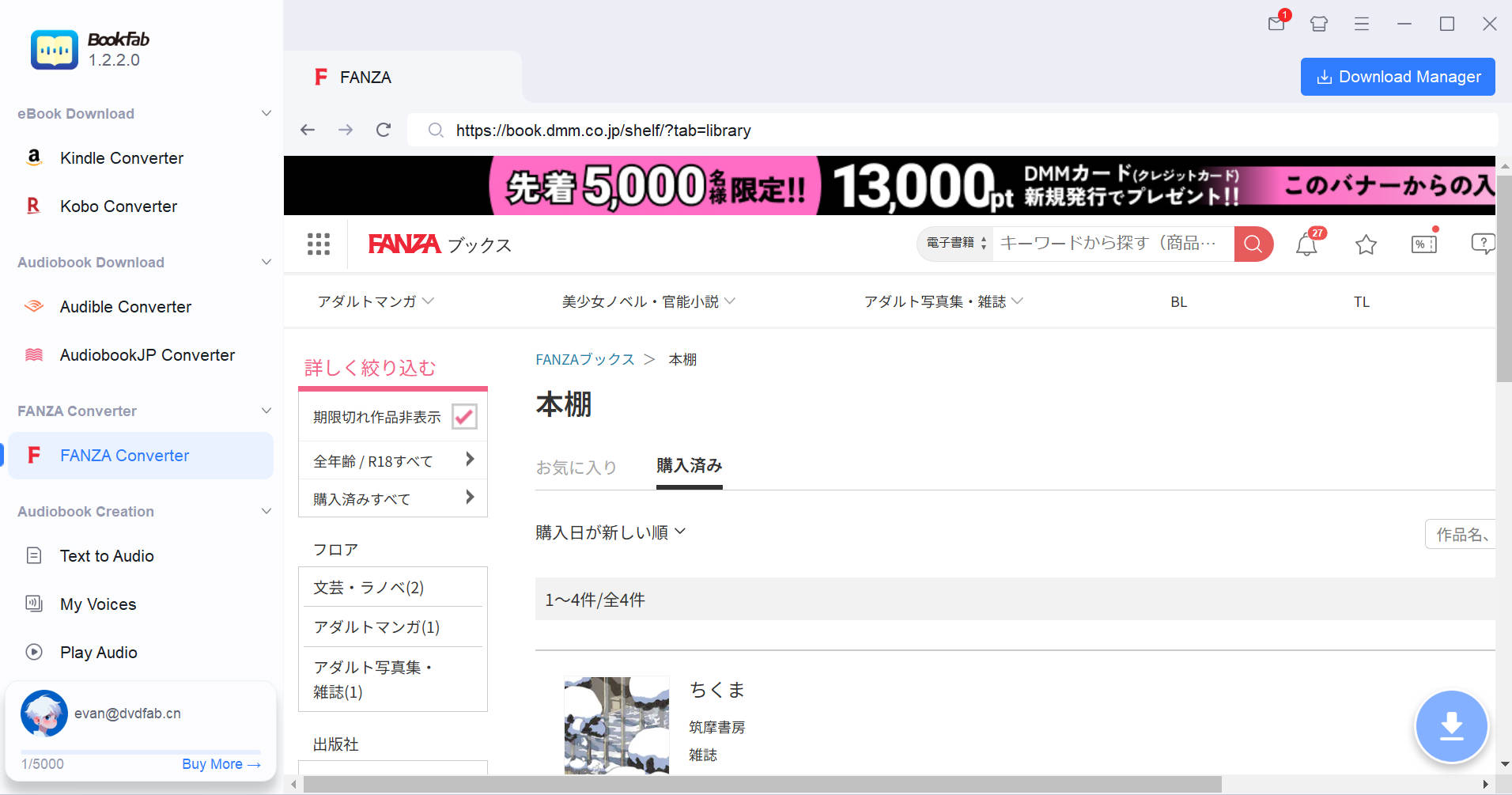
Open BookFab and select FANZA Converter from the sidebar. You'll be prompted to verify that you're over 18. Once confirmed, log in securely with your FANZA account to access your purchased titles.
Step 2. Choose a Title and Start Download
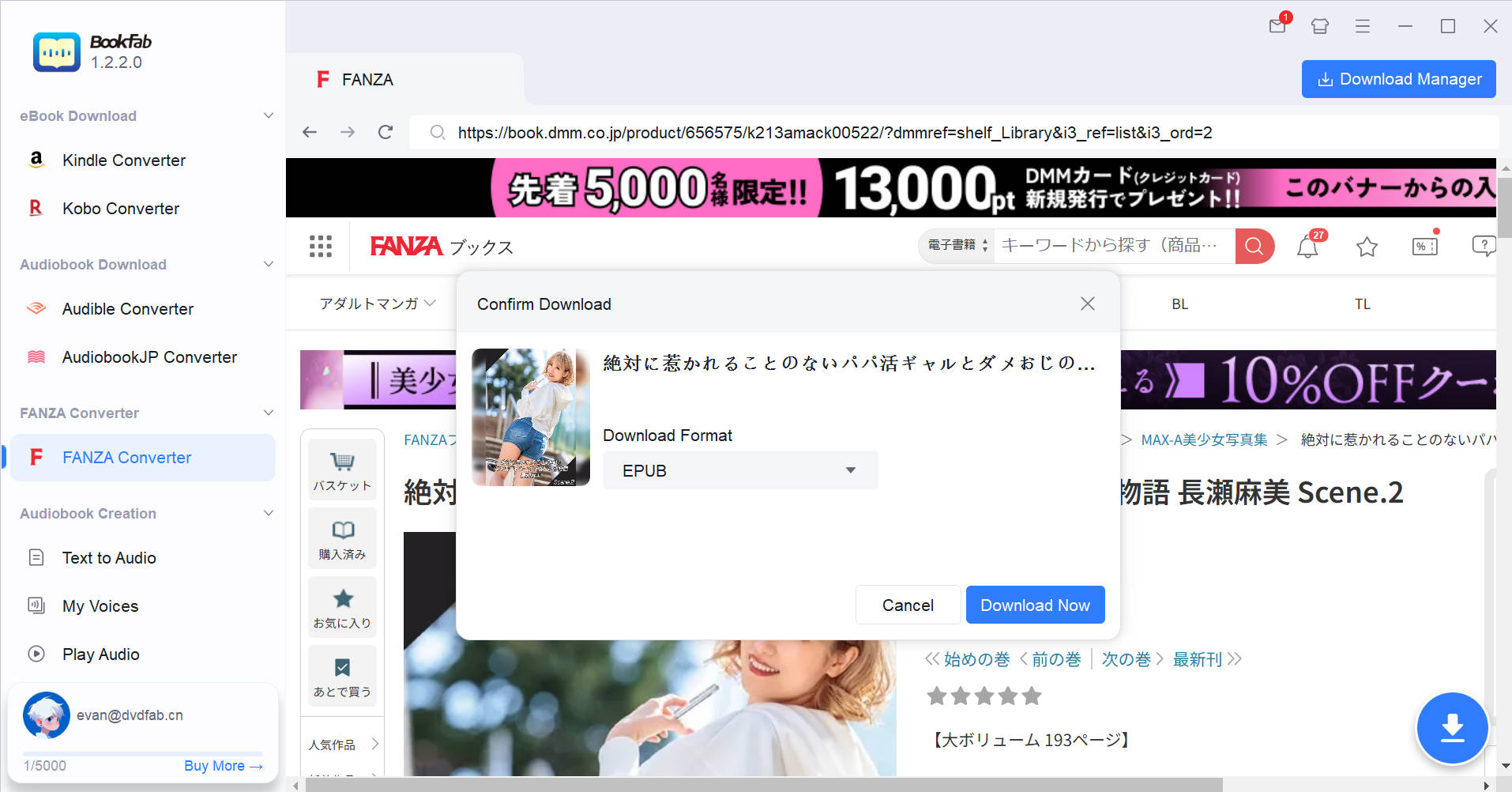
Browse your purchased content in the built-in browser. When you open a purchased manga, light novel, or photobook, BookFab detects it and activates the Download button. Choose PDF or EPUB, then click "Download Now" to add it to your download queue.
Step 3. Manage Your Downloads
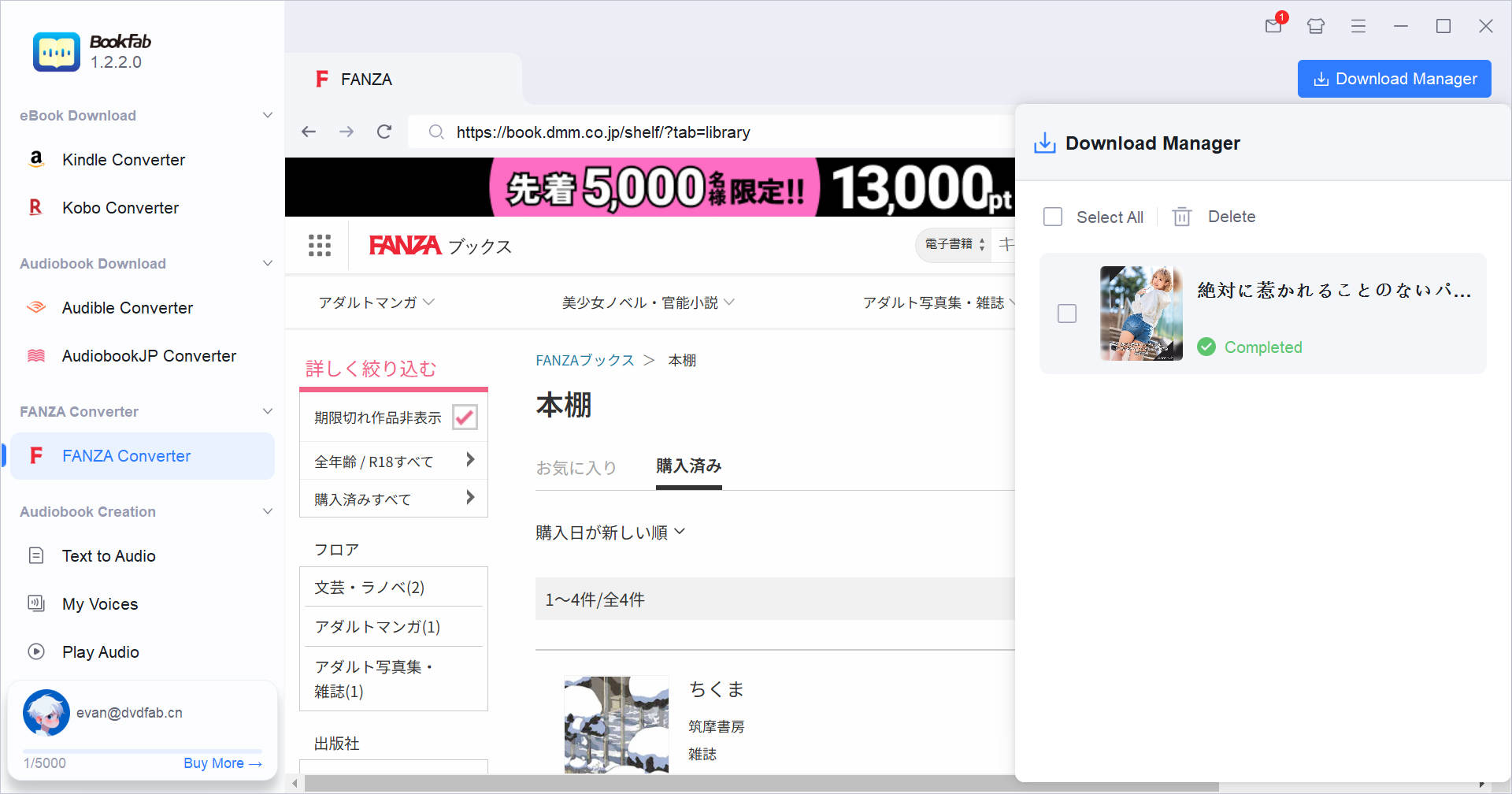
As files are downloading, you're free to continue browsing and add more tasks. The Download Manager tracks progress in real time, showing active, completed, and queued downloads. From the panel, you can pause or cancel tasks, or open completed files.
System Requirements

Windows 11/10 (32/64 bits)
4GB of RAM or above
40GB of free hard disk space or above
Live Internet connection required
Frequently Asked Questions
- Is it legal to remove DRM from my FANZA manga?
- What types of content are supported?
- Can I download FANZA manga that I haven't purchased?
- What devices and apps can I use to read FANZA manga?
- Will BookFab FANZA Converter affect the quality or structure of my manga?
- Is there a free trial available before I purchase the software?