Win
Mac
BookFab DMM Converter
Convert DMM manga and eBooks to high-quality PDF or EPUB files for flexible reading on any device or app.
Last Update: Jul 10, 2026
100% Safe & Clean
4.8(33)

Take Full Ownership of Your DMM Library
Permanent Backup
Download DMM Books and Manga for Offline Reading
BookFab DMM Converter lets you save purchased DMM manga, novels, and magazines straight to your local drive. Instead of being limited to the DMM app, you can access your library anytime without an internet connection. It creates a permanent backup under your control, helping you securely preserve your purchased content.
Plugin‑Free Setup
Browse Your DMM Library in Integrated Browser
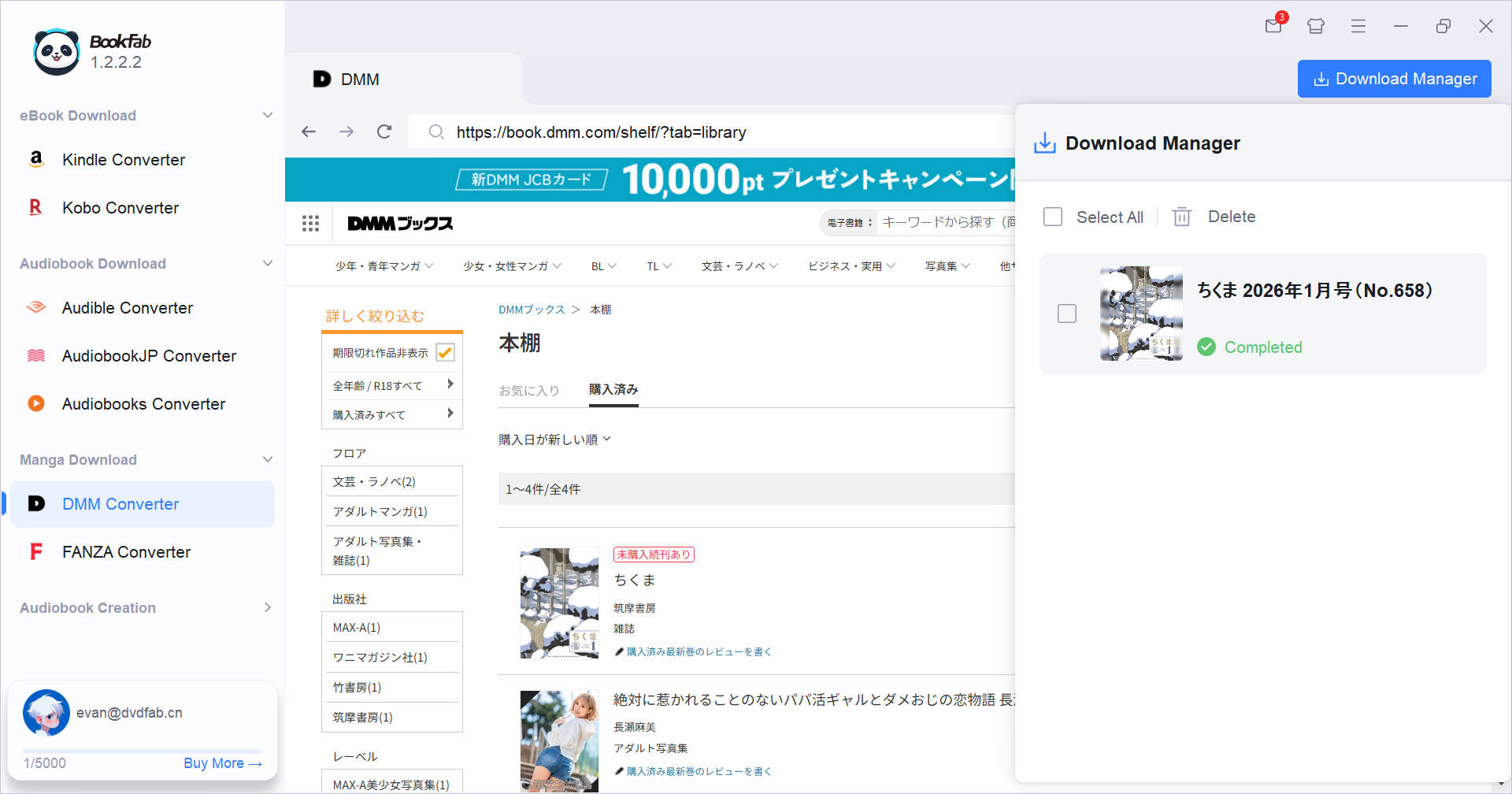
The built-in browser lets you log in to your DMM account and auto-detect your library—no extra plugins required. Simply open the detail page of a purchased DMM book, and the software instantly activates the download button. This streamlined process eliminates complex steps, allowing you to start downloading your favorite titles quickly and with minimal effort.

DRM-Free Output
Convert DMM Titles to PDF or EPUB without Quality Loss
BookFab DMM Converter transforms your purchased DMM titles into widely supported PDF or EPUB files. The converted files retain their original clarity, including detailed manga artwork. This gives you the freedom to read DMM books on your preferred device and in your favorite app without format limitations, allowing you to choose how and where you read.

Streamline Your Download and Organization Workflow
Metadata Integrity
Preserve Original Metadata and Covers Automatically
During conversion, BookFab DMM Converter saves important metadata like title, author, and high‑quality cover art and embeds it into the output file. The result is an organized, professional‑looking local library that displays correctly in local storage and eReader apps. It makes sorting, searching, and browsing large collections effortless.
Real-Time Control
Monitor and Organize your Download Tasks Easily
The integrated Download Manager provides real-time status updates for active, queued, and completed tasks. You can manage ongoing downloads or access the output folder directly from the panel. This organized workflow minimizes repetitive clicks and keeps bulk downloads smooth and productive.

What Users Say About BookFab DMM Converter

O
Olivia Bennett
Comic ArtistI have been using BookFab for my DMM collection and find it very reliable. I can make back-up copies of all my purchased DMM manga without issue.
J
James Whitaker
Publishing ManagerFlexible and high quality. I export PDF for manga and EPUB for novels. The conversion quality remains excellent regardless of the format.
N
Nakamura Rin
Character DesignerOverall, BookFab DMM Converter delivers exactly what it promises. If you want to download DMM books for long-term storage, this is a dependable tool.
S
Sophia Lin
Game DeveloperI use this to back up my DMM books. In my experience, it is one of the most intuitive tools for this purpose. The built-in browser is a huge win.
S
Satou Misaki
AnimatorI purchased the lifetime version so I will always have the most current version. My downloaded DMM magazines look clean and professional in my reading app. Great investment.
E
Ethan Brooks
Web DesignerIt does what it's supposed to do and it does it well! I've been backing up my DMM manga for months with NO problems. Solid conversion quality.
O
Olivia Bennett
Comic ArtistI have been using BookFab for my DMM collection and find it very reliable. I can make back-up copies of all my purchased DMM manga without issue.
J
James Whitaker
Publishing ManagerFlexible and high quality. I export PDF for manga and EPUB for novels. The conversion quality remains excellent regardless of the format.
N
Nakamura Rin
Character DesignerOverall, BookFab DMM Converter delivers exactly what it promises. If you want to download DMM books for long-term storage, this is a dependable tool.
S
Sophia Lin
Game DeveloperI use this to back up my DMM books. In my experience, it is one of the most intuitive tools for this purpose. The built-in browser is a huge win.
S
Satou Misaki
AnimatorI purchased the lifetime version so I will always have the most current version. My downloaded DMM magazines look clean and professional in my reading app. Great investment.
E
Ethan Brooks
Web DesignerIt does what it's supposed to do and it does it well! I've been backing up my DMM manga for months with NO problems. Solid conversion quality.
Step 1. Log In to Your DMM Account in BookFab
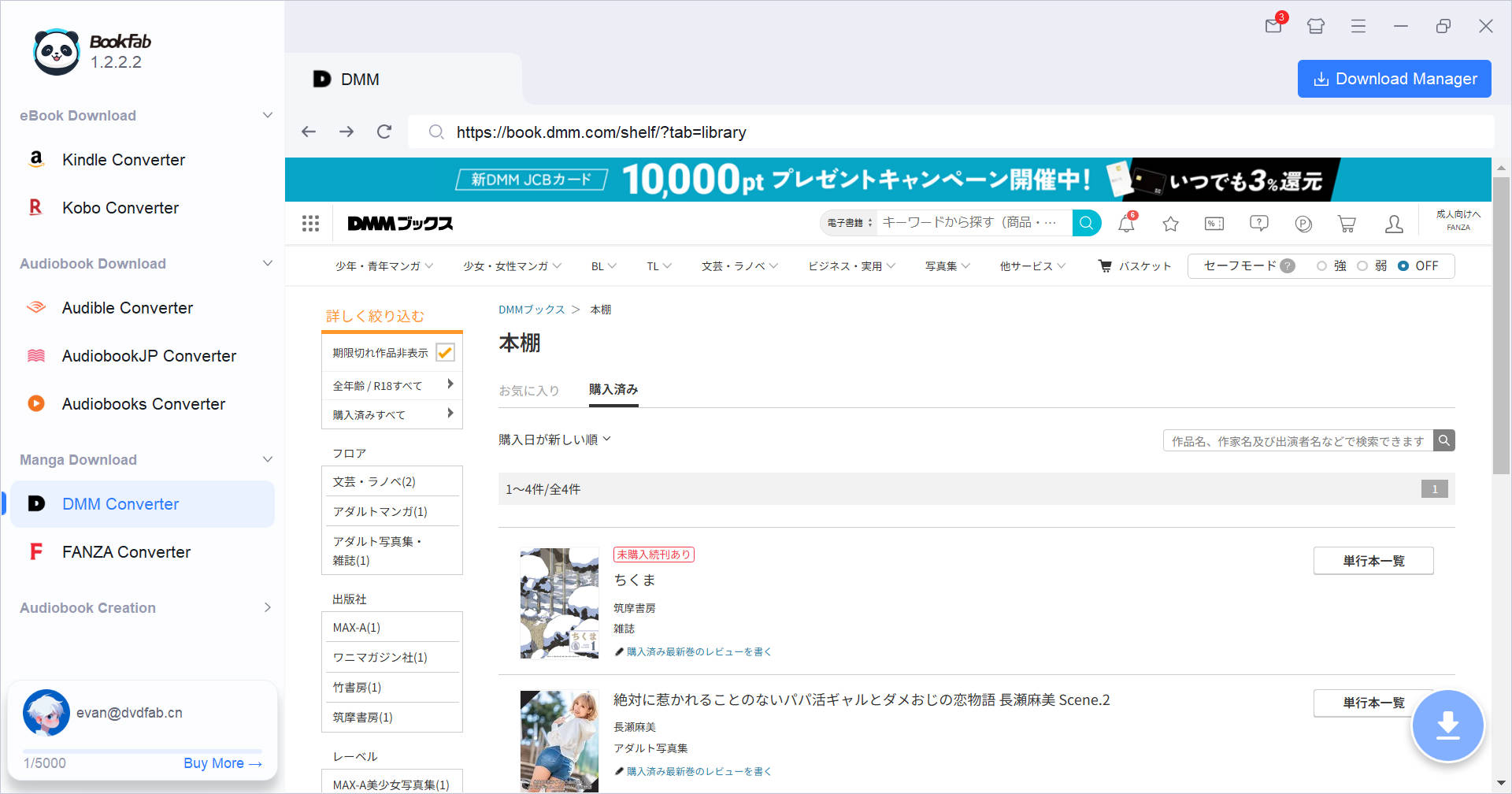
Launch BookFab and select DMM Converter. Log into your account via the built-in browser, then access your DMM library and open a book's detail page. Keep in mind that opening a FANZA book page will trigger a prompt to switch to the FANZA Converter for better compatibility.
Step 2. Choose Format and Start Download
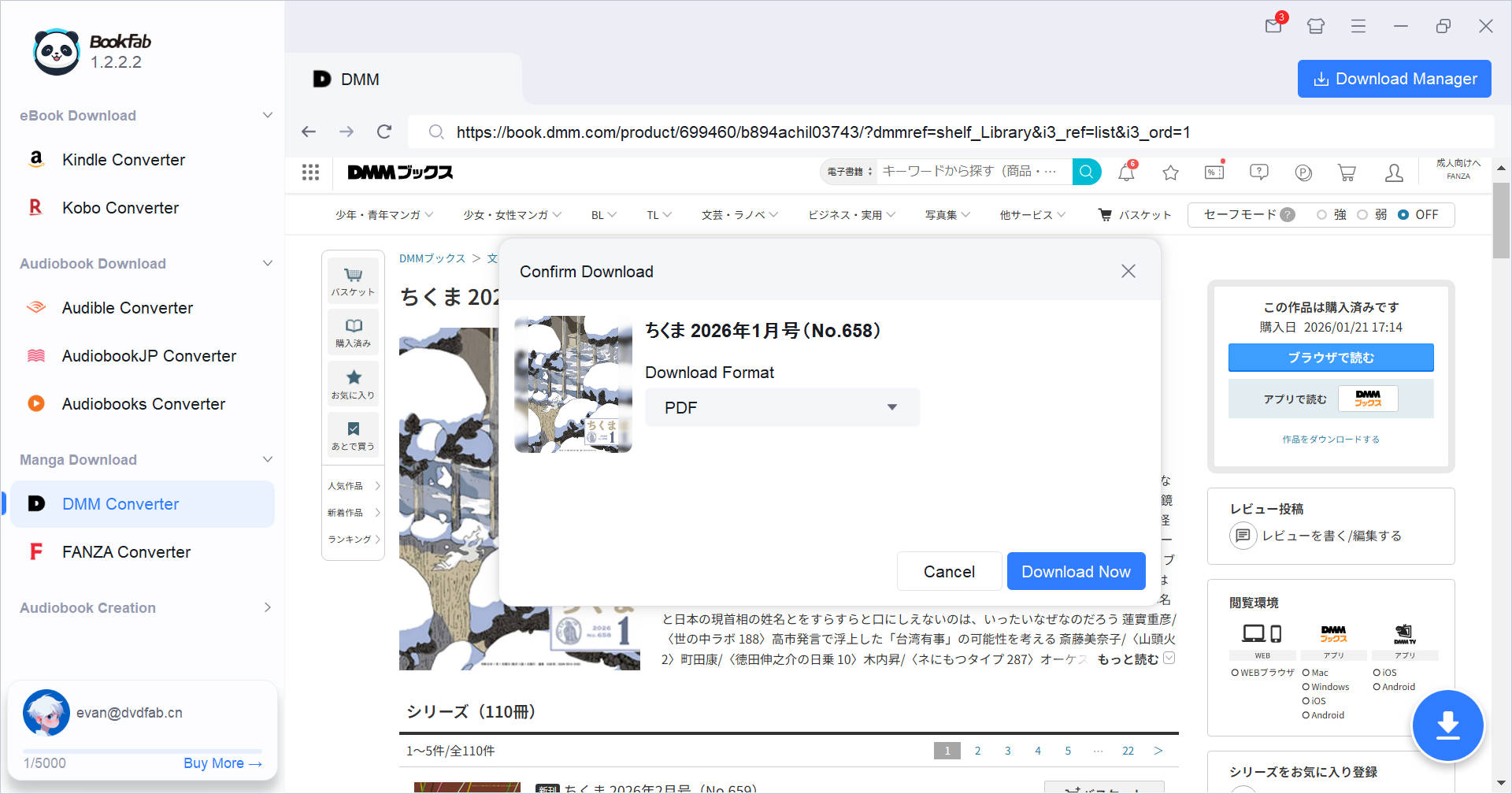
Once the detail page loads, BookFab automatically parses the book and activates the download button. Click it, select your preferred format, and hit "Download Now" to start.
Step 3. Monitor Downloading Tasks
Monitor your progress in real-time via the Download Manager panel. Once finished, you can open the output folder directly from the panel to access your converted files and enjoy your DMM books offline.
System Requirements

Windows 11 / 10 (64-bit)
Intel i3 or higher
4 GB RAM or higher
40GB of free hard disk space or above
Live Internet connection required
Frequently Asked Questions
- Does BookFab DMM Converter offer a free trial?
- Will the converted PDF or EPUB files lose quality?
- How do I batch download DMM books?
- Can I use the DMM Converter to download FANZA manga?
- On which devices can I read the downloaded DMM books?
- What should I do if the DMM book analysis fails?
Fair Use Policy : BookFab is legal only for personal needs and it's not allowed to share the downloaded content with any third party.
To avoid being blocked by content providers, a BookFab licensed account has a quota of 100 downloads per day from each supported content source. Whenever the quota is used up, it will refill at the start of the next day.