
How to Remove ebookjapan DRM and Convert .ebix to PDF, EPUB, or JPEG

Summary: Removing ebookjapan DRM usually requires converting proprietary .ebix manga files into more usable formats such as PDF, EPUB, or JPEG. This article covers two approaches: BookFab for direct DRM removal and format conversion, and EbixExtract for technical image-based extraction on the original Windows download machine.
Table of Contents
Many fans of Japanese manga discover free titles they love on ebookjapan or buy collectible manga editions there, only to find that the files downloaded through the official ebiReader are not standard PDF or EPUB files, but the platform's proprietary .ebix format that can only be opened in the official app. Like manga from platforms such as FANZA and DMM, ebookjapan titles are also protected by DRM. So, how can you remove ebookjapan DRM? And can you convert ebookjapan manga to easier-to-use formats like PDF? Read on to learn more.
Convert ebookjapan .ebix to PDF/EPUB/JPEG with BookFab ebookjapan Converter
BookFab ebookjapan Converter is specialized DRM removal software designed to help you rip your manga collection from ebookjapan. Instead of relying on complicated plugins, command-line tools, or screen-capture workarounds, it lets you bypass the restrictions of the official app and download your purchased manga directly to your local drive in PDF, EPUB, or JPEG format. With its built-in browser, the software connects to your ebookjapan account and automatically detects your library, making it easy to export your manga into widely supported formats while preserving the original metadata.
- Built-In Browser Detection: Log directly into your Yahoo! Japan account within the software to automatically identify and queue your manga for download.
- Flexible Output Formats: Save your entire manga as PDF (great for fixed-layout on tablets), EPUB (ideal for e-readers), or preserve the original images as JPEGs.
- Auto-Organized Archives: Downloads are automatically sorted into clean folders with the correct series titles, chapter info, and cover art.
- Batch Task Management: Monitor, pause, or clear multiple downloads simultaneously from a centralized dashboard.
The workflow for using BookFab ebookjapan Converter is quite straightforward. Based on my testing, the experience is very similar to browsing your own ebookjapan library in a standard web browser, then directly exporting the manga you want to save to your local storage. Here is the step-by-step guide based on the actual operation order.
Step 1. Launch BookFab and Sign in to Your ebookjapan Account
Download and install BookFab on your computer.
Open BookFab and select ebookjapan Converter from the left sidebar. Once you enter the module, the built-in browser will automatically navigate to the ebookjapan website. From there, simply sign in with your Yahoo! Japan account to access your personal library.
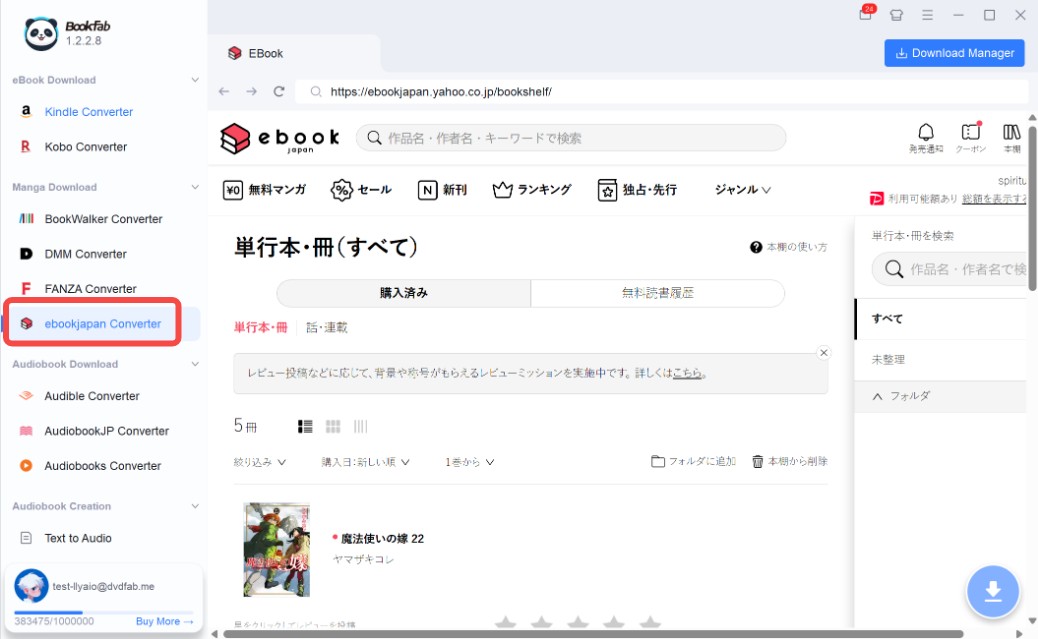
The key advantage here is that the entire process is handled within the software. You don't need to open an external browser, manually copy links, or search for .ebix source files in local folders, which saves a lot of trouble for users who aren't tech-savvy. After a successful login, you can browse your purchased or readable manga as usual.
Step 2. Open the Manga You Want to Save and Choose an Output Format
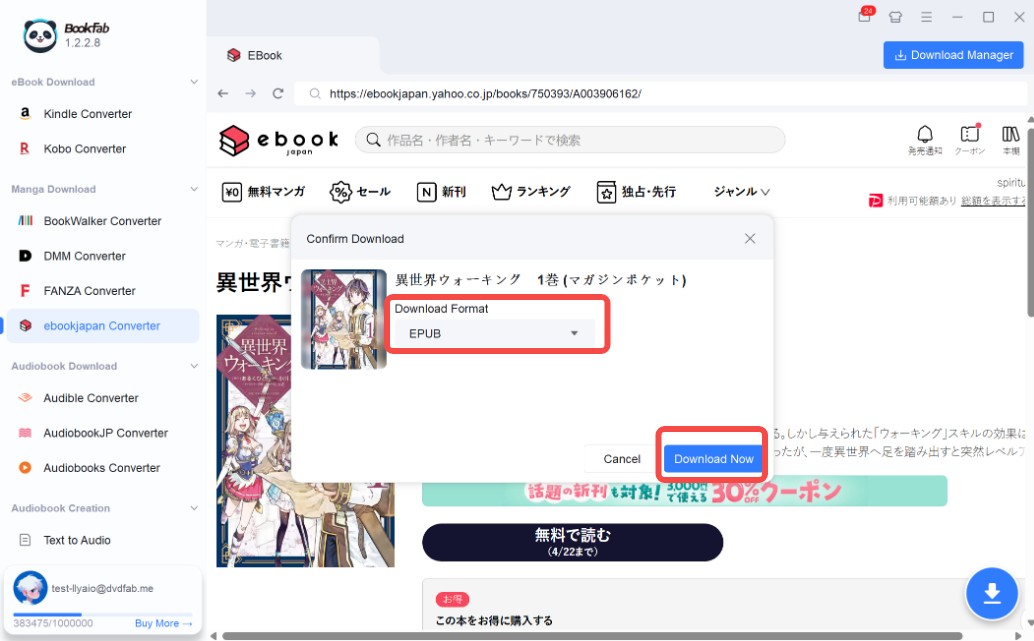
Navigate to the details page of the specific manga you wish to save. BookFab will automatically detect the content and activate the download button. Click the download button to bring up a "Confirm download" dialog box. Verify that the manga selection is correct and choose your preferred output format (PDF, EPUB, or JPEG) based on your reading habits and device requirements.
After selecting the format, click "Download Now". The software will begin downloading and converting the ebookjapan manga to your local drive. Unlike the official app which only allows offline reading within its own ecosystem, this step provides you with flexible files that are much easier to archive, organize, and use across different devices.
Step 3. Monitor the Conversion Progress in Download Manager
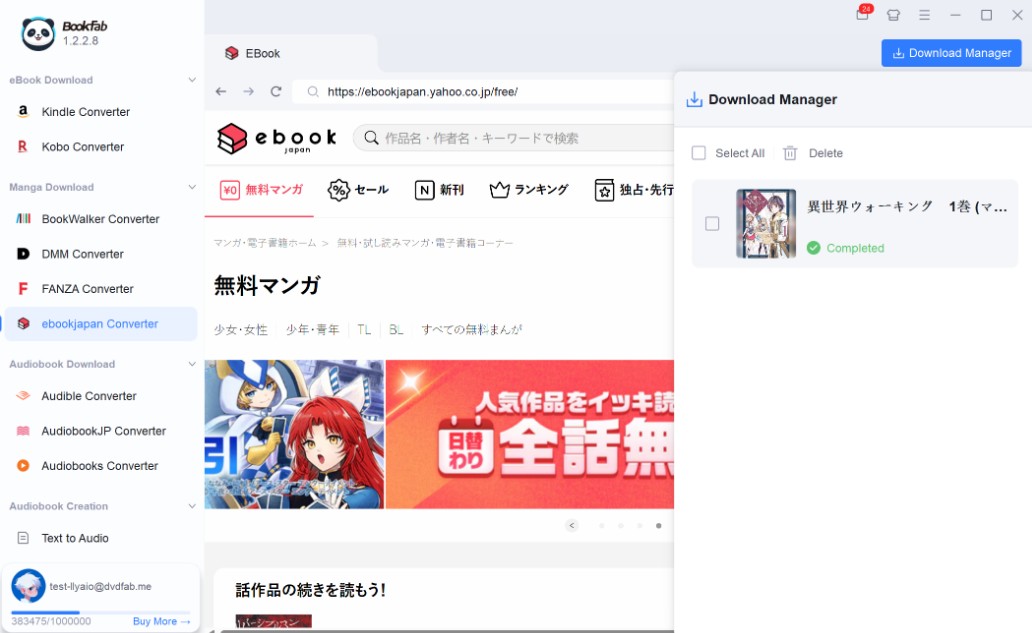
Once the download starts, you can go to the Download Manager to track the real-time progress of your tasks. BookFab displays the status of each item—whether it is processing, completed, or waiting in the queue.
This setup allows you to keep browsing the ebookjapan library and add more titles to your download list simultaneously, without having to wait on a single book's page until it finishes. It's an efficient way to handle multiple tasks at once.
Extract ebookjapan .ebix to JPG with EbixExtract
Note: EbixExtract relies on the ebiReader Windows app, whose installer was discontinued on October 15, 2025, with official support ending on October 21, 2025. As a result, the EbixExtract workflow is less dependable for long-term use, making BookFab ebookjapan Converter the more practical option for most ebookjapan users because it works independently of the official app.
If you prefer an open-source option and do not mind a more technical workflow, EbixExtract is another ebookjapan DRM removal tool worth trying. It is a public C# project built to unpack DRM-protected ebookjapan .ebix files downloaded from ebookjapan. The tool runs on Windows, requires .NET Framework 4.7.2, and works with .ebix packages downloaded through ebiReader.
That said, EbixExtract is very different from BookFab ebookjapan Converter. It does not directly convert ebookjapan manga to PDF or EPUB. Instead, it focuses on extracting pages from DRM-protected ebookjapan files as image files. Although the output files appear as .jpg, the actual extracted image data is often closer to BMP output. It also only works on the same machine that originally downloaded the .ebix file, which makes the ebookjapan DRM removal workflow more technical and less flexible. In short, EbixExtract is better suited to users who want to remove ebookjapan DRM by unpacking manga pages into images and then handling the rest of the process themselves.
Step 1. Download ebookjapan Manga and Prepare EbixExtract
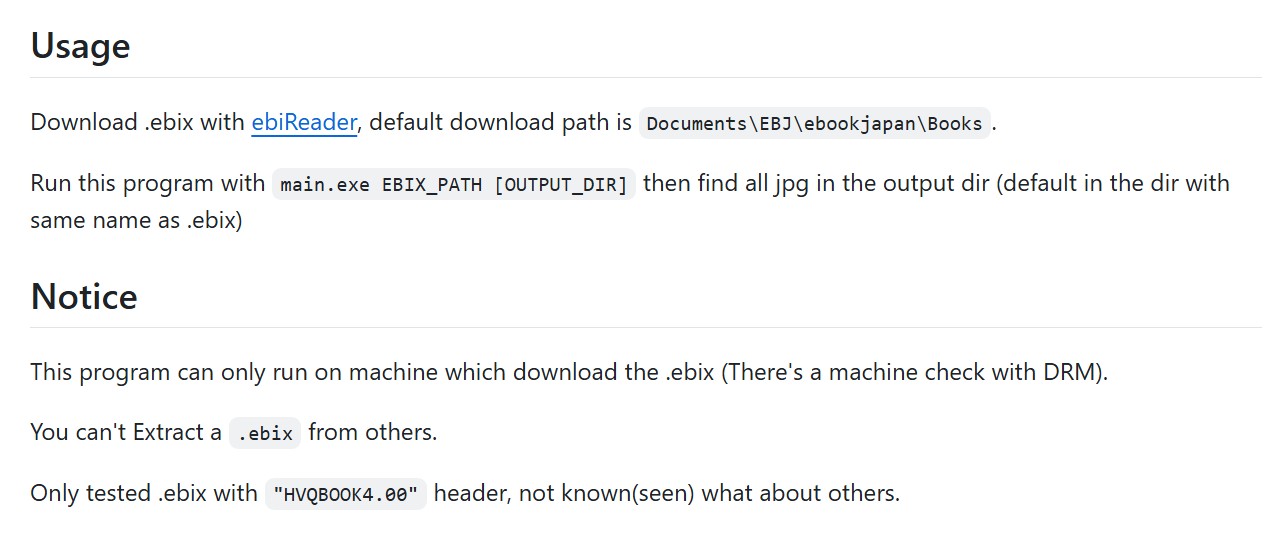
Before using EbixExtract, make sure your ebookjapan manga has already been downloaded as a .ebix file through the ebiReader app on a Windows computer. A common default download path is Documents\EBJ\ebookjapan\Books. Besides, make sure that .NET Framework 4.7.2 is installed before running the tool.
Step 2. Run the Extractor on Your .ebix File
Once your .ebix file is ready, run the tool with this command:
main.exe EBIX_PATH [OUTPUT_DIR]
Here, EBIX_PATH is the path to the ebookjapan .ebix file you want to extract, while OUTPUT_DIR is optional. If you do not specify an output folder, the program will create one using the same name as the .ebix file. After extraction is complete, the page images will be saved there.
Step 3. Check the Extracted Output Files
After the process finishes, what you get is a set of image files rather than a ready-made ebook. That means EbixExtract is mainly useful for pulling manga pages out of the proprietary .ebix package. If your end goal is a cleaner archive or a format that works better across devices, you may still need an extra step afterward to convert or reorganize those images.
FAQ
It depends on where you live. In many countries, DRM circumvention is restricted by copyright or anti-circumvention laws, even if you legally purchased the manga. As a result, removing DRM for personal backup or format shifting may still be limited or prohibited. Because the rules vary by country, ebookjapan DRM removal should only be considered for lawful personal use, not for sharing or redistribution.
Not directly. ebookjapan supports downloading for offline reading inside its own supported reading app ebiReader, but those downloads are not delivered as standard PDF files you can freely move around and open anywhere. In practice, ebookjapan titles are tied to the platform's own ecosystem, which is why users usually need a separate conversion workflow if they want PDF or EPUB copies for easier backup and reading across devices.
Yes, but only after DRM removal and conversion. Downloaded ebookjapan manga comes in the proprietary .ebix format, which Kindle and many other eReaders cannot open directly. To make it readable on those devices, you need a manga conversion tool such as BookFab ebookjapan Converter to convert the file into a more widely supported format like PDF or EPUB. After that, you can transfer the converted manga to your eReader by USB or, in the case of Kindle, through options like Send to Kindle.
Conclusion
If ebookjapan DRM removal is your goal, BookFab ebookjapan Converter offers a practical way to remove this protection and convert ebookjapan manga into widely supported formats like PDF, EPUB, and JPEG. For ebookjapan fans who want more control over their purchased manga, BookFab can serve as an ideal companion for backup, offline reading, and long-term collection management.