
[Solved] How to Download Rakuten Magazine?

Summary: Rakuten Magazine supports in-app downloads for offline reading, but downloaded issues are stored as app-managed data rather than PDF, EPUB, or JPG files. This guide explains the official download limits and shows how BookFab Rakuten Magazine Converter helps save issues to a PC for personal organization.
Table of Contents
![[Solved] How to Download Rakuten Magazine?](https://images.dvdfab.cn/media/20260515-183615_scnv11.jpg/public)
Rakuten Magazine is a Japanese digital magazine subscription service from Rakuten Group that allows users to read a wide selection of Japanese magazines on phones, tablets, and computers.
In this guide, I'll explain how Rakuten Magazine downloads work, what the official app can and can't download, and how to download Rakuten Magazine as PDF or EPUB files for personal use.
Can I Download Rakuten Magazine Issues?
Yes. Rakuten Magazine supports downloads for offline reading within the app. If you know you'll be commuting, traveling, flying, or staying somewhere with an unstable internet connection, you can save magazines in advance on your smartphone or tablet and read them later without using mobile data.
- • Read Japanese magazines during a commute
- • Save mobile data while traveling
- • Prepare magazines over Wi-Fi before a flight
- • Read in places with weak reception, such as trains, subways, or hotels
- • Open magazines faster without waiting for pages to load
However, the key point is that Rakuten Magazine downloads are closer to in-app cached content than normal files. They make reading more convenient, but they do not give you a standalone copy of the magazine. Once your subscription expires, those downloaded issues may no longer be available either.
How to Download Magazines in the Rakuten Magazine App
Downloading a magazine in the Rakuten Magazine mobile or tablet app is straightforward. You can follow these steps:
Step 1. Open the Rakuten Magazine app.
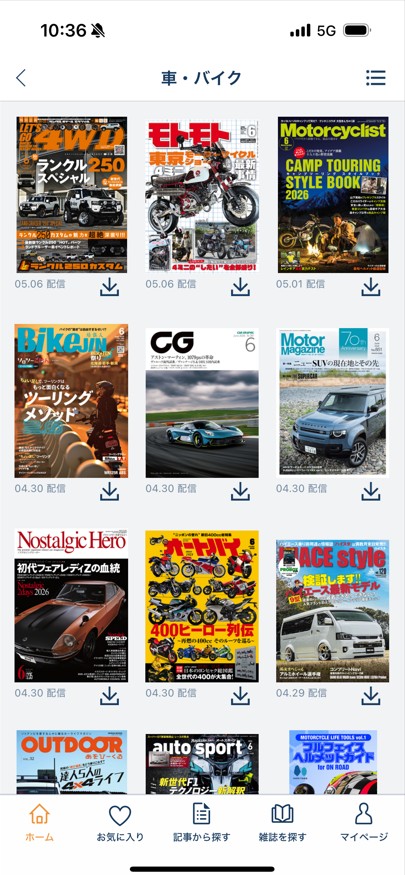
Step 2. Find the magazine you want to read.
Step 3. Tap the download icon.
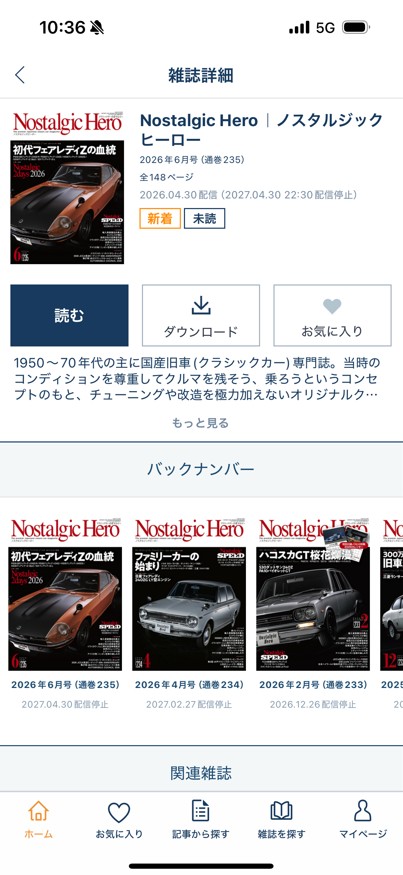
You can also download an issue from its magazine details page. If you regularly follow certain titles, Rakuten Magazine also offers an automatic download option for favorite magazines, making it easier to keep new issues ready for offline reading.
❗However, this official download feature has one important limitation: the downloaded magazine is still stored as app-managed data. It is not saved as a local PDF, EPUB, or JPG file, and you cannot freely move it to your computer, back it up, or open it with another reader. That is why the official app works well for temporary offline reading, but not for users who want to keep selected issues for long-term personal organization.
Download Rakuten Magazine as PDF/EPUB with BookFab Rakuten Magazine Converter
Although the official Rakuten Magazine app does not support local file saving, a professional and secure third-party tool can make the process more flexible.
BookFab Rakuten Magazine Converter is designed to help users download Rakuten Magazine issues to a PC and convert them into PDF, EPUB, and JPG formats. With BookFab, you can keep your favorite magazine issues on your computer, organize them by title or topic, back them up to external storage, and read them on compatible devices without being limited to the Rakuten Magazine mobile app.
- • Save favorite magazine issues on a computer.
- • Organize magazines by title, topic, or date.
- • Back up important issues to external storage.
- • Read saved magazines on different devices.
- • Keep travel, study, recipe, business, or hobby content for later use.
- • Avoid relying only on app-based offline caching.
Step 1: Open BookFab and Sign In to Rakuten Magazine
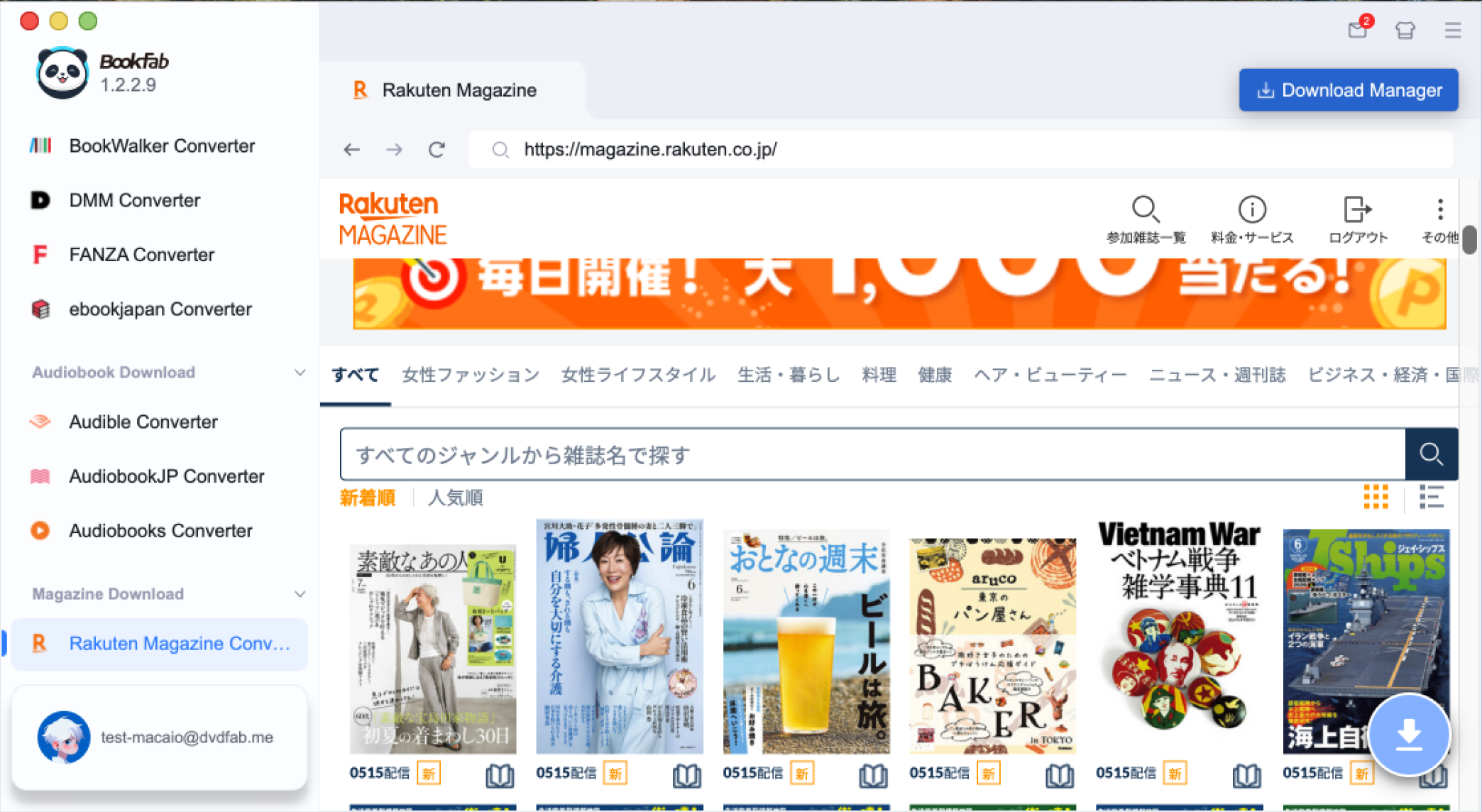
Dowonload and launch BookFab. Choose Rakuten Magazine Converter from the main menu. The built-in browser will take you to the Rakuten Magazine website, where you can sign in with your Rakuten account and access your magazine library.
Step 2: Choose a Magazine and Select the Output Format
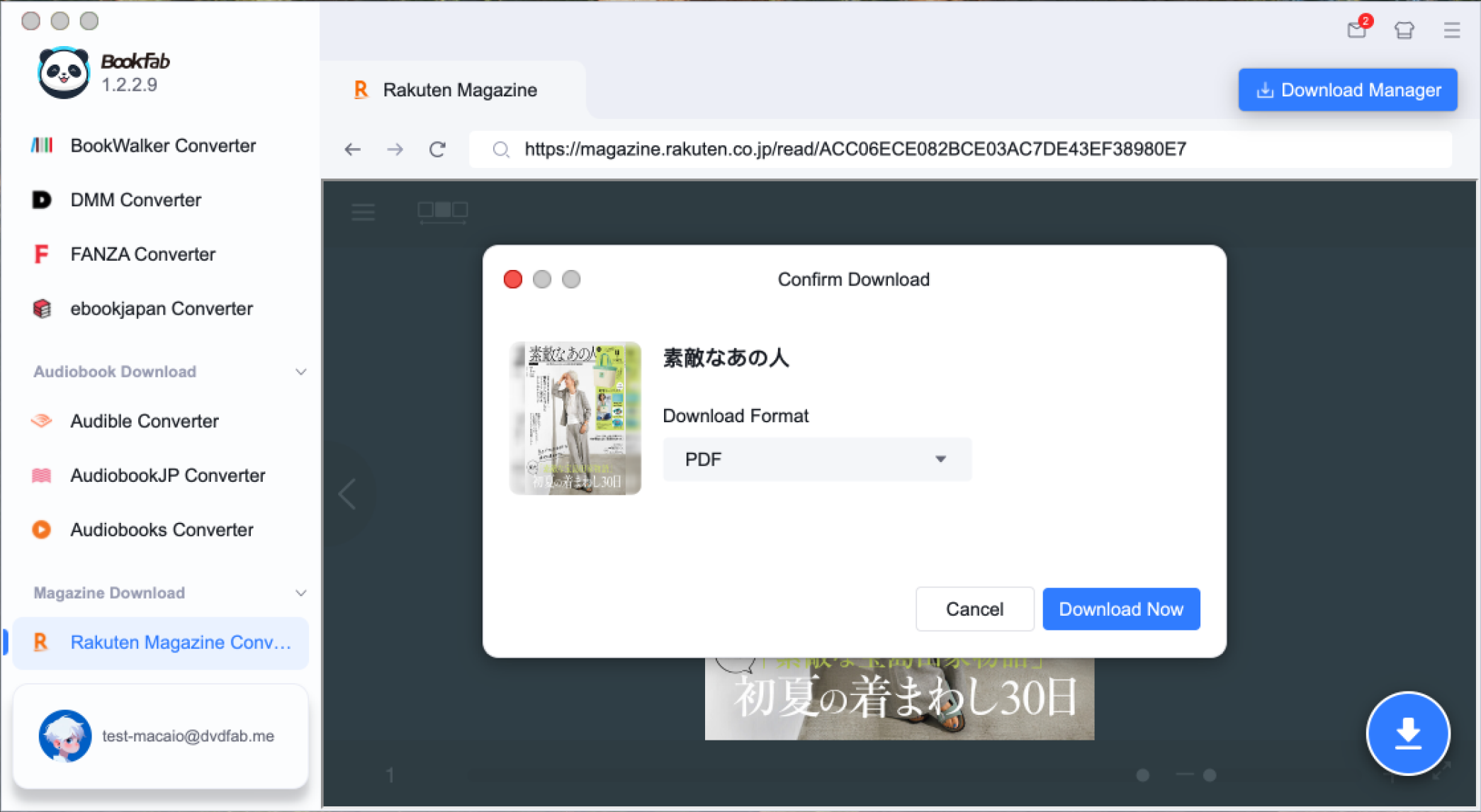
Open the magazine issue you want to save. BookFab will analyze the issue and make the download option available. Click the download button, then choose your preferred output format, such as PDF, EPUB, or JPG.
Step 3: Start the Download and Manage Your Tasks
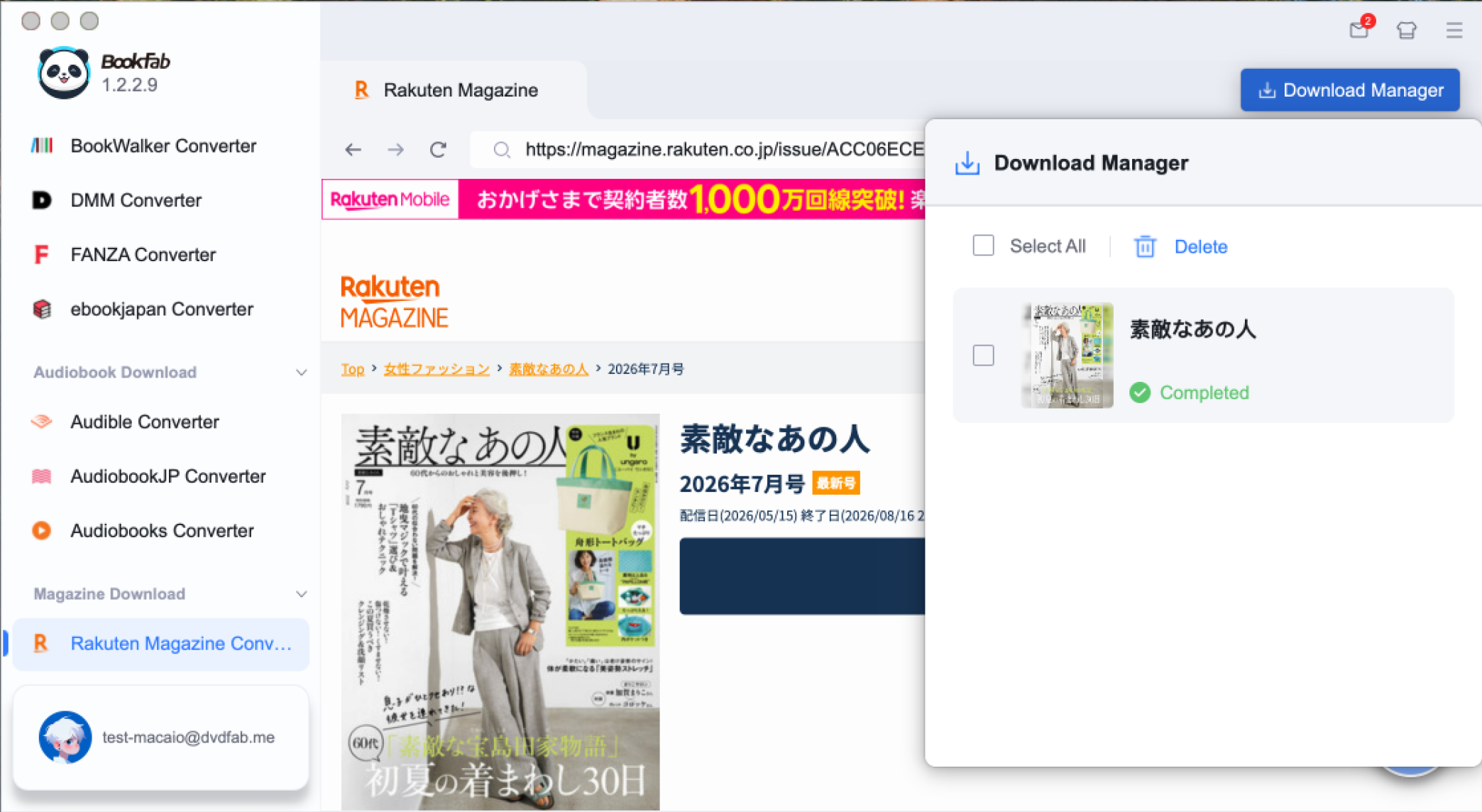
Click Download Now to begin. You can open the Download Manager to check progress, manage active tasks, and continue browsing your Rakuten Magazine library while adding more issues to the queue.
FAQ About Rakuten Magazine Downloads
Can I download Rakuten Magazine issues for offline reading?
Yes. You can download magazines in the Rakuten Magazine mobile or tablet app and read them offline. The official service page explains that once magazines are downloaded in the app, they can be read without an internet connection.
Can I save Rakuten Magazine as a PDF?
Not with the official app. Rakuten Magazine downloads are for in-app offline reading only. The service does not provide a built-in PDF export feature.
Why did my downloaded Rakuten Magazine issue disappear?
Downloaded issues can disappear or become unreadable when the magazine's distribution period ends, your subscription access expires, or the app automatically manages offline storage.
Where are Rakuten Magazine downloads stored?
They are stored inside the app's private storage area. You usually cannot access them as normal PDF, EPUB, or image files through your phone's file manager.
Can I read downloaded issues after canceling Rakuten Magazine?
Usually, downloaded issues depend on your active access rights. Once your subscription or trial access ends, downloaded magazines may no longer be readable inside the app.
Final Thoughts
This article explains two ways to download Rakuten Magazine issues. If you only need to read magazines offline while traveling or commuting, the official app's offline download feature works well. But if you want to back up selected issues, organize them as personal reference materials, or keep important magazines for long-term use, BookFab Rakuten Magazine Converter offers a more flexible way to build your own digital magazine library.